Tag: Statamic

  • Migrating from WordPress to Statamic (2026): Cost, Risks & SEO Checklist

    Migrating from WordPress to Statamic (2026): Cost, Risks & SEO Checklist

    Many businesses start with WordPress—and that’s fine.
    But by 2026, a growing number of marketing teams are asking a serious question:

    “Is WordPress still the right platform for our marketing site?”

    If performance issues, plugin fatigue, security concerns, or rising maintenance costs sound familiar, you’re not alone. This is why more teams are migrating from WordPress to Statamic—a modern, Laravel-based CMS built for speed, security, and long-term efficiency.

    This guide explains:

    • When a WordPress → Statamic migration makes sense
    • What can (and can’t) be migrated
    • SEO risks and how to avoid traffic loss
    • Realistic migration cost & timeline
    • A practical SEO migration checklist
    • Who should not migrate (important)

    Why Businesses Are Moving Away from WordPress

    WordPress still powers millions of sites—but marketing-driven teams face real friction as sites grow.

    Common WordPress pain points:

    • Plugin overload and conflicts
    • Slower performance over time
    • Rising maintenance costs
    • Security vulnerabilities via third-party plugins
    • Difficulty achieving consistent Core Web Vitals

    This is where Statamic stands out:

    • Flat-file CMS (no database dependency)
    • Built on Laravel
    • Minimal attack surface
    • Fast by default
    • Structured content for marketing teams

    👉 If you haven’t already, read Statamic vs WordPress (2026) to understand the architectural differences.


    When WordPress → Statamic Migration Makes Sense

    Migration is a strategic decision—not a trend.

    Statamic is a good fit if:

    • Your site is marketing-focused (SaaS, brand, landing pages)
    • Performance & SEO matter
    • You’re tired of plugin dependency
    • Maintenance cost keeps increasing
    • You want predictable long-term ownership cost

    Statamic is NOT ideal if:

    • You rely heavily on WooCommerce
    • Your site depends on many WordPress-only plugins
    • Editors need complete visual page-builder freedom
    • You run a large multi-author blog network

    What Can Be Migrated from WordPress to Statamic?

    Can be migrated

    • Pages & posts
    • Categories & taxonomies
    • Media (images, files)
    • SEO metadata (titles, descriptions)
    • URLs & permalink structure
    • Redirects (301s)

    Cannot be directly migrated

    • WordPress plugins
    • Themes & page builders
    • Shortcodes
    • Plugin-specific features

    👉 In Statamic, features are rebuilt cleanly, not patched with plugins—this is a strength, not a limitation.


    WordPress to Statamic Migration Cost (2026)

    Typical Migration Cost Ranges

    Site TypeEstimated Cost
    Small marketing site$1,500 – $3,000
    SaaS / brand site$3,000 – $6,000
    Enterprise marketing site$6,000 – $12,000+

    What Impacts the Cost

    • Number of pages & content types
    • URL complexity
    • SEO requirements
    • Custom features to rebuild
    • Multi-language setup
    • Design refresh vs rebuild

    👉 Migration is often combined with a performance or design upgrade, delivering better ROI.

    If you’re considering a migration, our 👉 Statamic Development Services
    include structured migration planning, SEO safety, and post-launch support.


    SEO Risks (and How to Avoid Them)

    SEO is the #1 concern during any CMS migration—and rightly so.

    Common SEO Risks

    • URL changes without redirects
    • Metadata loss
    • Broken internal links
    • Image path changes
    • Missing structured data
    • Temporary indexing issues

    How to Migrate Without Losing Traffic

    A professional migration includes:

    • Full URL mapping
    • 301 redirect implementation
    • Metadata migration
    • Sitemap regeneration
    • Robots.txt review
    • Post-launch SEO validation

    👉 Done correctly, traffic loss is avoidable—and many sites see performance gains after migration.


    WordPress → Statamic SEO Migration Checklist

    Before launch:

    • ✅ Crawl existing WordPress site
    • ✅ Export all URLs & metadata
    • ✅ Identify top-performing pages
    • ✅ Plan content structure in Statamic
    • ✅ Prepare redirect rules

    During migration:

    • ✅ Rebuild templates with clean HTML
    • ✅ Preserve URL structure where possible
    • ✅ Implement 301 redirects
    • ✅ Optimize images & assets
    • ✅ Configure SEO fields

    After launch:

    • ✅ Submit new sitemap
    • ✅ Monitor Search Console
    • ✅ Fix crawl errors
    • ✅ Track rankings & traffic
    • ✅ Validate Core Web Vitals

    Timeline: How Long Does Migration Take?

    Project SizeTimeline
    Small site2–3 weeks
    Medium site3–5 weeks
    Large site6–8+ weeks

    A phased approach ensures minimal downtime and zero SEO shock.


    Maintenance After Migration

    One major benefit of Statamic is lower ongoing maintenance.

    After migration:

    • No plugin updates
    • No database optimization
    • Fewer security patches
    • Cleaner deployments

    This is a sharp contrast to WordPress, where ongoing 👉 WordPress Maintenance Services
    are often essential just to keep sites stable.


    Who Should NOT Migrate to Statamic?

    Migration is not always the right move.

    Do not migrate if:

    • Your business depends on WooCommerce
    • You need dozens of third-party plugins
    • Your editors rely heavily on drag-and-drop builders
    • Your site is purely blog-driven

    In these cases, optimizing WordPress with professional 👉 WordPress Development Services
    may be the better solution.


    Final Verdict: Is WordPress → Statamic Migration Worth It?

    Yes—if your website is a marketing asset, not just a content container.

    Statamic delivers:
    ✔ Faster performance
    ✔ Lower long-term cost
    ✔ Better security
    ✔ Cleaner SEO foundations
    ✔ Less operational overhead

    Migration isn’t about changing CMS—it’s about fixing structural problems WordPress can’t solve cleanly.


    Need Help Migrating from WordPress to Statamic?

    If you want:

    • A safe, SEO-friendly migration
    • Clear cost & timeline
    • Structured content rebuild
    • Post-launch support

    Explore our 👉 Statamic Development Services

    We specialize in performance-driven migrations, not risky CMS switches.
  • Statamic Pricing Guide (2026): Development Cost, License & Maintenance Explained

    Statamic Pricing Guide (2026): Development Cost, License & Maintenance Explained

    One of the first questions businesses ask before choosing Statamic is simple:

    “How much does Statamic really cost?”

    Unlike WordPress, where costs are spread across plugins, hosting, and ongoing fixes, Statamic pricing is more transparent—but often misunderstood.

    In this 2026 pricing guide, we break down:

    • Statamic license costs
    • Development pricing (real-world ranges)
    • Hosting & infrastructure costs
    • Maintenance costs
    • A 3-year cost comparison with WordPress
    • When Statamic is (and isn’t) cost-effective

    This guide is written for founders, marketing teams, and decision-makers evaluating Statamic for serious marketing websites.


    What Makes Statamic’s Pricing Different?

    Statamic is a flat-file CMS built on Laravel. That single architectural decision changes everything about pricing:

    • No database dependency
    • No plugin ecosystem to license
    • Fewer security layers required
    • Lower maintenance overhead

    👉 In short: higher upfront clarity, lower long-term cost.

    If you’re new to Statamic, you may want to first read Statamic vs WordPress (2026) to understand the architectural differences.


    Statamic License Cost (2026)

    Statamic uses a one-time license model, not recurring plugin subscriptions.

    Statamic License Options

    PlanCostBest For
    SoloFreeSmall sites, personal projects
    Pro~$259 (one-time)Business & marketing sites

    ✔ No monthly CMS fees
    ✔ No per-plugin licensing
    ✔ No vendor lock-in

    For most businesses, Statamic Pro is a one-time cost, not a recurring expense.


    Statamic Development Cost in 2026

    Statamic is not a DIY CMS like WordPress. Development cost depends on structure, design, and integrations.

    Realistic Development Pricing

    Project TypeTypical Cost
    Basic marketing website$1,500 – $3,000
    SaaS / brand website$3,000 – $7,000
    Enterprise marketing site$7,000 – $15,000+

    What Influences the Cost

    • Custom design vs template
    • Number of content types & blueprints
    • Multi-language support
    • Integrations (CRM, analytics, forms)
    • Performance optimization

    A professional build ensures:

    • Structured content for marketers
    • SEO-ready templates
    • Future scalability

    This is why working with a specialized Statamic team matters.

    👉 Learn more about our Statamic Development Services


    Hosting Cost for Statamic

    Statamic is lightweight compared to WordPress.

    Typical Hosting Costs

    • VPS / cloud hosting: $10–$30/month
    • CDN (optional): $5–$15/month
    • No database tuning required

    Statamic runs efficiently on:

    • DigitalOcean
    • AWS
    • Hetzner
    • Any Laravel-friendly host

    👉 Hosting cost is lower than WordPress for similar traffic.


    Statamic Maintenance Cost (2026)

    Statamic requires minimal maintenance, but not zero.

    What Maintenance Includes

    • Laravel & Statamic updates
    • Security patches
    • Performance checks
    • Minor content or layout changes
    • Server monitoring

    Typical Maintenance Cost

    Support LevelCost
    Basic monitoring$50 – $100/month
    Full support$150 – $300/month

    Compared to WordPress, this is significantly lower because:

    • No plugin updates
    • No database corruption risk
    • Smaller attack surface

    Statamic vs WordPress: 3-Year Cost Comparison

    Cost AreaWordPressStatamic
    CMS licenseFreeOne-time ~$259
    Plugins / add-ons$300–$800/year$0
    Hosting$20–$50/month$10–$30/month
    MaintenanceHighLow
    Security fixesOngoingMinimal
    3-year TCOHigherLower

    👉 WordPress looks cheaper upfront but costs more over time.
    👉 Statamic costs more initially but saves money long-term.

    If you’re running WordPress today, factor in:

    • Plugin renewals
    • Performance fixes
    • Security patches
    • Emergency break-fix work

    This is why many businesses rely on WordPress Maintenance Services just to keep sites stable.


    When Statamic Is NOT Cost-Effective

    Statamic may not be the right choice if:

    • You need dozens of third-party plugins
    • You run a large blog network
    • Non-technical editors need total layout freedom
    • You rely heavily on WooCommerce

    In those cases, WordPress—with proper development and maintenance—may still be the better fit.

    👉 Learn more about WordPress Development Services


    Who Gets the Best ROI from Statamic?

    Statamic is ideal for:

    • SaaS marketing websites
    • Startup landing pages
    • Brand & corporate websites
    • Performance-focused SEO sites
    • Teams who want low operational overhead

    If your website is a marketing asset, not just a content dump, Statamic delivers excellent ROI.


    Final Verdict: Is Statamic Worth the Cost in 2026?

    Yes—if you care about performance, security, and long-term cost control.

    Statamic is:
    ✔ Predictable in pricing
    ✔ Cheaper to maintain
    ✔ Faster by default
    ✔ Built for modern marketing teams

    It’s not the cheapest CMS—but it’s often the most cost-efficient over time.


    Need a Statamic Cost Estimate?

    If you want:

    • A clear pricing breakdown
    • Architecture recommendations
    • Migration advice from WordPress
    • Ongoing support options

    Explore our 👉 Statamic Development Services

    We focus on performance, SEO, and long-term maintainability, not just getting a site live.

  • Statamic vs WordPress (2026): Which CMS Is Better for Marketing Sites?

    Statamic vs WordPress (2026): Which CMS Is Better for Marketing Sites?

    Choosing the right CMS for a marketing website in 2026 is no longer just about popularity. It’s about performance, total cost of ownership, security, scalability, and how efficiently your marketing team can publish and iterate.

    For years, WordPress has been the default choice. But modern teams are increasingly evaluating Statamic, a flat-file CMS built on Laravel, as a serious alternative—especially for high-performance marketing sites, SaaS landing pages, and brand websites.

    In this guide, we’ll compare Statamic vs WordPress in 2026, with a strong focus on usage cost, technology stack, maintenance overhead, and real-world marketing needs, so you can make the right decision for your business.

    What Is WordPress?

    WordPress is the world’s most widely used CMS, powering over 40% of all websites. It’s database-driven, plugin-based, and supported by a massive ecosystem of themes, plugins, and developers.

    Businesses typically choose WordPress for:

    • Blogs and content-heavy sites
    • Marketing websites with frequent updates
    • WooCommerce stores
    • Editorial workflows with non-technical users

    If you’re planning a WordPress-based site or customization, our👉 WordPress Development Services help businesses build scalable, SEO-optimized WordPress solutions.


    What Is Statamic?

    Statamic is a modern, flat-file CMS built on Laravel. Instead of a database, it stores content in files (YAML/Markdown), making it extremely fast, secure, and developer-friendly.

    Statamic is ideal for:

    • Marketing and brand websites
    • SaaS landing pages
    • Performance-critical sites
    • Teams already using Laravel

    If you’re exploring a modern CMS approach, our 👉 Statamic Development Services help companies design fast, clean, and future-proof marketing sites.

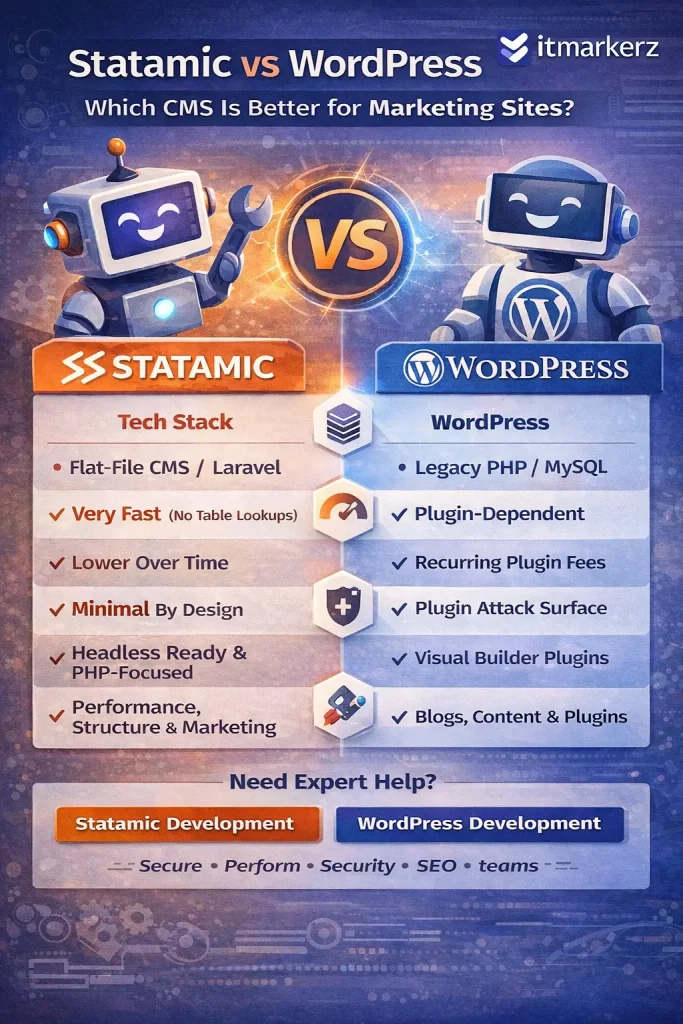
    Infographic comparing Statamic vs WordPress in 2026 for marketing websites, highlighting differences in tech stack, performance, cost, security, content flexibility, and overall focus, with itmarkerz branding.

    Technology Stack Comparison (2026)

    FeatureWordPressStatamic
    Core LanguagePHPPHP (Laravel)
    StorageMySQL DatabaseFlat Files (YAML/Markdown)
    FrameworkCustom / LegacyLaravel
    API ReadyPlugin-basedNative
    Headless SupportPossible (complex)Native
    PerformancePlugin dependentVery high by default
    Security SurfaceLargeMinimal

    Key takeaway:

    • WordPress relies heavily on plugins and database queries.
    • Statamic benefits from Laravel’s modern architecture and file-based speed

    Usage Cost & Total Cost of Ownership

    WordPress Cost Breakdown

    WordPress itself is free, but real costs add up quickly:

    • Premium themes & plugins
    • Hosting optimized for WordPress
    • Security plugins
    • Performance plugins (cache, CDN, image optimization)
    • Ongoing maintenance & updates

    For serious marketing sites, WordPress is rarely “free” in practice.

    That’s why many businesses opt for professional 👉 WordPress Maintenance Services to handle updates, backups, security, and performance tuning.

    Statamic Cost Breakdown

    Statamic uses a one-time license fee (for advanced features), but:

    • No plugin sprawl
    • No database optimization costs
    • Fewer security layers needed
    • Lower long-term maintenance effort

    Over 2–3 years, Statamic often costs less than WordPress for marketing-focused websites.


    Performance & Speed (Critical for Marketing SEO)

    WordPress

    • Performance depends on:
      • Theme quality
      • Number of plugins
      • Hosting
      • Caching setup
    • Poorly managed WordPress sites often suffer from:
      • Slow TTFB
      • Plugin conflicts
      • Bloated frontend assets

    Statamic

    • Flat-file = no database queries
    • Extremely fast page loads
    • Built for static caching and CDN usage
    • Excellent Core Web Vitals out of the box

    For SEO-driven marketing sites, Statamic has a clear performance advantage.


    Security & Maintenance Effort

    WordPress

    • Frequent plugin/theme updates
    • Common attack target due to popularity
    • Requires continuous monitoring
    • Higher risk if updates are skipped

    This is why ongoing 👉 WordPress Maintenance is almost mandatory for business-critical sites.

    Statamic

    • No database = smaller attack surface
    • No third-party plugin ecosystem chaos
    • Laravel security updates
    • Minimal maintenance overhead

    Statamic is inherently more secure by design.


    Content Editing Experience (Marketing Teams)

    WordPress

    Pros:

    • Familiar editor (Gutenberg)
    • Huge ecosystem
    • Easy for non-technical users

    Cons:

    • Editors can break layouts
    • Plugin-dependent features
    • Performance trade-offs

    Statamic

    Pros:

    • Clean, structured content
    • Flexible fields
    • Safer editorial control
    • Excellent for multi-language & structured marketing pages

    Cons:

    • Slight learning curve for teams new to Laravel-based CMSs

    SEO Capabilities (2026)

    Both CMSs can rank well in Google, but the approach differs:

    WordPress SEO

    • Strong plugin ecosystem (Yoast, RankMath)
    • Requires configuration and discipline
    • Performance impacts SEO if not optimized

    Statamic SEO

    • Clean HTML output
    • Excellent page speed
    • SEO baked into templates
    • Fewer technical SEO issues by default

    Statamic rewards teams who care about technical SEO and performance.


    When Should You Choose WordPress?

    Choose WordPress if:

    • You need a familiar CMS for editors
    • Your site relies heavily on plugins
    • You publish large volumes of content
    • You want fast onboarding of content teams
    • You plan WooCommerce or heavy integrations

    👉 Ideal with professional WordPress development & maintenance


    When Should You Choose Statamic?

    Choose Statamic if:

    • Your site is marketing-focused (SaaS, brand, landing pages)
    • Performance & security matter
    • You want lower long-term costs
    • You prefer structured content
    • You already use Laravel or modern stacks

    👉 Ideal with expert Statamic development


    Statamic vs WordPress: Final Verdict (2026)

    WordPress is still powerful—but heavy.
    Statamic is lean, modern, and built for performance-first marketing.

    Use CaseBest Choice
    Blog-heavy sitesWordPress
    Enterprise marketing siteStatamic
    SaaS landing pagesStatamic
    Content teams with pluginsWordPress
    Low-maintenance marketingStatamic

    Need Help Choosing or Building?

    If you’re unsure which CMS fits your marketing goals, our team can help you evaluate, build, and maintain the right solution:

    We focus on performance, security, SEO, and long-term cost efficiency—not just CMS popularity.