Choosing the right CMS for a marketing website in 2026 is no longer just about popularity. It’s about performance, total cost of ownership, security, scalability, and how efficiently your marketing team can publish and iterate.
For years, WordPress has been the default choice. But modern teams are increasingly evaluating Statamic, a flat-file CMS built on Laravel, as a serious alternative—especially for high-performance marketing sites, SaaS landing pages, and brand websites.
In this guide, we’ll compare Statamic vs WordPress in 2026, with a strong focus on usage cost, technology stack, maintenance overhead, and real-world marketing needs, so you can make the right decision for your business.
What Is WordPress?
WordPress is the world’s most widely used CMS, powering over 40% of all websites. It’s database-driven, plugin-based, and supported by a massive ecosystem of themes, plugins, and developers.
Businesses typically choose WordPress for:
- Blogs and content-heavy sites
- Marketing websites with frequent updates
- WooCommerce stores
- Editorial workflows with non-technical users
If you’re planning a WordPress-based site or customization, our👉 WordPress Development Services help businesses build scalable, SEO-optimized WordPress solutions.
What Is Statamic?
Statamic is a modern, flat-file CMS built on Laravel. Instead of a database, it stores content in files (YAML/Markdown), making it extremely fast, secure, and developer-friendly.
Statamic is ideal for:
- Marketing and brand websites
- SaaS landing pages
- Performance-critical sites
- Teams already using Laravel
If you’re exploring a modern CMS approach, our 👉 Statamic Development Services help companies design fast, clean, and future-proof marketing sites.
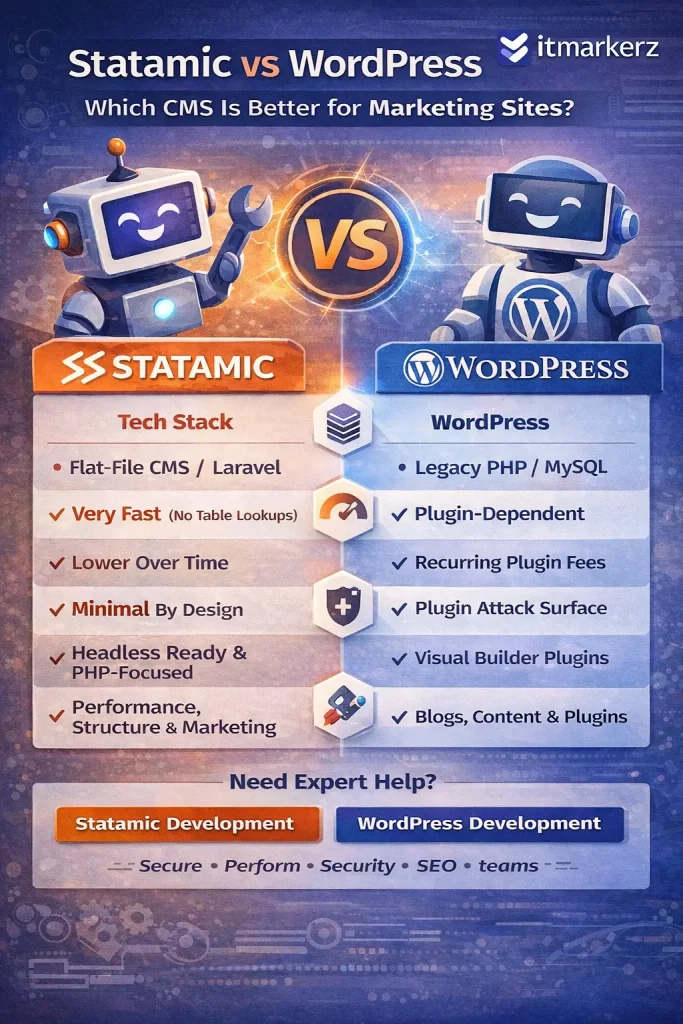
Technology Stack Comparison (2026)
| Feature | WordPress | Statamic |
|---|---|---|
| Core Language | PHP | PHP (Laravel) |
| Storage | MySQL Database | Flat Files (YAML/Markdown) |
| Framework | Custom / Legacy | Laravel |
| API Ready | Plugin-based | Native |
| Headless Support | Possible (complex) | Native |
| Performance | Plugin dependent | Very high by default |
| Security Surface | Large | Minimal |
Key takeaway:
- WordPress relies heavily on plugins and database queries.
- Statamic benefits from Laravel’s modern architecture and file-based speed
Usage Cost & Total Cost of Ownership
WordPress Cost Breakdown
WordPress itself is free, but real costs add up quickly:
- Premium themes & plugins
- Hosting optimized for WordPress
- Security plugins
- Performance plugins (cache, CDN, image optimization)
- Ongoing maintenance & updates
For serious marketing sites, WordPress is rarely “free” in practice.
That’s why many businesses opt for professional 👉 WordPress Maintenance Services to handle updates, backups, security, and performance tuning.
Statamic Cost Breakdown
Statamic uses a one-time license fee (for advanced features), but:
- No plugin sprawl
- No database optimization costs
- Fewer security layers needed
- Lower long-term maintenance effort
Over 2–3 years, Statamic often costs less than WordPress for marketing-focused websites.
Performance & Speed (Critical for Marketing SEO)
WordPress
- Performance depends on:
- Theme quality
- Number of plugins
- Hosting
- Caching setup
- Poorly managed WordPress sites often suffer from:
- Slow TTFB
- Plugin conflicts
- Bloated frontend assets
Statamic
- Flat-file = no database queries
- Extremely fast page loads
- Built for static caching and CDN usage
- Excellent Core Web Vitals out of the box
For SEO-driven marketing sites, Statamic has a clear performance advantage.
Security & Maintenance Effort
WordPress
- Frequent plugin/theme updates
- Common attack target due to popularity
- Requires continuous monitoring
- Higher risk if updates are skipped
This is why ongoing 👉 WordPress Maintenance is almost mandatory for business-critical sites.
Statamic
- No database = smaller attack surface
- No third-party plugin ecosystem chaos
- Laravel security updates
- Minimal maintenance overhead
Statamic is inherently more secure by design.
Content Editing Experience (Marketing Teams)
WordPress
Pros:
- Familiar editor (Gutenberg)
- Huge ecosystem
- Easy for non-technical users
Cons:
- Editors can break layouts
- Plugin-dependent features
- Performance trade-offs
Statamic
Pros:
- Clean, structured content
- Flexible fields
- Safer editorial control
- Excellent for multi-language & structured marketing pages
Cons:
- Slight learning curve for teams new to Laravel-based CMSs
SEO Capabilities (2026)
Both CMSs can rank well in Google, but the approach differs:
WordPress SEO
- Strong plugin ecosystem (Yoast, RankMath)
- Requires configuration and discipline
- Performance impacts SEO if not optimized
Statamic SEO
- Clean HTML output
- Excellent page speed
- SEO baked into templates
- Fewer technical SEO issues by default
Statamic rewards teams who care about technical SEO and performance.
When Should You Choose WordPress?
Choose WordPress if:
- You need a familiar CMS for editors
- Your site relies heavily on plugins
- You publish large volumes of content
- You want fast onboarding of content teams
- You plan WooCommerce or heavy integrations
👉 Ideal with professional WordPress development & maintenance
When Should You Choose Statamic?
Choose Statamic if:
- Your site is marketing-focused (SaaS, brand, landing pages)
- Performance & security matter
- You want lower long-term costs
- You prefer structured content
- You already use Laravel or modern stacks
👉 Ideal with expert Statamic development
Statamic vs WordPress: Final Verdict (2026)
WordPress is still powerful—but heavy.
Statamic is lean, modern, and built for performance-first marketing.
| Use Case | Best Choice |
|---|---|
| Blog-heavy sites | WordPress |
| Enterprise marketing site | Statamic |
| SaaS landing pages | Statamic |
| Content teams with plugins | WordPress |
| Low-maintenance marketing | Statamic |
Need Help Choosing or Building?
If you’re unsure which CMS fits your marketing goals, our team can help you evaluate, build, and maintain the right solution:
We focus on performance, security, SEO, and long-term cost efficiency—not just CMS popularity.