Category: Content Management Services

  • Migrating from WordPress to Statamic (2026): Cost, Risks & SEO Checklist

    Migrating from WordPress to Statamic (2026): Cost, Risks & SEO Checklist

    Many businesses start with WordPress—and that’s fine.
    But by 2026, a growing number of marketing teams are asking a serious question:

    “Is WordPress still the right platform for our marketing site?”

    If performance issues, plugin fatigue, security concerns, or rising maintenance costs sound familiar, you’re not alone. This is why more teams are migrating from WordPress to Statamic—a modern, Laravel-based CMS built for speed, security, and long-term efficiency.

    This guide explains:

    • When a WordPress → Statamic migration makes sense
    • What can (and can’t) be migrated
    • SEO risks and how to avoid traffic loss
    • Realistic migration cost & timeline
    • A practical SEO migration checklist
    • Who should not migrate (important)

    Why Businesses Are Moving Away from WordPress

    WordPress still powers millions of sites—but marketing-driven teams face real friction as sites grow.

    Common WordPress pain points:

    • Plugin overload and conflicts
    • Slower performance over time
    • Rising maintenance costs
    • Security vulnerabilities via third-party plugins
    • Difficulty achieving consistent Core Web Vitals

    This is where Statamic stands out:

    • Flat-file CMS (no database dependency)
    • Built on Laravel
    • Minimal attack surface
    • Fast by default
    • Structured content for marketing teams

    👉 If you haven’t already, read Statamic vs WordPress (2026) to understand the architectural differences.


    When WordPress → Statamic Migration Makes Sense

    Migration is a strategic decision—not a trend.

    Statamic is a good fit if:

    • Your site is marketing-focused (SaaS, brand, landing pages)
    • Performance & SEO matter
    • You’re tired of plugin dependency
    • Maintenance cost keeps increasing
    • You want predictable long-term ownership cost

    Statamic is NOT ideal if:

    • You rely heavily on WooCommerce
    • Your site depends on many WordPress-only plugins
    • Editors need complete visual page-builder freedom
    • You run a large multi-author blog network

    What Can Be Migrated from WordPress to Statamic?

    Can be migrated

    • Pages & posts
    • Categories & taxonomies
    • Media (images, files)
    • SEO metadata (titles, descriptions)
    • URLs & permalink structure
    • Redirects (301s)

    Cannot be directly migrated

    • WordPress plugins
    • Themes & page builders
    • Shortcodes
    • Plugin-specific features

    👉 In Statamic, features are rebuilt cleanly, not patched with plugins—this is a strength, not a limitation.


    WordPress to Statamic Migration Cost (2026)

    Typical Migration Cost Ranges

    Site TypeEstimated Cost
    Small marketing site$1,500 – $3,000
    SaaS / brand site$3,000 – $6,000
    Enterprise marketing site$6,000 – $12,000+

    What Impacts the Cost

    • Number of pages & content types
    • URL complexity
    • SEO requirements
    • Custom features to rebuild
    • Multi-language setup
    • Design refresh vs rebuild

    👉 Migration is often combined with a performance or design upgrade, delivering better ROI.

    If you’re considering a migration, our 👉 Statamic Development Services
    include structured migration planning, SEO safety, and post-launch support.


    SEO Risks (and How to Avoid Them)

    SEO is the #1 concern during any CMS migration—and rightly so.

    Common SEO Risks

    • URL changes without redirects
    • Metadata loss
    • Broken internal links
    • Image path changes
    • Missing structured data
    • Temporary indexing issues

    How to Migrate Without Losing Traffic

    A professional migration includes:

    • Full URL mapping
    • 301 redirect implementation
    • Metadata migration
    • Sitemap regeneration
    • Robots.txt review
    • Post-launch SEO validation

    👉 Done correctly, traffic loss is avoidable—and many sites see performance gains after migration.


    WordPress → Statamic SEO Migration Checklist

    Before launch:

    • ✅ Crawl existing WordPress site
    • ✅ Export all URLs & metadata
    • ✅ Identify top-performing pages
    • ✅ Plan content structure in Statamic
    • ✅ Prepare redirect rules

    During migration:

    • ✅ Rebuild templates with clean HTML
    • ✅ Preserve URL structure where possible
    • ✅ Implement 301 redirects
    • ✅ Optimize images & assets
    • ✅ Configure SEO fields

    After launch:

    • ✅ Submit new sitemap
    • ✅ Monitor Search Console
    • ✅ Fix crawl errors
    • ✅ Track rankings & traffic
    • ✅ Validate Core Web Vitals

    Timeline: How Long Does Migration Take?

    Project SizeTimeline
    Small site2–3 weeks
    Medium site3–5 weeks
    Large site6–8+ weeks

    A phased approach ensures minimal downtime and zero SEO shock.


    Maintenance After Migration

    One major benefit of Statamic is lower ongoing maintenance.

    After migration:

    • No plugin updates
    • No database optimization
    • Fewer security patches
    • Cleaner deployments

    This is a sharp contrast to WordPress, where ongoing 👉 WordPress Maintenance Services
    are often essential just to keep sites stable.


    Who Should NOT Migrate to Statamic?

    Migration is not always the right move.

    Do not migrate if:

    • Your business depends on WooCommerce
    • You need dozens of third-party plugins
    • Your editors rely heavily on drag-and-drop builders
    • Your site is purely blog-driven

    In these cases, optimizing WordPress with professional 👉 WordPress Development Services
    may be the better solution.


    Final Verdict: Is WordPress → Statamic Migration Worth It?

    Yes—if your website is a marketing asset, not just a content container.

    Statamic delivers:
    ✔ Faster performance
    ✔ Lower long-term cost
    ✔ Better security
    ✔ Cleaner SEO foundations
    ✔ Less operational overhead

    Migration isn’t about changing CMS—it’s about fixing structural problems WordPress can’t solve cleanly.


    Need Help Migrating from WordPress to Statamic?

    If you want:

    • A safe, SEO-friendly migration
    • Clear cost & timeline
    • Structured content rebuild
    • Post-launch support

    Explore our 👉 Statamic Development Services

    We specialize in performance-driven migrations, not risky CMS switches.
  • WordPress to Statamic SEO Migration Checklist (2026): Step-by-Step Guide

    WordPress to Statamic SEO Migration Checklist (2026): Step-by-Step Guide

    A CMS migration can either improve your SEO or destroy years of rankings—there is no middle ground.

    If you’re planning to migrate from WordPress to Statamic, SEO should be treated as a first-class requirement, not an afterthought. The good news? When done correctly, a Statamic migration can improve performance, Core Web Vitals, and long-term SEO stability.

    This step-by-step checklist shows exactly how to migrate from WordPress to Statamic without losing rankings, traffic, or authority.

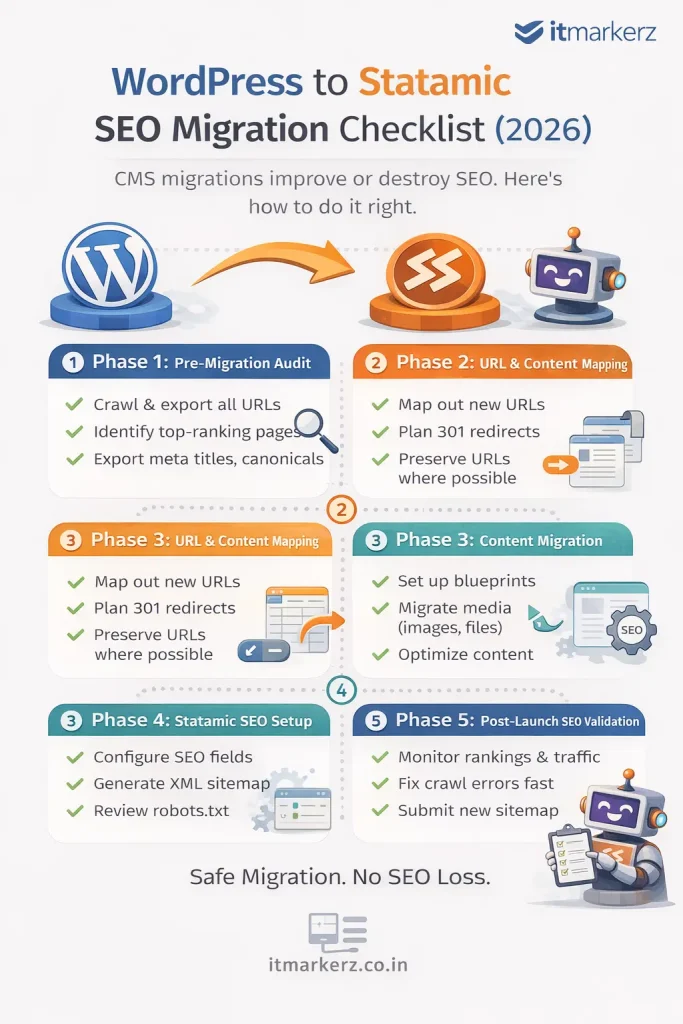
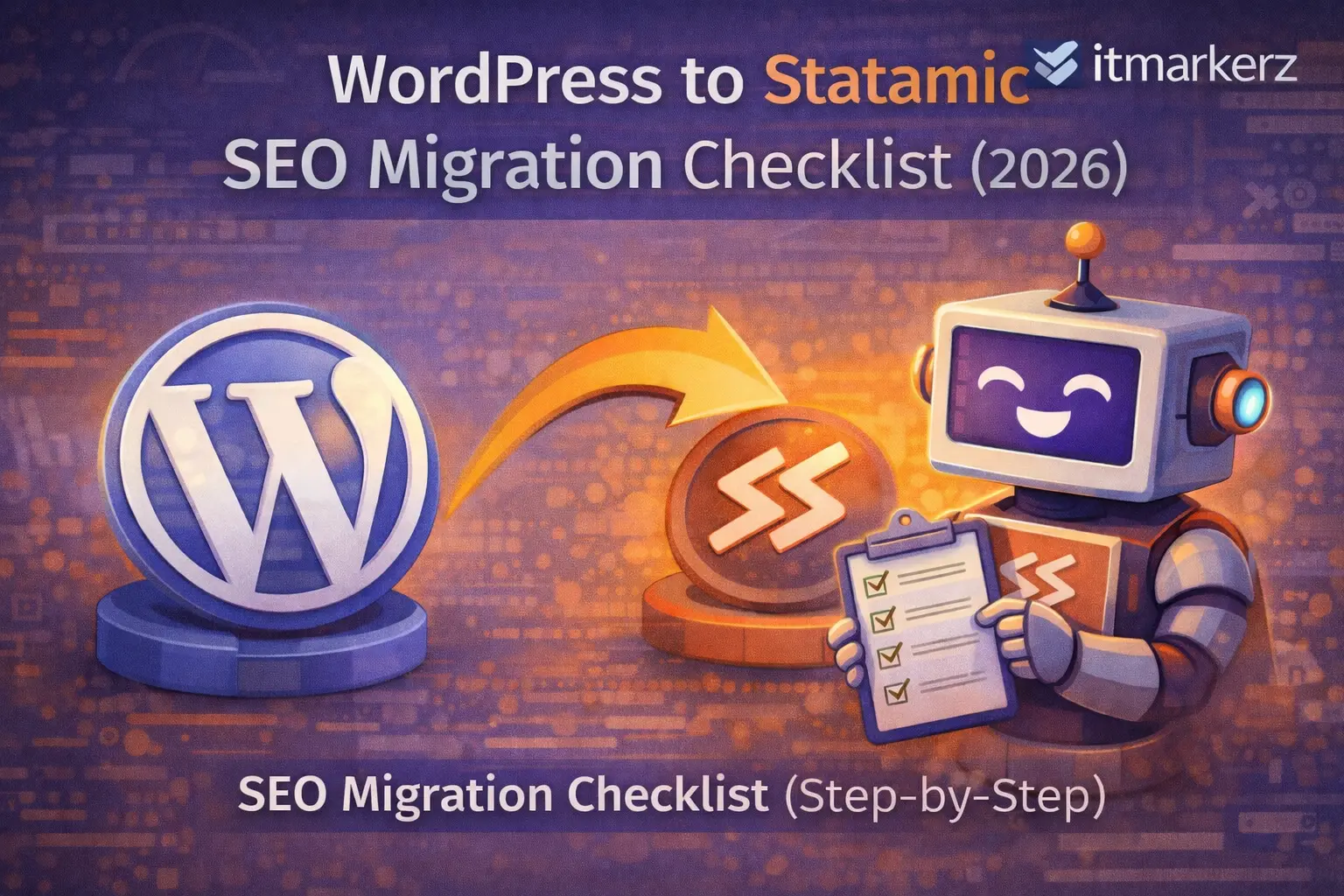
    Minimal infographic showing a WordPress to Statamic SEO migration checklist for 2026, outlining pre-migration audit, URL mapping, content migration, Statamic SEO setup, and post-launch validation steps

    Why SEO Migrations Fail (And How to Avoid It)

    Most SEO losses during CMS migrations happen because of:

    • URL changes without redirects
    • Metadata loss
    • Broken internal links
    • Image path changes
    • Poor post-launch monitoring

    Statamic itself is SEO-friendly by design, but migration mistakes—not the CMS—cause ranking drops.


    Phase 1: Pre-Migration SEO Audit (DO NOT SKIP)

    Before touching Statamic, you must freeze and document your current SEO state.

    ✅ Crawl the Existing WordPress Site

    Use tools like:

    • Screaming Frog
    • Ahrefs / Semrush
    • Google Search Console

    Export:

    • All indexable URLs
    • Status codes
    • Canonicals
    • Meta titles & descriptions
    • H1–H6 structure
    • Image URLs
    • Internal links

    This becomes your SEO source of truth.


    ✅ Identify High-Value Pages

    Not all pages are equal.

    Mark pages with:

    • Highest organic traffic
    • Best keyword rankings
    • Backlinks
    • Conversion value

    These pages get extra protection during migration.


    ✅ Export SEO Metadata

    From WordPress SEO plugins (Yoast / RankMath), export:

    • Meta titles
    • Meta descriptions
    • Index / noindex rules
    • Canonicals
    • Open Graph data (optional)

    👉 These will map directly into Statamic SEO fields.


    Phase 2: URL & Content Mapping (Critical Step)

    ✅ Preserve URL Structure Wherever Possible

    The safest SEO migration is:

    Old URL = New URL

    Example:

    /services/wordpress-development → /services/wordpress-development

    Statamic allows full control over routing—use it.


    ✅ Create a URL Mapping Sheet

    For every WordPress URL:

    • Old URL
    • New Statamic URL
    • Redirect required? (Yes/No)

    Even one missing redirect can leak SEO authority.


    ✅ Plan 301 Redirects

    If URLs must change:

    • Use 301 redirects only
    • Avoid redirect chains
    • Never rely on 302s

    Statamic supports clean redirect rules via:

    • Config files
    • Web server rules (Nginx / Apache)

    Phase 3: Content Migration into Statamic

    ✅ Rebuild Content Using Blueprints

    Statamic uses structured content, not page builders.

    Best practice:

    • Create collections (Pages, Blog, Resources)
    • Define blueprints with SEO fields
    • Keep content clean and reusable

    This improves:

    • SEO consistency
    • Content governance
    • Long-term scalability

    ✅ Migrate Media Carefully

    WordPress media URLs often look like:

    /wp-content/uploads/2023/09/image.jpg

    During migration:

    • Preserve filenames
    • Avoid changing image URLs if possible
    • Optimize images for size & format (WebP)

    Broken images = broken SEO signals.


    Phase 4: SEO Setup in Statamic

    ✅ Configure SEO Fields

    Ensure Statamic templates include:

    • Meta title
    • Meta description
    • Canonical URL
    • Open Graph tags
    • Twitter cards (optional)

    Statamic’s clean HTML output is a major SEO advantage.


    ✅ Generate XML Sitemap

    • Include only indexable URLs
    • Exclude test pages
    • Submit new sitemap to Google Search Console immediately after launch

    ✅ Robots.txt Review

    Check:

    • No accidental disallow rules
    • Correct sitemap reference
    • Crawlable assets (CSS, JS)

    Phase 5: Pre-Launch SEO Validation

    Before going live, test everything.

    ✅ Crawl the Statamic Staging Site

    Confirm:

    • All pages return 200
    • Redirects work correctly
    • Canonicals are correct
    • No orphan pages
    • No duplicate titles

    ✅ Compare Old vs New SEO Data

    Validate:

    • Title parity
    • Description parity
    • Heading structure
    • Internal links

    Your Statamic site should be SEO-equivalent or better than WordPress.


    Phase 6: Post-Launch SEO Checklist (First 30 Days)

    ✅ Submit Sitemap in GSC

    Immediately submit the new sitemap and request indexing for key pages.


    ✅ Monitor Rankings & Traffic

    For the first 30 days:

    • Watch impressions & clicks
    • Track ranking volatility
    • Fix crawl errors fast

    Small drops are normal. Large drops indicate a missed redirect or index issue.


    ✅ Fix Issues Quickly

    Common post-launch fixes:

    • Missing redirects
    • Noindex errors
    • Canonical mismatches
    • Broken internal links

    Fast fixes = fast recovery.


    SEO Benefits After WordPress → Statamic Migration

    When done correctly, teams often see:

    • Faster page load times
    • Better Core Web Vitals
    • Lower bounce rates
    • Improved crawl efficiency
    • More stable rankings

    Statamic’s flat-file architecture removes many performance bottlenecks common in WordPress.


    When You Should NOT DIY This Migration

    Do not attempt a DIY SEO migration if:

    • Your site gets significant organic traffic
    • SEO is a primary lead channel
    • You have complex URL structures
    • You rely on organic revenue

    In these cases, professional help pays for itself.

    👉 Our Statamic Development Services include SEO-safe WordPress migrations, URL mapping, redirect strategy, and post-launch monitoring.


    Final SEO Migration Rule

    CMS migrations don’t hurt SEO.
    Poor planning does.

    With the right checklist, WordPress → Statamic migration can be a ranking upgrade, not a risk.

  • Statamic Pricing Guide (2026): Development Cost, License & Maintenance Explained

    Statamic Pricing Guide (2026): Development Cost, License & Maintenance Explained

    One of the first questions businesses ask before choosing Statamic is simple:

    “How much does Statamic really cost?”

    Unlike WordPress, where costs are spread across plugins, hosting, and ongoing fixes, Statamic pricing is more transparent—but often misunderstood.

    In this 2026 pricing guide, we break down:

    • Statamic license costs
    • Development pricing (real-world ranges)
    • Hosting & infrastructure costs
    • Maintenance costs
    • A 3-year cost comparison with WordPress
    • When Statamic is (and isn’t) cost-effective

    This guide is written for founders, marketing teams, and decision-makers evaluating Statamic for serious marketing websites.


    What Makes Statamic’s Pricing Different?

    Statamic is a flat-file CMS built on Laravel. That single architectural decision changes everything about pricing:

    • No database dependency
    • No plugin ecosystem to license
    • Fewer security layers required
    • Lower maintenance overhead

    👉 In short: higher upfront clarity, lower long-term cost.

    If you’re new to Statamic, you may want to first read Statamic vs WordPress (2026) to understand the architectural differences.


    Statamic License Cost (2026)

    Statamic uses a one-time license model, not recurring plugin subscriptions.

    Statamic License Options

    PlanCostBest For
    SoloFreeSmall sites, personal projects
    Pro~$259 (one-time)Business & marketing sites

    ✔ No monthly CMS fees
    ✔ No per-plugin licensing
    ✔ No vendor lock-in

    For most businesses, Statamic Pro is a one-time cost, not a recurring expense.


    Statamic Development Cost in 2026

    Statamic is not a DIY CMS like WordPress. Development cost depends on structure, design, and integrations.

    Realistic Development Pricing

    Project TypeTypical Cost
    Basic marketing website$1,500 – $3,000
    SaaS / brand website$3,000 – $7,000
    Enterprise marketing site$7,000 – $15,000+

    What Influences the Cost

    • Custom design vs template
    • Number of content types & blueprints
    • Multi-language support
    • Integrations (CRM, analytics, forms)
    • Performance optimization

    A professional build ensures:

    • Structured content for marketers
    • SEO-ready templates
    • Future scalability

    This is why working with a specialized Statamic team matters.

    👉 Learn more about our Statamic Development Services


    Hosting Cost for Statamic

    Statamic is lightweight compared to WordPress.

    Typical Hosting Costs

    • VPS / cloud hosting: $10–$30/month
    • CDN (optional): $5–$15/month
    • No database tuning required

    Statamic runs efficiently on:

    • DigitalOcean
    • AWS
    • Hetzner
    • Any Laravel-friendly host

    👉 Hosting cost is lower than WordPress for similar traffic.


    Statamic Maintenance Cost (2026)

    Statamic requires minimal maintenance, but not zero.

    What Maintenance Includes

    • Laravel & Statamic updates
    • Security patches
    • Performance checks
    • Minor content or layout changes
    • Server monitoring

    Typical Maintenance Cost

    Support LevelCost
    Basic monitoring$50 – $100/month
    Full support$150 – $300/month

    Compared to WordPress, this is significantly lower because:

    • No plugin updates
    • No database corruption risk
    • Smaller attack surface

    Statamic vs WordPress: 3-Year Cost Comparison

    Cost AreaWordPressStatamic
    CMS licenseFreeOne-time ~$259
    Plugins / add-ons$300–$800/year$0
    Hosting$20–$50/month$10–$30/month
    MaintenanceHighLow
    Security fixesOngoingMinimal
    3-year TCOHigherLower

    👉 WordPress looks cheaper upfront but costs more over time.
    👉 Statamic costs more initially but saves money long-term.

    If you’re running WordPress today, factor in:

    • Plugin renewals
    • Performance fixes
    • Security patches
    • Emergency break-fix work

    This is why many businesses rely on WordPress Maintenance Services just to keep sites stable.


    When Statamic Is NOT Cost-Effective

    Statamic may not be the right choice if:

    • You need dozens of third-party plugins
    • You run a large blog network
    • Non-technical editors need total layout freedom
    • You rely heavily on WooCommerce

    In those cases, WordPress—with proper development and maintenance—may still be the better fit.

    👉 Learn more about WordPress Development Services


    Who Gets the Best ROI from Statamic?

    Statamic is ideal for:

    • SaaS marketing websites
    • Startup landing pages
    • Brand & corporate websites
    • Performance-focused SEO sites
    • Teams who want low operational overhead

    If your website is a marketing asset, not just a content dump, Statamic delivers excellent ROI.


    Final Verdict: Is Statamic Worth the Cost in 2026?

    Yes—if you care about performance, security, and long-term cost control.

    Statamic is:
    ✔ Predictable in pricing
    ✔ Cheaper to maintain
    ✔ Faster by default
    ✔ Built for modern marketing teams

    It’s not the cheapest CMS—but it’s often the most cost-efficient over time.


    Need a Statamic Cost Estimate?

    If you want:

    • A clear pricing breakdown
    • Architecture recommendations
    • Migration advice from WordPress
    • Ongoing support options

    Explore our 👉 Statamic Development Services

    We focus on performance, SEO, and long-term maintainability, not just getting a site live.

  • Common Mistakes When Migrating from WordPress to Statamic (And How to Avoid Them)

    Migrating from WordPress to Statamic can dramatically improve performance, security, and long-term maintenance costs—but only if the migration is done correctly.

    Unfortunately, many migrations fail not because of Statamic, but because of avoidable mistakes made during planning, SEO handling, and content rebuilding.

    This article breaks down the most common WordPress → Statamic migration mistakes in 2026, explains why they happen, and shows you how to avoid them safely.

    If you’re planning a migration, this guide can save you months of lost traffic and expensive rework.


    Mistake #1: Treating Statamic Like WordPress

    This is the most common and most expensive mistake.

    Many teams assume Statamic is just “WordPress without plugins.” It’s not.

    Why this is a problem

    • Statamic is architecture-driven, not plugin-driven
    • Features are built cleanly instead of patched
    • Content is structured, not free-form

    Trying to replicate WordPress plugins or page builders inside Statamic leads to:

    • Over-engineered templates
    • Poor content structure
    • Higher long-term maintenance cost

    How to avoid it

    • Redesign content using Statamic blueprints
    • Build features intentionally
    • Embrace structured content instead of page builders

    Statamic works best when you rethink architecture, not when you copy WordPress behavior.


    Mistake #2: Changing URLs Without a Redirect Strategy

    This mistake alone can destroy years of SEO equity.

    What goes wrong

    • URLs change unintentionally
    • Old WordPress permalinks stop resolving
    • No 301 redirects are in place
    • Google sees pages as “deleted”

    Even one high-traffic page without a redirect can cause ranking loss.

    How to avoid it

    • Crawl the entire WordPress site before migration
    • Create a URL mapping sheet
    • Preserve URLs wherever possible
    • Implement 301 redirects for every changed URL

    Statamic gives full routing control—use it to protect SEO.


    Mistake #3: Losing SEO Metadata During Migration

    WordPress SEO plugins (Yoast, RankMath) store critical data that is often forgotten during migration.

    Commonly lost data

    • Meta titles
    • Meta descriptions
    • Canonical URLs
    • Index / noindex rules

    Without this data, Google must re-evaluate your pages from scratch.

    How to avoid it

    • Export all SEO metadata from WordPress
    • Map fields into Statamic blueprints
    • Validate metadata parity before launch

    Statamic handles SEO cleanly—but only if the data is migrated correctly.


    Mistake #4: Ignoring High-Value Pages

    Not all pages matter equally.

    Many migrations fail because teams treat every page the same, instead of prioritizing revenue-driving pages.

    High-risk pages include

    • Pages with strong keyword rankings
    • Pages with backlinks
    • Landing pages that convert leads
    • Pages driving organic revenue

    How to avoid it

    • Identify top-performing pages in Google Search Console
    • Protect these pages first
    • Validate redirects and metadata manually
    • Monitor them closely post-launch

    SEO migrations should be priority-based, not bulk-only.


    Mistake #5: Breaking Media & Image URLs

    WordPress media URLs often follow predictable paths (/wp-content/uploads/...).
    Breaking these URLs can cause:

    • Broken images
    • Lost image search traffic
    • Slower page loads
    • Poor UX signals

    How to avoid it

    • Preserve filenames where possible
    • Re-map media carefully
    • Optimize images during migration
    • Use modern formats (WebP) without breaking URLs

    Statamic allows better media handling—but careless migration can hurt SEO.


    Mistake #6: Skipping Pre-Launch SEO Testing

    Launching without testing is a guaranteed risk.

    What usually breaks

    • Missing redirects
    • Noindex tags accidentally enabled
    • Canonical mismatches
    • Broken internal links
    • Incorrect sitemap URLs

    How to avoid it

    Before launch:

    • Crawl the Statamic staging site
    • Compare old vs new URLs
    • Validate redirects
    • Check robots.txt
    • Confirm sitemap accuracy

    A staging SEO audit is non-negotiable.


    Mistake #7: Expecting “Zero Fluctuation” After Launch

    Some ranking fluctuation after migration is normal.

    The mistake is panicking—or worse—ignoring early signals.

    What to expect

    • Minor ranking movement in the first 1–3 weeks
    • Temporary crawl adjustments
    • Gradual stabilization

    How to avoid damage

    • Monitor Google Search Console daily
    • Fix crawl errors immediately
    • Validate redirect coverage
    • Track top pages individually

    Fast action prevents long-term loss.


    Mistake #8: DIY Migration for Business-Critical Sites

    Statamic is clean—but migrations are complex.

    Do NOT DIY if:

    • SEO is a major revenue channel
    • The site has complex URLs
    • You depend on organic leads
    • You can’t afford traffic loss

    The cost of fixing a broken migration is much higher than doing it right the first time.

    👉 This is where professional Statamic Development Services save time, money, and rankings.


    Mistake #9: Forgetting Post-Migration Maintenance Planning

    Migration is not the finish line.

    Some teams migrate successfully—but fail to plan:

    • Monitoring
    • Updates
    • SEO follow-ups
    • Performance tracking

    Statamic requires less maintenance than WordPress, but it still needs:

    • Laravel updates
    • Server monitoring
    • SEO checks

    Skipping this invites slow decay.


    Final Rule for WordPress → Statamic Migration

    Most migration failures are not technical—they’re planning failures.

    Statamic is one of the best CMS platforms for modern marketing websites, but only when migration is:
    ✔ SEO-aware
    ✔ Structured
    ✔ Carefully tested
    ✔ Professionally executed


    Need Help Avoiding These Mistakes?

    If you want:

    • Safe WordPress → Statamic migration
    • SEO-first planning
    • URL & metadata protection
    • Post-launch monitoring

    Explore our 👉 Statamic Development Services

    We specialize in SEO-safe migrations, not risky rebuilds.

  • Statamic Maintenance vs WordPress Maintenance (2026): Cost & Effort Compared

    Maintenance is the hidden cost of every CMS.

    Most businesses choose a platform based on build cost—but over time, maintenance effort, security risk, and performance tuning become the real expense. By 2026, the gap between Statamic maintenance and WordPress maintenance is clearer than ever.

    This article compares Statamic vs WordPress maintenance in practical terms:

    • What actually needs maintenance
    • Monthly and annual costs
    • Security and performance workload
    • Team effort and risk
    • Which CMS is cheaper long-term

    Why Maintenance Matters More Than Ever in 2026

    In 2026, websites are expected to be:

    • Fast (Core Web Vitals)
    • Secure
    • SEO-stable
    • Always available

    Maintenance is no longer optional. The real question is:

    How much effort does your CMS require just to stay healthy?


    WordPress Maintenance: What You’re Really Paying For

    WordPress itself is free—but maintaining it isn’t.

    Typical WordPress Maintenance Tasks

    • Core updates (frequent)
    • Plugin updates (often weekly)
    • Theme updates
    • Security patches
    • Database optimization
    • Backup management
    • Performance tuning
    • Emergency fixes after plugin conflicts

    Each plugin adds:

    • Update risk
    • Security exposure
    • Performance overhead

    This is why most serious WordPress sites rely on professional
    👉 WordPress Maintenance Services


    WordPress Maintenance Cost (2026)

    Maintenance TypeTypical Cost
    Basic updates & backups$50–$100/month
    Performance + security$150–$300/month
    High-traffic / business-critical$300–$600+/month

    And this doesn’t include:

    • Emergency fixes
    • Downtime impact
    • SEO recovery work

    Statamic Maintenance: Why It’s Fundamentally Lighter

    Statamic is a flat-file CMS built on Laravel. That architecture removes many WordPress pain points.

    Typical Statamic Maintenance Tasks

    • Occasional Laravel & Statamic updates
    • Server monitoring
    • Light security checks
    • Periodic SEO validation

    No plugins.
    No database tuning.
    No weekly firefighting.


    Statamic Maintenance Cost (2026)

    Maintenance LevelTypical Cost
    Basic monitoring$50–$100/month
    Full support$100–$250/month

    For many marketing websites, maintenance effort drops by 40–60% after moving to Statamic.

    👉 Learn more about Statamic Development Services and long-term support options.


    Security Maintenance: Plugins vs Architecture

    WordPress Security Reality

    • Largest CMS attack surface globally
    • Vulnerabilities often come from plugins
    • Zero-day plugin exploits are common
    • Requires constant monitoring

    Security fixes are reactive and ongoing.


    Statamic Security Advantage

    • No plugin ecosystem
    • No public admin attack surface
    • Laravel security updates
    • Smaller footprint = fewer vulnerabilities

    Security is proactive by design, not plugin-driven.


    Performance Maintenance: Ongoing vs Built-In

    WordPress Performance Maintenance

    To keep WordPress fast, teams often need:

    • Cache plugins
    • Asset optimization plugins
    • CDN configuration
    • Database cleanup
    • Continuous monitoring

    Performance often degrades over time unless actively managed.


    Statamic Performance Reality

    • No database queries for content
    • Clean templates
    • Minimal JavaScript
    • Predictable rendering

    Performance stays stable without constant tuning.

    This is why Statamic consistently passes Core Web Vitals with less effort.


    Maintenance Effort Comparison (Real-World)

    AreaWordPressStatamic
    Update frequencyHighLow
    Plugin conflictsCommonNone
    Security patchesFrequentMinimal
    Performance tuningContinuousRare
    Emergency fixesLikelyUncommon
    Maintenance stressHighLow

    Long-Term Cost Comparison (3 Years)

    Cost CategoryWordPressStatamic
    Maintenance feesHighLow
    Emergency fixesCommonRare
    Performance workOngoingMinimal
    Downtime riskHigherLower
    Total effortHeavyLight

    👉 Over 3 years, Statamic is usually cheaper to maintain, even if build cost is slightly higher.


    When WordPress Maintenance Still Makes Sense

    WordPress may still be the right choice if:

    • You rely on WooCommerce
    • You need many third-party plugins
    • Editors demand drag-and-drop builders
    • You run large editorial platforms

    In these cases, invest in professional
    👉 WordPress Development Services to reduce maintenance pain.


    When Statamic Wins Clearly

    Statamic is ideal when:

    • Your site is marketing-focused
    • SEO and performance matter
    • Maintenance budget is limited
    • You want predictable long-term cost
    • You prefer architecture over plugins

    This is why many SaaS and startup teams are switching.


    Final Verdict: Maintenance Is an Architectural Decision

    You don’t reduce maintenance by working harder.
    You reduce it by choosing the right CMS.

    In 2026:

    • WordPress maintenance is ongoing and reactive
    • Statamic maintenance is light and predictable

    If your site is a marketing asset, not a plugin marketplace, Statamic offers a clear advantage.


    Need Help Reducing CMS Maintenance?

    If you want:

    • Lower maintenance cost
    • Better performance stability
    • Fewer security risks
    • Long-term peace of mind

    Explore our
    👉 Statamic Development Services

    We build low-maintenance, high-performance marketing websites—not fragile plugin stacks.

  • Why Statamic Outperforms WordPress for Core Web Vitals in 2026

    Google’s Core Web Vitals (CWV) are no longer “nice to have.”
    In 2026, they are a baseline requirement for ranking, user experience, and conversion performance—especially for marketing and SaaS websites.

    Many teams struggle to pass Core Web Vitals on WordPress, even after adding caching plugins, CDNs, and performance tweaks. This is where Statamic consistently outperforms WordPress—not because of hacks, but because of architecture.

    This article explains why Statamic wins on Core Web Vitals in 2026, how WordPress struggles structurally, and what this means for SEO, CRO, and long-term site performance.


    Core Web Vitals Refresher (2026)

    Google currently evaluates three key metrics:

    • LCP (Largest Contentful Paint) – Loading performance
    • INP (Interaction to Next Paint) – Responsiveness (replaced FID)
    • CLS (Cumulative Layout Shift) – Visual stability

    Passing CWV is now directly tied to:

    • Organic rankings
    • Crawl efficiency
    • Conversion rates
    • Mobile UX scores

    The Real Problem with WordPress Performance

    WordPress performance issues are rarely caused by “bad hosting” alone.
    They are structural.

    Typical WordPress Performance Bottlenecks

    • Database queries on every request
    • Plugin-heavy execution chains
    • Render-blocking JavaScript from themes & builders
    • CSS bloat from multipurpose themes
    • Runtime caching instead of pre-rendered output

    Even well-optimized WordPress sites often need:

    • Page caching plugins
    • Object caching (Redis/Memcached)
    • Asset optimization plugins
    • CDN configuration
    • Continuous tuning

    This increases complexity, cost, and fragility.

    👉 This is why many teams rely on ongoing
    WordPress Maintenance Services just to keep performance stable.


    Why Statamic Is Faster by Design

    Statamic is a flat-file CMS built on Laravel.
    That one design choice changes everything.

    Key Architectural Advantages

    • No database queries for content
    • Pre-rendered content delivery
    • Clean, minimal HTML output
    • No plugin execution chains
    • Full control over assets & templates

    Performance is not “optimized later”—it’s inherent.


    Core Web Vitals: Statamic vs WordPress (2026)

    1️⃣ Largest Contentful Paint (LCP)

    WordPress

    • Often delayed by:
      • Database calls
      • Theme logic
      • Plugin execution
      • Large hero images from page builders

    Statamic

    • Content is read directly from files
    • Templates are clean and predictable
    • No runtime query delays

    👉 Statamic consistently delivers faster LCP, especially on mobile.


    2️⃣ INP (Interaction to Next Paint)

    INP measures how quickly the site responds to user interaction.

    WordPress struggles because

    • JavaScript-heavy themes
    • Page builders injecting event listeners
    • Third-party scripts loading early

    Statamic excels because

    • Minimal JavaScript by default
    • No page builders
    • Developers control exactly what loads and when

    👉 Statamic sites feel instantly responsive—a major UX and SEO advantage.


    3️⃣ Cumulative Layout Shift (CLS)

    CLS failures are extremely common on WordPress.

    Common causes

    • Ads loading late
    • Fonts shifting layout
    • Plugin UI injections
    • Dynamic banners & popups

    Statamic advantage

    • Predictable layouts
    • No plugin UI injections
    • Stable templates
    • Controlled font loading

    👉 CLS issues are rare unless introduced deliberately.


    The Plugin Problem (WordPress’s Biggest Weakness)

    Every WordPress performance fix usually involves:

    • Another plugin
    • Another configuration
    • Another update risk

    This creates:

    • Plugin conflicts
    • Security exposure
    • Performance regression after updates
    • Higher maintenance cost

    Statamic avoids this entirely by:

    • Building features cleanly
    • Using Laravel-native tooling
    • Eliminating plugin dependency

    This is why long-term performance stability is much higher with Statamic.


    Hosting Impact: Why Statamic Costs Less to Run

    WordPress performance usually requires:

    • Heavier servers
    • Aggressive caching layers
    • CDN dependency

    Statamic performs extremely well on:

    • Small VPS instances
    • Simple Laravel-friendly hosting
    • Minimal infrastructure

    👉 Lower hosting cost + better performance is a rare combination.


    SEO Impact of Better Core Web Vitals

    Statamic’s CWV advantage leads to:

    • Better mobile rankings
    • Lower bounce rates
    • Higher crawl efficiency
    • Faster indexing
    • Improved conversion rates

    For marketing websites, performance directly affects:

    • Lead generation
    • Paid ad landing page scores
    • Brand perception

    This is why Statamic is increasingly chosen for SEO-driven marketing sites.


    When WordPress Can Still Pass CWV (With Effort)

    To be fair, WordPress can pass Core Web Vitals—but usually requires:

    • Custom lightweight theme
    • Zero page builders
    • Minimal plugins
    • Advanced caching
    • Continuous monitoring

    At that point, WordPress becomes:

    • Harder to maintain
    • More expensive long-term
    • Less flexible for marketers

    Many teams choose Statamic instead of fighting the platform.


    Statamic Is Not for Everyone (Important)

    Statamic may NOT be ideal if:

    • You rely on WooCommerce
    • You need dozens of plugins
    • Editors demand drag-and-drop builders
    • Your site is blog-heavy with many contributors

    In those cases, WordPress—built and maintained properly—may still fit.

    👉 Learn more about WordPress Development Services


    Why Marketing Teams Prefer Statamic in 2026

    Marketing teams choose Statamic because:

    • Pages load fast without effort
    • Core Web Vitals pass by default
    • SEO foundations are clean
    • Content is structured
    • Maintenance overhead is low

    This combination is rare—and valuable.


    Final Verdict: Performance Is Architectural

    You can optimize WordPress for performance.
    But Statamic starts fast and stays fast.

    In 2026, Core Web Vitals are not optional.
    Statamic outperforms WordPress because it avoids the structural bottlenecks WordPress cannot escape cleanly.


    Need a High-Performance Statamic Website?

    If you want:

    • CWV-optimized marketing site
    • SEO-first architecture
    • Low maintenance overhead
    • Long-term performance stability

    Explore our 👉 Statamic Development Services

    We build performance-first marketing websites, not plugin stacks.

  • How to Choose a Statamic Development Agency in 2026 (Pricing, Process & Red Flags)

    How to Choose a Statamic Development Agency in 2026 (Pricing, Process & Red Flags)

    Statamic has emerged as one of the most powerful CMS platforms for high-performance marketing websites, SaaS landing pages, and brand sites. Built on Laravel and designed around speed, security, and structured content, Statamic is no longer a “niche CMS” in 2026.

    But here’s the catch:

    👉 Statamic’s success depends heavily on who builds it.

    Unlike WordPress, Statamic is not plug-and-play. Choosing the wrong development agency can turn a fast, elegant CMS into an expensive, hard-to-maintain project.

    This guide explains how to choose the right Statamic development agency in 2026, covering:

    • Realistic pricing
    • What a good Statamic process looks like
    • Red flags to avoid
    • Maintenance and long-term cost considerations

    Why Choosing the Right Statamic Agency Matters

    Statamic is developer-centric by design. It assumes:

    • Strong Laravel fundamentals
    • Clean frontend architecture
    • Structured content modeling
    • Performance-first thinking

    Agencies that come from a WordPress-only mindset often struggle with Statamic because:

    • There is no plugin marketplace to “patch” problems
    • Architecture decisions matter more
    • Poor early decisions increase long-term costs

    That’s why choosing a true Statamic development agency is critical.


    What a Good Statamic Development Agency Should Do

    1. Strong Laravel Expertise (Non-Negotiable)

    Statamic runs on Laravel. A good agency should be comfortable with:

    • Laravel routing & middleware
    • Blade or modern frontend stacks
    • Data modeling using Statamic collections & blueprints
    • Performance optimization at the framework level

    🚩 If an agency says “Statamic is easier than Laravel,” that’s a warning sign.


    2. Marketing-First Content Architecture

    A professional Statamic agency designs content for marketers, not just developers.

    You should see:

    • Clean content blueprints
    • Reusable page sections
    • Flexible landing page structures
    • SEO-friendly URLs and metadata control

    This is where Statamic truly shines for marketing websites.


    3. Performance & Core Web Vitals Focus

    Statamic’s flat-file approach enables:

    • Extremely fast load times
    • Minimal server overhead
    • Excellent Core Web Vitals

    A good agency will:

    • Design for static caching
    • Optimize images and assets
    • Avoid unnecessary JavaScript bloat

    Performance is not optional in 2026—it’s a ranking factor and conversion driver.


    Statamic Development Pricing in 2026 (Realistic Ranges)

    Statamic pricing varies widely depending on scope, design, and integrations.

    Typical Price Ranges

    Project TypeEstimated Cost
    Basic marketing site$1,500 – $3,000
    SaaS or brand site$3,000 – $7,000
    Enterprise marketing site$7,000 – $15,000+

    Why Statamic Often Costs Less Long-Term

    • No recurring plugin licenses
    • Lower hosting requirements
    • Minimal security overhead
    • Reduced maintenance hours

    Compared to WordPress, Statamic’s total cost of ownership is usually lower over 2–3 years.


    Statamic vs WordPress Agencies: Key Differences

    AspectWordPress AgencyStatamic Agency
    ApproachPlugin-drivenArchitecture-driven
    PerformanceNeeds optimizationFast by default
    SecurityPlugin riskMinimal surface
    MaintenanceContinuousLightweight
    Ideal forContent-heavy blogsMarketing & SaaS sites

    If your site depends on plugins for basic functionality, WordPress may be better.
    If performance and structure matter, Statamic is the better fit.


    Red Flags When Hiring a Statamic Development Company

    Avoid agencies that:

    🚩 Push WordPress plugins as alternatives
    🚩 Can’t explain Statamic blueprints clearly
    🚩 Lack real Laravel project experience
    🚩 Promise “instant” builds with no architecture discussion
    🚩 Don’t talk about performance or SEO
    🚩 Have no post-launch maintenance plan

    Statamic is powerful—but only in the right hands.


    Maintenance & Long-Term Support Considerations

    Statamic requires far less maintenance than WordPress, but not zero.

    A professional agency should offer:

    • Laravel & Statamic updates
    • Server & deployment support
    • Performance monitoring
    • Minor content or layout enhancements

    This is where Statamic truly reduces operational burden compared to WordPress.


    When Should You Choose a Statamic Agency?

    Statamic is ideal if:

    • Your site is marketing-focused
    • Performance & SEO matter
    • You want lower long-term costs
    • You prefer structured content
    • You don’t want plugin dependency

    If you rely heavily on third-party plugins or non-technical editors, WordPress may still be suitable.


    Why Work With a Specialized Statamic Agency?

    A specialized Statamic team understands:

    • Laravel-first architecture
    • Marketing-driven content modeling
    • Performance & SEO alignment
    • Long-term maintainability

    At itmarkerz, our 👉 Statamic Development Services
    focus on building fast, secure, SEO-ready marketing websites using modern CMS practices—without plugin bloat.


    Final Checklist Before You Decide

    Before hiring a Statamic agency, ask:

    ✔ Do they have Laravel experience?
    ✔ Can they explain Statamic blueprints clearly?
    ✔ Do they design for marketers, not just developers?
    ✔ Do they talk about performance and SEO?
    ✔ Do they offer post-launch support?

    If the answer is “yes” to all five—you’re on the right track.

  • Statamic vs WordPress (2026): Which CMS Is Better for Marketing Sites?

    Statamic vs WordPress (2026): Which CMS Is Better for Marketing Sites?

    Choosing the right CMS for a marketing website in 2026 is no longer just about popularity. It’s about performance, total cost of ownership, security, scalability, and how efficiently your marketing team can publish and iterate.

    For years, WordPress has been the default choice. But modern teams are increasingly evaluating Statamic, a flat-file CMS built on Laravel, as a serious alternative—especially for high-performance marketing sites, SaaS landing pages, and brand websites.

    In this guide, we’ll compare Statamic vs WordPress in 2026, with a strong focus on usage cost, technology stack, maintenance overhead, and real-world marketing needs, so you can make the right decision for your business.

    What Is WordPress?

    WordPress is the world’s most widely used CMS, powering over 40% of all websites. It’s database-driven, plugin-based, and supported by a massive ecosystem of themes, plugins, and developers.

    Businesses typically choose WordPress for:

    • Blogs and content-heavy sites
    • Marketing websites with frequent updates
    • WooCommerce stores
    • Editorial workflows with non-technical users

    If you’re planning a WordPress-based site or customization, our👉 WordPress Development Services help businesses build scalable, SEO-optimized WordPress solutions.


    What Is Statamic?

    Statamic is a modern, flat-file CMS built on Laravel. Instead of a database, it stores content in files (YAML/Markdown), making it extremely fast, secure, and developer-friendly.

    Statamic is ideal for:

    • Marketing and brand websites
    • SaaS landing pages
    • Performance-critical sites
    • Teams already using Laravel

    If you’re exploring a modern CMS approach, our 👉 Statamic Development Services help companies design fast, clean, and future-proof marketing sites.

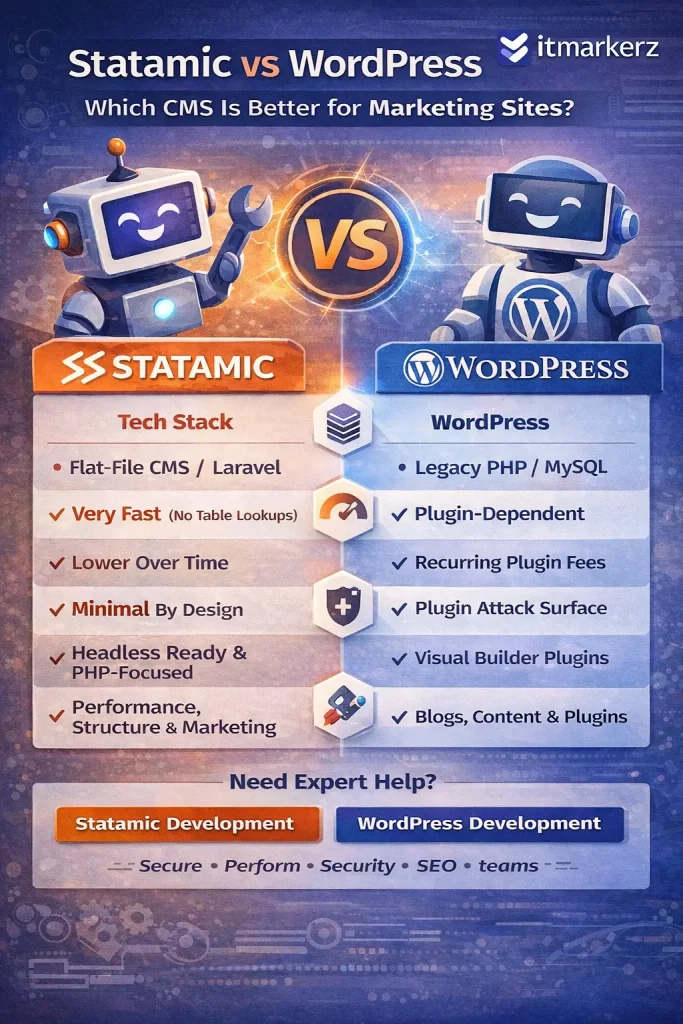
    Infographic comparing Statamic vs WordPress in 2026 for marketing websites, highlighting differences in tech stack, performance, cost, security, content flexibility, and overall focus, with itmarkerz branding.

    Technology Stack Comparison (2026)

    FeatureWordPressStatamic
    Core LanguagePHPPHP (Laravel)
    StorageMySQL DatabaseFlat Files (YAML/Markdown)
    FrameworkCustom / LegacyLaravel
    API ReadyPlugin-basedNative
    Headless SupportPossible (complex)Native
    PerformancePlugin dependentVery high by default
    Security SurfaceLargeMinimal

    Key takeaway:

    • WordPress relies heavily on plugins and database queries.
    • Statamic benefits from Laravel’s modern architecture and file-based speed

    Usage Cost & Total Cost of Ownership

    WordPress Cost Breakdown

    WordPress itself is free, but real costs add up quickly:

    • Premium themes & plugins
    • Hosting optimized for WordPress
    • Security plugins
    • Performance plugins (cache, CDN, image optimization)
    • Ongoing maintenance & updates

    For serious marketing sites, WordPress is rarely “free” in practice.

    That’s why many businesses opt for professional 👉 WordPress Maintenance Services to handle updates, backups, security, and performance tuning.

    Statamic Cost Breakdown

    Statamic uses a one-time license fee (for advanced features), but:

    • No plugin sprawl
    • No database optimization costs
    • Fewer security layers needed
    • Lower long-term maintenance effort

    Over 2–3 years, Statamic often costs less than WordPress for marketing-focused websites.


    Performance & Speed (Critical for Marketing SEO)

    WordPress

    • Performance depends on:
      • Theme quality
      • Number of plugins
      • Hosting
      • Caching setup
    • Poorly managed WordPress sites often suffer from:
      • Slow TTFB
      • Plugin conflicts
      • Bloated frontend assets

    Statamic

    • Flat-file = no database queries
    • Extremely fast page loads
    • Built for static caching and CDN usage
    • Excellent Core Web Vitals out of the box

    For SEO-driven marketing sites, Statamic has a clear performance advantage.


    Security & Maintenance Effort

    WordPress

    • Frequent plugin/theme updates
    • Common attack target due to popularity
    • Requires continuous monitoring
    • Higher risk if updates are skipped

    This is why ongoing 👉 WordPress Maintenance is almost mandatory for business-critical sites.

    Statamic

    • No database = smaller attack surface
    • No third-party plugin ecosystem chaos
    • Laravel security updates
    • Minimal maintenance overhead

    Statamic is inherently more secure by design.


    Content Editing Experience (Marketing Teams)

    WordPress

    Pros:

    • Familiar editor (Gutenberg)
    • Huge ecosystem
    • Easy for non-technical users

    Cons:

    • Editors can break layouts
    • Plugin-dependent features
    • Performance trade-offs

    Statamic

    Pros:

    • Clean, structured content
    • Flexible fields
    • Safer editorial control
    • Excellent for multi-language & structured marketing pages

    Cons:

    • Slight learning curve for teams new to Laravel-based CMSs

    SEO Capabilities (2026)

    Both CMSs can rank well in Google, but the approach differs:

    WordPress SEO

    • Strong plugin ecosystem (Yoast, RankMath)
    • Requires configuration and discipline
    • Performance impacts SEO if not optimized

    Statamic SEO

    • Clean HTML output
    • Excellent page speed
    • SEO baked into templates
    • Fewer technical SEO issues by default

    Statamic rewards teams who care about technical SEO and performance.


    When Should You Choose WordPress?

    Choose WordPress if:

    • You need a familiar CMS for editors
    • Your site relies heavily on plugins
    • You publish large volumes of content
    • You want fast onboarding of content teams
    • You plan WooCommerce or heavy integrations

    👉 Ideal with professional WordPress development & maintenance


    When Should You Choose Statamic?

    Choose Statamic if:

    • Your site is marketing-focused (SaaS, brand, landing pages)
    • Performance & security matter
    • You want lower long-term costs
    • You prefer structured content
    • You already use Laravel or modern stacks

    👉 Ideal with expert Statamic development


    Statamic vs WordPress: Final Verdict (2026)

    WordPress is still powerful—but heavy.
    Statamic is lean, modern, and built for performance-first marketing.

    Use CaseBest Choice
    Blog-heavy sitesWordPress
    Enterprise marketing siteStatamic
    SaaS landing pagesStatamic
    Content teams with pluginsWordPress
    Low-maintenance marketingStatamic

    Need Help Choosing or Building?

    If you’re unsure which CMS fits your marketing goals, our team can help you evaluate, build, and maintain the right solution:

    We focus on performance, security, SEO, and long-term cost efficiency—not just CMS popularity.