Tag: PHP

  • Laravel Queues & Horizon at Scale (2026): Idempotency, Retries, and Enterprise Job Pipelines

    In enterprise Laravel systems, the queue is where the business actually runs: imports, billing calculations, notifications, webhooks, reports, AI ingestion, and scheduled workflows. The fastest way to create outages is to treat queues like “background tasks” instead of a production-critical system.

    This guide shows how to run Laravel queues + Horizon safely at scale: queue separation, correct retry configuration, idempotency, long-running jobs, batch pipelines, and monitoring—without duplicate processing or random worker meltdowns.

    For the full enterprise build guide, start here: Laravel Development (2026): The Complete Guide to Building & Scaling Enterprise Applications. If you need help hardening your production queues under SLA: Laravel Maintenance.


    Quick navigation


    1) Why queues break in production

    • Mixed workloads: imports + notifications + CPU-heavy rating all share the same workers.
    • Wrong timeouts: workers kill jobs early; jobs restart; duplicates happen.
    • No idempotency: retries create double charges, double emails, double exports.
    • Unbounded jobs: one job tries to do “everything” and eats memory.
    • No queue monitoring: you discover problems only after customers complain.

    Enterprise rule: A job must be safe to retry. If it isn’t, it’s not production-ready.


    2) Enterprise queue design (separation + priorities)

    Start by separating workloads by behavior. A clean enterprise baseline looks like:

    • critical (payments, billing actions, contract state changes)
    • notifications (emails/SMS/webhooks)
    • imports (file ingestion + normalization)
    • compute (rating engines, analytics, heavy transforms)
    • exports (CSV/XLS/PDF generation)

    Why this matters: if exports spike, your payments must still run. If imports spike, your notifications must still send. Queue separation prevents “cross-contamination.”

    Horizon example: dedicated supervisors per workload

    Here’s a clean starting point (adapt to your infra). The key is: separate queues + different timeouts + right worker counts.

    // config/horizon.php (example)
    'environments' => [
      'production' => [
        'critical' => [
          'connection' => 'redis',
          'queue' => ['critical'],
          'balance' => 'auto',
          'minProcesses' => 2,
          'maxProcesses' => 10,
          'tries' => 3,
          'timeout' => 120,
        ],
    
        'notifications' => [
          'connection' => 'redis',
          'queue' => ['notifications'],
          'balance' => 'auto',
          'minProcesses' => 1,
          'maxProcesses' => 8,
          'tries' => 5,
          'timeout' => 120,
        ],
    
        'imports' => [
          'connection' => 'redis',
          'queue' => ['imports'],
          'balance' => 'auto',
          'minProcesses' => 1,
          'maxProcesses' => 4,
          'tries' => 1,
          'timeout' => 3600,
        ],
    
        'compute' => [
          'connection' => 'redis',
          'queue' => ['compute'],
          'balance' => 'auto',
          'minProcesses' => 2,
          'maxProcesses' => 20,
          'tries' => 2,
          'timeout' => 1800,
        ],
    
        'exports' => [
          'connection' => 'redis',
          'queue' => ['exports'],
          'balance' => 'auto',
          'minProcesses' => 1,
          'maxProcesses' => 6,
          'tries' => 2,
          'timeout' => 900,
        ],
      ],
    ];

    3) timeout vs retry_after (the #1 duplicate-processing cause)

    This mistake causes “phantom duplicates” in billing systems: the worker kills a job at timeout, but Redis thinks it’s still running, then re-queues it after retry_after and the job runs again.

    Rule of thumb: retry_after must be greater than your longest real job runtime (plus buffer), and worker timeout must align to that reality.

    // config/queue.php (Redis)
    'redis' => [
      'driver' => 'redis',
      'connection' => 'default',
      'queue' => env('REDIS_QUEUE', 'default'),
      // Must be > longest job runtime + buffer
      'retry_after' => 5400,
      'block_for' => null,
      'after_commit' => true,
    ];

    Enterprise reality: If you don’t measure job runtime distribution (p95/p99), you’ll guess timeouts—and guessing creates duplicates.


    4) Idempotency patterns (do this or pay later)

    Idempotency means: if a job runs twice (retry, redeploy, crash), the business outcome remains correct. Here are enterprise-grade patterns that work.

    A) Idempotency key + DB unique constraint

    Best for payments, invoices, webhooks, and “create once” operations.

    // Example: write once using a unique key
    // Table has UNIQUE(idempotency_key)
    
    DB::transaction(function () use ($key, $payload) {
      $already = DB::table('job_outcomes')
        ->where('idempotency_key', $key)
        ->lockForUpdate()
        ->first();
    
      if ($already) {
        return; // safe retry
      }
    
      // Do the business action
      // ...
    
      DB::table('job_outcomes')->insert([
        'idempotency_key' => $key,
        'status' => 'done',
        'created_at' => now(),
        'updated_at' => now(),
      ]);
    });

    B) Distributed lock (Redis) for “one-at-a-time” processing

    Best for imports, per-customer processing, per-file pipelines, and allowance tracking (bundles).

    use Illuminate\Support\Facades\Cache;
    
    $lock = Cache::lock("import:{$supplierId}:{$period}", 7200);
    
    if (! $lock->get()) {
      return; // another worker is processing this already
    }
    
    try {
      // do work safely
    } finally {
      optional($lock)->release();
    }

    C) “Exactly-once” isn’t real—design for safe “at-least-once”

    Queues are designed for at-least-once delivery. Your architecture must assume duplicates are possible and handle them safely.


    5) Long-running jobs: imports, exports, heavy rating

    Enterprise strategy is simple: no single job should do unbounded work. Use chunking + batches.

    • Parse files using streams (don’t load entire CSV into memory).
    • Process in chunks (1k–5k rows) based on your workload.
    • Commit progress frequently (and log progress events).
    • Use “replace vs patch” write modes depending on the pipeline.

    CTO signal: Chunking + idempotency is how you make “reprocessing” safe—critical in billing and finance systems.


    6) Batches & pipelines: structure multi-stage processing

    Most enterprise workflows are pipelines, not single jobs. Example:

    Import (chunked) →
    Normalize + dedupe →
    Rate (compute queue) →
    Apply bundles →
    Update summary →
    Export / notify

    Use batch IDs to tie all stages together so ops can answer: “What happened for period X?”

    • Store job_id / batch_id on records created/updated
    • Write processing history per stage (start/end + counts + errors)
    • Make each stage rerunnable independently (with idempotency)

    7) Monitoring & alerting (what to track)

    Enterprise queue monitoring should trigger alerts before customer impact.

    • Backlog depth per queue (critical/imports/compute)
    • Job failure rate (spikes = release regression or upstream data shift)
    • Runtime p95/p99 for heavy jobs (timeout tuning and capacity planning)
    • Deadlocks/lock wait timeouts (DB-level contention)
    • Worker restarts/OOM (memory leaks or oversized jobs)

    This is exactly what an enterprise maintenance plan should include: monitoring + tuning + incident response. See: Laravel Maintenance.


    8) Incident playbook: backlog spikes, deadlocks, failures

    Scenario A: backlog spike on imports

    • Confirm upstream change (new file format/volume).
    • Scale imports supervisor temporarily.
    • Reduce chunk size if memory is spiking.
    • Enable strict validation + issue logging so pipeline doesn’t stall.

    Scenario B: deadlocks/lock wait timeouts

    • Identify hot queries and add the right composite indexes.
    • Reduce transaction scope (shorter transactions).
    • Batch updates (e.g., 200–500 rows) instead of huge updates.
    • Implement deadlock retry around critical updates.

    Scenario C: job failures after release

    • Pause only the affected queue (not all queues).
    • Rollback the release or hotfix the specific job.
    • Replay failed jobs safely only if idempotency is confirmed.

    9) Copy/paste enterprise checklist

    1. Separate queues by workload (critical/notifications/imports/compute/exports).
    2. Align worker timeout and Redis retry_after to real p95/p99 runtimes.
    3. Make every job safe to retry (idempotency keys + locks + unique constraints).
    4. Chunk long tasks (stream files, small batches, frequent commits).
    5. Use batch IDs + processing histories per stage.
    6. Monitor backlog depth, failure rates, runtime distribution, and worker memory.
    7. Create an incident playbook for spikes, deadlocks, and regressions.

    Next steps (internal links)

    Need enterprise Laravel architecture + scaling?

    We design queue-first systems, safe pipelines, and high-throughput job processing (Horizon + Redis + MySQL tuning).

    Want monitoring + SLA support?

    We keep production stable: queue monitoring, failure triage, performance tuning, patching, and incident response.

    Upgrading to Laravel 12 safely? Laravel Upgrade Service. Building AI ingestion pipelines (RAG indexing/agents) on queues? Laravel AI Development.

    FAQ

    What is the most common cause of duplicate processing in Laravel queues?

    Misconfigured retry_after vs worker timeout, combined with jobs that aren’t idempotent. If a job is killed and re-queued, it will run twice unless your design prevents duplicates.

    How do enterprises scale Horizon safely?

    By separating workloads into dedicated queues and supervisors, measuring job runtimes (p95/p99), and applying idempotency patterns so retries are safe.

    Should we use one queue or multiple queues?

    Multiple queues. Mixing imports, CPU-heavy compute, and critical billing actions causes unpredictable latency and incidents. Queue separation makes performance predictable and safer under load.
  • Enterprise Laravel Architecture Blueprint: DDD, Service Layer, Events, Queues

    Enterprise Laravel success isn’t about “writing more code.” It’s about building a system that stays stable as teams grow, features multiply, and traffic becomes unpredictable. This blueprint gives you a practical reference architecture for DDD-inspired structure, a clean Service Layer, event-driven workflows, and queue design that scales—without overengineering.

    If you want the full enterprise guide first, start here: Laravel Development (2026): The Complete Guide to Building & Scaling Enterprise Applications.


    What you’ll get in this blueprint


    When DDD is worth it (and when it isn’t)

    DDD is not a requirement. It’s a scaling strategy. Use it when the problem domain is complex and the business rules change frequently (pricing, billing, compliance, multi-tenant workflows, approvals, auditability). Avoid heavy DDD when your app is mostly CRUD with light rules—because complexity becomes cost.

    SignalDDD is a good ideaDDD is probably overkill
    Business rulesMany rules, exceptions, approvals, validationsSimple CRUD, minimal rules
    Team scaleMultiple teams, parallel delivery1–3 developers
    Change frequencyRules change monthly/weeklyRare changes, mostly content
    RiskCompliance, payments, audit trails, SLAsLow-stakes internal tools

    Enterprise shortcut: You don’t need “full DDD.” In Laravel, a DDD-inspired modular structure + a strong Service Layer gives you 80% of the value with far less ceremony.


    Reference architecture: layers + responsibilities

    This architecture keeps your domain rules stable while allowing UI, API, jobs, and integrations to evolve independently.

    LayerWhat belongs hereWhat should NOT be here
    Presentation (Controllers, Console Commands)Auth, request validation, mapping DTOs, returning responsesBusiness rules, pricing logic, workflow decisions
    Application (Service Layer / Use Cases)Use-case orchestration, transactions, authorization, emitting eventsLow-level DB queries scattered everywhere
    Domain (Entities, Value Objects, Domain Services)Core business rules, invariants, domain eventsHTTP, Queue, Mail, external APIs, frameworks
    Infrastructure (Repositories, 3rd party integrations)Eloquent models, DB queries, clients, queue adapters, storageBusiness decisions that should be in Domain/Application

    How this looks in a real Laravel codebase

    app/
      Domains/
        Billing/
          Actions/
          DTO/
          Events/
          Jobs/
          Models/
          Policies/
          Repositories/
          Services/
          ValueObjects/
      Http/
        Controllers/
      Console/
      Support/
        Idempotency/
        Outbox/
        Tenancy/
        Observability/

    Important: You don’t have to rename everything. The point is separation: controllers stay thin, services orchestrate, domain rules are centralized, and infrastructure details don’t leak everywhere.


    Service Layer pattern: the enterprise “center of gravity”

    The Service Layer is where most enterprise Laravel teams win or lose. It’s the layer that:

    • Coordinates use cases (create order, approve invoice, renew subscription, apply bundle, etc.)
    • Wraps operations in transactions
    • Enforces authorization + policies
    • Emits events after state changes
    • Schedules jobs for async work (emails, exports, webhooks, heavy computation)

    Thin Controllers rule (copy/paste standard)

    Controllers validate input, call a single service method, and return a response. If a controller starts accumulating “ifs” and complex logic, it’s leaking business rules.

    Service Layer example (credible Laravel shape)

    <?php
    // app/Domains/Billing/Services/InvoiceService.php
    
    namespace App\Domains\Billing\Services;
    
    use App\Domains\Billing\Events\InvoiceIssued;
    use App\Domains\Billing\Models\Invoice;
    use App\Domains\Billing\Repositories\InvoiceRepository;
    use Illuminate\Support\Facades\DB;
    
    class InvoiceService
    {
        public function __construct(
            private InvoiceRepository $invoices,
        ) {}
    
        public function issue(array $data): Invoice
        {
            return DB::transaction(function () use ($data) {
                // 1) validate invariants (domain rules should live in domain models/value objects too)
                // 2) persist state changes via repository
                $invoice = $this->invoices->createIssued($data);
    
                // 3) emit domain event (listeners/jobs can react)
                event(new InvoiceIssued($invoice->id));
    
                return $invoice;
            });
        }
    }

    This pattern keeps your workflows testable and your controllers clean. Most importantly, it creates a single place to trace “what happened” in production.


    Events: Domain events vs Integration events (don’t mix them)

    Enterprise event-driven systems fail when events become “random notifications.” The fix is classification:

    • Domain events: something meaningful happened in your domain (InvoiceIssued, PaymentCaptured, SubscriptionRenewed).
    • Integration events: messages that leave your system or cross boundaries (InvoiceIssuedToERP, CustomerSyncedToCRM).

    Domain event example

    <?php
    // app/Domains/Billing/Events/InvoiceIssued.php
    
    namespace App\Domains\Billing\Events;
    
    class InvoiceIssued
    {
        public function __construct(public string $invoiceId) {}
    }

    Listener that schedules async work (email/webhook/export)

    <?php
    // app/Domains/Billing/Listeners/QueueInvoiceNotifications.php
    
    namespace App\Domains\Billing\Listeners;
    
    use App\Domains\Billing\Events\InvoiceIssued;
    use App\Domains\Billing\Jobs\SendInvoiceEmailJob;
    
    class QueueInvoiceNotifications
    {
        public function handle(InvoiceIssued $event): void
        {
            SendInvoiceEmailJob::dispatch($event->invoiceId)
                ->onQueue('notifications');
        }
    }

    Enterprise rule: Your domain event is not “send an email.” Your domain event is the business fact. Emails, webhooks, and exports are reactions.


    Queues at scale: how enterprise Laravel stays fast

    Queues aren’t just “background processing.” In enterprise apps they are the safety valve that protects your API from slow tasks and unpredictable workloads.

    Queue design: separate workloads (don’t dump everything into “default”)

    • default: small, quick jobs only
    • imports: heavy CSV parsing, normalization, batching
    • rating/compute: CPU-heavy calculations
    • notifications: email/SMS/webhooks
    • reports: exports, PDFs, scheduled reports

    Reliability essentials: retries, timeouts, and backoff

    • Timeout should match real job runtime (plus headroom).
    • Backoff prevents retry storms during outages.
    • Max attempts should match business risk (don’t retry payments 20 times).

    Idempotency: the #1 enterprise queue rule

    Every job should be safe to run more than once. This protects you from retries, worker restarts, and duplicate delivery. Use an idempotency key strategy per use-case.

    <?php
    // app/Support/Idempotency/IdempotencyGuard.php
    
    namespace App\Support\Idempotency;
    
    use Illuminate\Support\Facades\Cache;
    
    class IdempotencyGuard
    {
        public static function once(string $key, int $ttlSeconds, callable $fn)
        {
            $lock = Cache::lock("idem:{$key}", $ttlSeconds);
    
            if (! $lock->get()) {
                return null; // already processing or already processed recently
            }
    
            try {
                return $fn();
            } finally {
                optional($lock)->release();
            }
        }
    }

    In jobs: build a key like invoice-email:{invoiceId} or webhook:{eventId}:{endpoint}.

    The Outbox Pattern (enterprise-grade event delivery)

    If you publish messages to other systems (webhooks, Kafka, CRM, ERP), you will eventually face a failure window: DB commits, but message publish fails. The Outbox Pattern solves this by storing outbound events in your DB inside the same transaction, then delivering them asynchronously.

    // Outbox table fields (conceptual):
    id (uuid)
    aggregate_type (e.g., Invoice)
    aggregate_id
    event_type (e.g., InvoiceIssued)
    payload (json)
    status (pending|sent|failed)
    attempts
    next_attempt_at
    created_at

    Enterprise win: your core data and “messages to the outside world” are consistent and recoverable.

    Queues + Events diagram (paste into a diagram tool if needed)

    HTTP Request
      ↓
    Controller (thin)
      ↓
    Service Layer (transaction)
      ↓
    DB Commit  →  Domain Event emitted
                      ↓
                Listener schedules Jobs
                      ↓
                 Queue Workers
                      ↓
         Notifications / Webhooks / Exports

    Testing strategy that survives enterprise growth

    Enterprise Laravel teams stop trusting tests when tests are slow, brittle, or poorly scoped. The fix is layering your tests the same way you layered your architecture.

    • Unit tests (Domain): fast tests for business rules and invariants.
    • Service tests (Application): test use-case orchestration with DB transactions.
    • Contract tests (Integrations): external APIs mocked + verified.
    • Smoke tests (Production): critical endpoints and queue health checks.

    Enterprise testing rule

    If a test fails, it should clearly answer: “Which business rule broke?” If you can’t tell, the test is noise.


    Enterprise Laravel architecture checklist (copy/paste)

    1. Controllers are thin (validate, call service, return response).
    2. Service Layer owns transactions and orchestrates use cases.
    3. Domain rules are centralized (entities/value objects, not scattered).
    4. Events are classified: domain vs integration events.
    5. Queues are separated by workload type (imports/compute/notifications).
    6. Jobs are idempotent (safe retries).
    7. Outbox used for reliable outbound integrations.
    8. Observability exists: structured logs, error tracking, queue metrics.
    9. Regression suite exists around revenue/auth/data boundaries.
    10. Upgrade cadence defined (quarterly dependencies, yearly Laravel baseline).

    Recommended Next Steps (Internal Links)

    Build / Scale

    Need an enterprise Laravel team to build or refactor architecture with confidence?

    Keep it stable

    Want SLAs, monitoring, security patching, and performance hardening?

    Upgrade safely

    Moving legacy apps to Laravel 12 with staged rollouts and low risk.

    Add AI features

    RAG search, automation, AI copilots—built with enterprise privacy controls.


    FAQ

    Do we need full DDD to build enterprise apps in Laravel?

    No. Most teams succeed with a DDD-inspired modular structure + a strict service layer. Use “full DDD” only when business rules are truly complex and constantly changing.

    Where should business rules live?

    In the domain (entities/value objects/domain services) and orchestrated by the service layer. Avoid scattering core rules inside controllers, jobs, or random model observers.

    When should we use events and queues?

    Use events for meaningful domain facts, and queues for slow or failure-prone work: notifications, exports, webhook delivery, third-party APIs, and heavy computations.

    What’s the biggest queue mistake in enterprise Laravel?

    Non-idempotent jobs. Retries happen. Workers restart. Networks fail. If your jobs aren’t safe to run twice, your system will eventually corrupt state or double-send actions.

  • Statamic vs WordPress (2026): Which CMS Is Better for Marketing Sites?

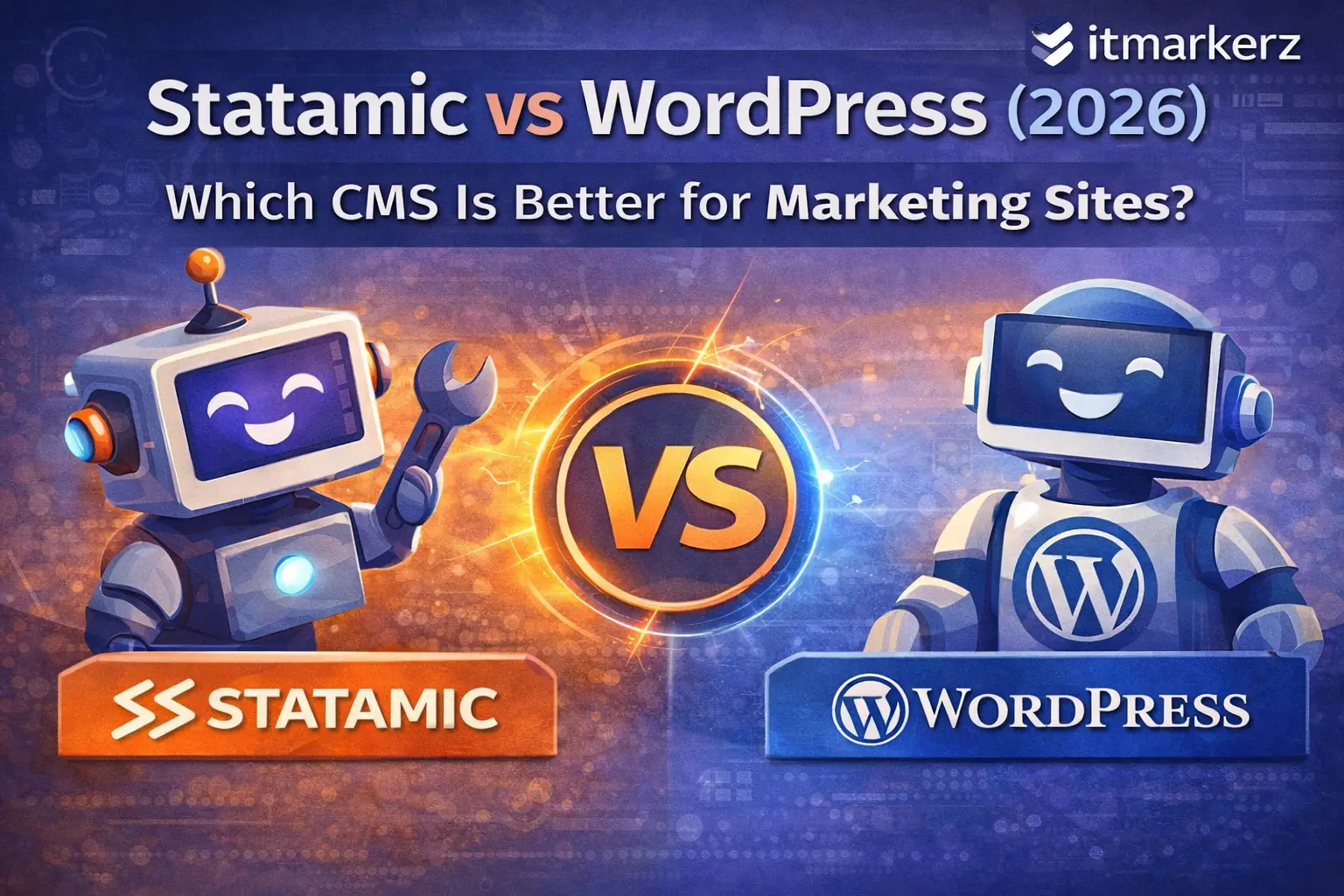
    Statamic vs WordPress (2026): Which CMS Is Better for Marketing Sites?

    Choosing the right CMS for a marketing website in 2026 is no longer just about popularity. It’s about performance, total cost of ownership, security, scalability, and how efficiently your marketing team can publish and iterate.

    For years, WordPress has been the default choice. But modern teams are increasingly evaluating Statamic, a flat-file CMS built on Laravel, as a serious alternative—especially for high-performance marketing sites, SaaS landing pages, and brand websites.

    In this guide, we’ll compare Statamic vs WordPress in 2026, with a strong focus on usage cost, technology stack, maintenance overhead, and real-world marketing needs, so you can make the right decision for your business.

    What Is WordPress?

    WordPress is the world’s most widely used CMS, powering over 40% of all websites. It’s database-driven, plugin-based, and supported by a massive ecosystem of themes, plugins, and developers.

    Businesses typically choose WordPress for:

    • Blogs and content-heavy sites
    • Marketing websites with frequent updates
    • WooCommerce stores
    • Editorial workflows with non-technical users

    If you’re planning a WordPress-based site or customization, our👉 WordPress Development Services help businesses build scalable, SEO-optimized WordPress solutions.


    What Is Statamic?

    Statamic is a modern, flat-file CMS built on Laravel. Instead of a database, it stores content in files (YAML/Markdown), making it extremely fast, secure, and developer-friendly.

    Statamic is ideal for:

    • Marketing and brand websites
    • SaaS landing pages
    • Performance-critical sites
    • Teams already using Laravel

    If you’re exploring a modern CMS approach, our 👉 Statamic Development Services help companies design fast, clean, and future-proof marketing sites.

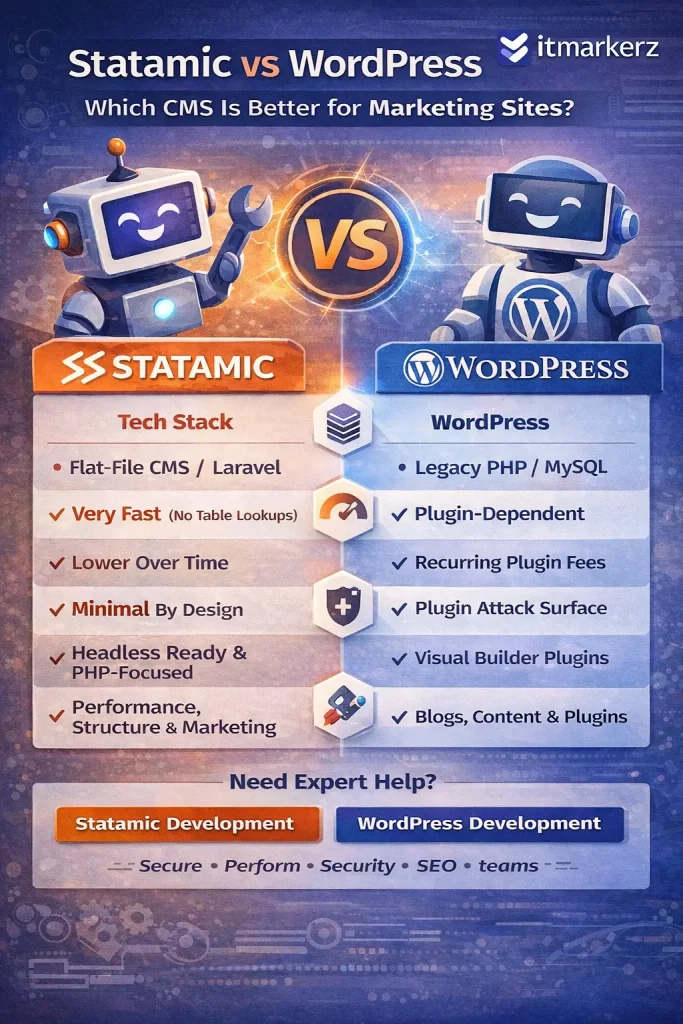
    Infographic comparing Statamic vs WordPress in 2026 for marketing websites, highlighting differences in tech stack, performance, cost, security, content flexibility, and overall focus, with itmarkerz branding.

    Technology Stack Comparison (2026)

    FeatureWordPressStatamic
    Core LanguagePHPPHP (Laravel)
    StorageMySQL DatabaseFlat Files (YAML/Markdown)
    FrameworkCustom / LegacyLaravel
    API ReadyPlugin-basedNative
    Headless SupportPossible (complex)Native
    PerformancePlugin dependentVery high by default
    Security SurfaceLargeMinimal

    Key takeaway:

    • WordPress relies heavily on plugins and database queries.
    • Statamic benefits from Laravel’s modern architecture and file-based speed

    Usage Cost & Total Cost of Ownership

    WordPress Cost Breakdown

    WordPress itself is free, but real costs add up quickly:

    • Premium themes & plugins
    • Hosting optimized for WordPress
    • Security plugins
    • Performance plugins (cache, CDN, image optimization)
    • Ongoing maintenance & updates

    For serious marketing sites, WordPress is rarely “free” in practice.

    That’s why many businesses opt for professional 👉 WordPress Maintenance Services to handle updates, backups, security, and performance tuning.

    Statamic Cost Breakdown

    Statamic uses a one-time license fee (for advanced features), but:

    • No plugin sprawl
    • No database optimization costs
    • Fewer security layers needed
    • Lower long-term maintenance effort

    Over 2–3 years, Statamic often costs less than WordPress for marketing-focused websites.


    Performance & Speed (Critical for Marketing SEO)

    WordPress

    • Performance depends on:
      • Theme quality
      • Number of plugins
      • Hosting
      • Caching setup
    • Poorly managed WordPress sites often suffer from:
      • Slow TTFB
      • Plugin conflicts
      • Bloated frontend assets

    Statamic

    • Flat-file = no database queries
    • Extremely fast page loads
    • Built for static caching and CDN usage
    • Excellent Core Web Vitals out of the box

    For SEO-driven marketing sites, Statamic has a clear performance advantage.


    Security & Maintenance Effort

    WordPress

    • Frequent plugin/theme updates
    • Common attack target due to popularity
    • Requires continuous monitoring
    • Higher risk if updates are skipped

    This is why ongoing 👉 WordPress Maintenance is almost mandatory for business-critical sites.

    Statamic

    • No database = smaller attack surface
    • No third-party plugin ecosystem chaos
    • Laravel security updates
    • Minimal maintenance overhead

    Statamic is inherently more secure by design.


    Content Editing Experience (Marketing Teams)

    WordPress

    Pros:

    • Familiar editor (Gutenberg)
    • Huge ecosystem
    • Easy for non-technical users

    Cons:

    • Editors can break layouts
    • Plugin-dependent features
    • Performance trade-offs

    Statamic

    Pros:

    • Clean, structured content
    • Flexible fields
    • Safer editorial control
    • Excellent for multi-language & structured marketing pages

    Cons:

    • Slight learning curve for teams new to Laravel-based CMSs

    SEO Capabilities (2026)

    Both CMSs can rank well in Google, but the approach differs:

    WordPress SEO

    • Strong plugin ecosystem (Yoast, RankMath)
    • Requires configuration and discipline
    • Performance impacts SEO if not optimized

    Statamic SEO

    • Clean HTML output
    • Excellent page speed
    • SEO baked into templates
    • Fewer technical SEO issues by default

    Statamic rewards teams who care about technical SEO and performance.


    When Should You Choose WordPress?

    Choose WordPress if:

    • You need a familiar CMS for editors
    • Your site relies heavily on plugins
    • You publish large volumes of content
    • You want fast onboarding of content teams
    • You plan WooCommerce or heavy integrations

    👉 Ideal with professional WordPress development & maintenance


    When Should You Choose Statamic?

    Choose Statamic if:

    • Your site is marketing-focused (SaaS, brand, landing pages)
    • Performance & security matter
    • You want lower long-term costs
    • You prefer structured content
    • You already use Laravel or modern stacks

    👉 Ideal with expert Statamic development


    Statamic vs WordPress: Final Verdict (2026)

    WordPress is still powerful—but heavy.
    Statamic is lean, modern, and built for performance-first marketing.

    Use CaseBest Choice
    Blog-heavy sitesWordPress
    Enterprise marketing siteStatamic
    SaaS landing pagesStatamic
    Content teams with pluginsWordPress
    Low-maintenance marketingStatamic

    Need Help Choosing or Building?

    If you’re unsure which CMS fits your marketing goals, our team can help you evaluate, build, and maintain the right solution:

    We focus on performance, security, SEO, and long-term cost efficiency—not just CMS popularity.

  • JetBrains State of PHP 2025: Laravel Leads PHP Frameworks — What It Means in 2026

    JetBrains State of PHP 2025: Laravel Leads PHP Frameworks — What It Means in 2026

    Quick answer: JetBrains’ State of PHP 2025 shows Laravel remains the dominant PHP framework, leading at ~64% usage with no major framework shake-ups.
    In this guide, you’ll get the top 5 takeaways and what they mean for 2026 planning:

    • which PHP/tooling direction teams are moving toward
    • what to prioritize (testing, performance, DX)
    • how to turn survey signals into your next sprint decisions
      If you’re running Laravel in production, this is the fastest way to align roadmap + hiring + upgrades with real ecosystem data.

    JetBrains’ State of PHP 2025 paints a very specific picture of where PHP (and Laravel) is heading as we enter 2026: PHP is not “dying” — it’s professionalizing. The ecosystem is modernizing, tooling is maturing fast, and AI is becoming a default part of day-to-day development workflows.

    For Laravel teams, that translates into a clear set of strategic priorities for 2026:

    • standardize on modern PHP versions (and align framework upgrades with support windows),
    • invest in automated code quality + testing,
    • decide how you’ll operationalize AI safely,
    • and keep an eye on runtime/deployment innovation (FrankenPHP is moving from “interesting” to “real”).

    Below is a practical, Laravel-team-focused breakdown of the report’s most important findings — and what you should do about them in 2026.

    If your Laravel stack is heading into 2026 with an upgrade backlog or performance concerns, our team can help you modernize safely—framework upgrades, CI hardening, and production-grade architecture via our Laravel development services. For ongoing stability (security patches, uptime, speed), pair it with a monthly maintenance & monitoring plan.

    1) The survey signals stability (and it’s mostly experienced teams)

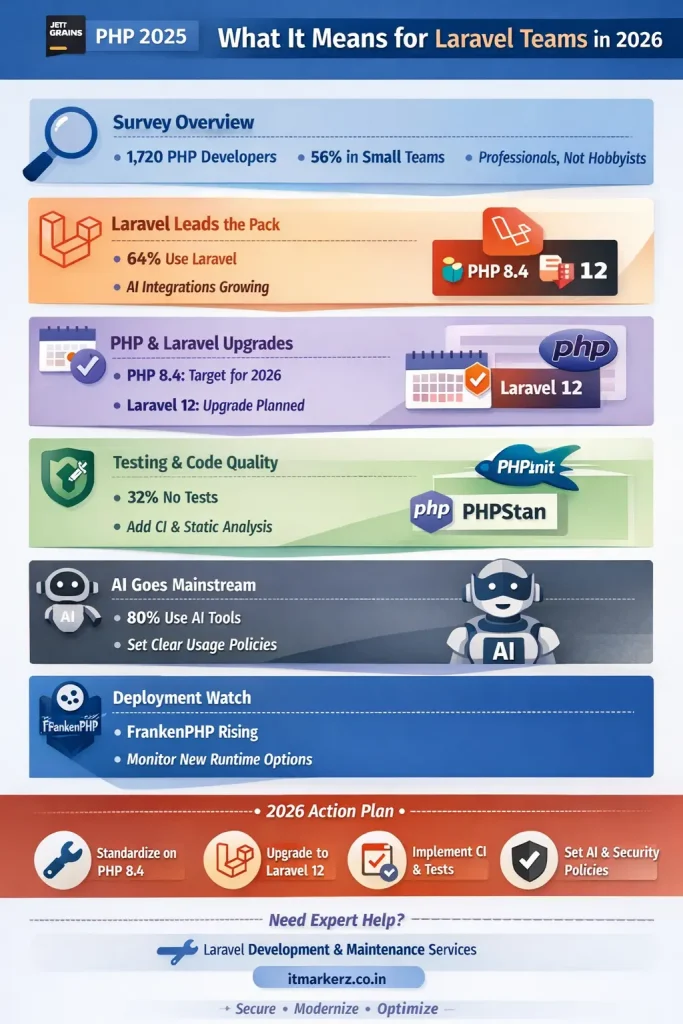
    JetBrains’ PHP findings come from their Developer Ecosystem Survey 2025, with 1,720 respondents who identified PHP as their main language.

    The broader JetBrains survey ran April–June 2025 and included 24,534 developers after data cleaning, with weighting applied (and an explicit note that JetBrains users may be more likely to respond).

    Why Laravel teams should care: this isn’t just “hobby PHP” — the data is skewed toward professional teams and real workflows. The report also notes 56% of PHP developers work in small teams (2–7 people), which matches how many Laravel shops operate.

    What this means in 2026: you don’t need heavyweight “enterprise process” to improve outcomes — you need lightweight automation (tests, static analysis, CI) that fits small teams.

    2) Laravel remains the dominant PHP framework — and its ecosystem is accelerating

    There were “no major shifts” in framework adoption: Laravel leads with 64% usage among PHP developers in the survey.
    JetBrains also includes a Laravel ecosystem note from Taylor Otwell pointing to Laravel Cloud and AI-related integrations like Laravel Boost and “MCP”.

    What this means in 2026: Laravel’s center of gravity is moving toward:

    • more “platform” thinking (deployment/ops via Laravel Cloud),
    • more first-party or standardized tooling integrations,
    • more AI-assisted developer experience.

    If you’re running Laravel in 2026 and still treating it like “just a PHP framework”, you’ll miss the speed gains that the ecosystem is trying to hand you.
    3) PHP version reality: modernization is winning — but 2026 is a support-window trap

    JetBrains reports PHP 8.x dominates with 89% usage, while PHP 7.x is still present (and legacy versions aren’t totally gone).

    Now pair that with PHP’s official support timeline:

    • PHP 8.3 active support ended Dec 31, 2025 (security fixes continue after that).
    • PHP 8.4 remains in active support through Dec 31, 2026.

    So as of January 2026, if your production baseline is PHP 8.3, you’re already in “security-fixes-only” territory. That’s not a crisis — but it is a strategic signal: 8.4 becomes the sensible default for 2026 for teams that want active support.

    Laravel version alignment (this is the key planning lever)

    Laravel’s own support policy table (official docs) makes planning much easier:

    • Laravel 11: supports PHP 8.2–8.4; security fixes until March 12, 2026.
    • Laravel 12: supports PHP 8.2–8.5; security fixes until Feb 24, 2027.
    • Laravel 13: planned Q1 2026, supports PHP 8.3–8.5 (per the same table).

    What this means in 2026 (practical guidance):

    • If you’re on Laravel 10 or older, you’re already behind on framework security windows — prioritize upgrading.
    • If you’re on Laravel 11, plan to move to Laravel 12 in 2026 to extend runway (and target PHP 8.4+ where possible).

    treat PHP + Laravel upgrades as a planned release cycle—not an emergency. If you want a staged, low-risk upgrade plan (audit → compatibility fixes → test coverage → CI rollout → deployment hardening), we offer this as part of our Laravel development services, and we can keep your app secure and fast long-term with our laravel maintenance & monitoring.


    4) Testing: PHP is improving — but a big chunk still ships without tests

    JetBrains reports:

    • PHPUnit remains the standard at 50%,
    • Pest reached 17% (gaining momentum),
    • and 32% of developers don’t write tests at all.

    For Laravel teams, this is a big deal because the “Laravel advantage” is largely speed of change. If your team moves fast but has low test coverage, you’ll eventually pay for it with regressions, slow releases, and high support load.

    What to do in 2026 (high ROI, low drama):

    • Pick a baseline: PHPUnit-only is fine; Pest is also fine — the point is consistency.
    • Make it measurable: a simple rule like “new features require tests” + CI gating beats a perfect testing strategy that never happens.

    5) Code quality is moving toward static analysis — but many teams still do nothing

    JetBrains highlights a clear leader: PHPStan at 36% usage (up significantly), with tools like PHP CS Fixer (30%) and PHP_CodeSniffer (22%) also widely used — while 42% don’t use any code quality tools regularly.

    For Laravel teams in 2026, static analysis is not “nice to have” anymore. It’s the cheapest way to reduce bugs when:

    • team size is small,
    • change velocity is high,
    • and AI-generated code is increasingly common.

    What to do in 2026:

    • Make PHPStan (or equivalent) part of CI.
    • Add style checks that are automated (don’t rely on humans to remember rules).
    Infographic summarizing JetBrains State of PHP 2025 and what it means for Laravel teams in 2026: survey overview, Laravel usage, PHP 8.4 and Laravel 12 upgrade focus, testing and code quality, AI adoption, FrankenPHP watch, and a 2026 action plan.

    6) AI is now default — your team needs policy, not debate

    This is the loudest shift in the report:

    • 95% of developers have tried at least one AI tool.
    • 80% regularly use AI assistants/editors.
    • Daily usage leaders: ChatGPT (49%), GitHub Copilot (29%), JetBrains AI Assistant (20%) (and JetBrains AI tripled adoption vs last year).

    The bigger “2026 signal” is what’s next:

    • 72% are likely to try AI coding agents in the next year.
    • JetBrains points to their agent Junie as part of that shift.
    • Top blockers are not technical — they’re governance: privacy/security (44%), IP concerns (24%), and lack of knowledge (22%).

    What Laravel teams should do in 2026

    If you do nothing, AI use will still happen — just inconsistently and unsafely. A simple policy beats chaos. Examples of what to standardize:

    • What’s allowed: refactors, boilerplate tests, scaffolding, docs, query optimization suggestions.
    • What’s restricted: pasting secrets, customer data, proprietary code in public tools.
    • How to review: require human review for AI-generated code (especially auth, payments, permissions, billing).

    7) Deployment & runtime innovation: FrankenPHP is getting real attention

    JetBrains calls out FrankenPHP as a 2025 ecosystem highlight and notes it became a project backed by the PHP Foundation, plus it has “worker mode” and performance-oriented features.

    This matters for Laravel teams because deployment options shape cost/performance — and Laravel itself now documents FrankenPHP as a server configuration option in its deployment docs.

    What to do in 2026:

    • You don’t have to migrate production to FrankenPHP immediately.
    • But you should track it, test it in a non-critical service, and evaluate if it changes your scaling/cost profile.

    A practical “2026 action plan” for Laravel teams

    2025 finding2026 risk for Laravel teamsAction to take
    PHP 8.x dominates, but support windows move fast Running on “security-only” branches without realizing itStandardize on PHP 8.4 for 2026 where possible; align Laravel version accordingly
    Laravel leads framework adoption Teams fall behind on ecosystem leverage (platform + tooling)Treat Laravel upgrades as a strategic cadence, not a painful event
    32% don’t write tests Shipping speed collapses as codebase growsAdd CI test gating + minimum coverage expectations
    PHPStan rising, but many teams still skip code quality More bugs + slower reviews, especially with AI codeAdd static analysis + formatting checks to CI
    AI is mainstream; agents nextIP/security exposure + inconsistent qualityWrite a short AI usage policy + enforce review rules

    The bottom line for 2026

    JetBrains’ State of PHP 2025 is essentially telling Laravel teams: the winners in 2026 won’t be the teams who argue about whether PHP is modern — they’ll be the teams who operationalize modernization.

    That means:

    • stay inside support windows (PHP + Laravel),
    • automate quality (tests + static analysis),
    • and put guardrails around AI so it speeds you up instead of creating risk.

    If you’re planning a Laravel upgrade in 2026—or want to standardize testing, PHPStan, CI, and secure AI usage—we can do the heavy lifting end-to-end. Explore our Laravel development services for upgrades and new builds, and our laravel maintenance & monitoring plan for ongoing security, performance, and uptime.

  • Laravel Best Practices for SaaS Projects

    Laravel Best Practices for SaaS Projects

    A Practical, Scalable, and Secure Guide for Modern SaaS Teams

    Building a SaaS product is not just about writing code — it’s about scalability, security, performance, and long-term maintainability. Laravel has become one of the most reliable frameworks for SaaS development, but real success depends on how you use it.

    This guide covers Laravel best practices specifically for SaaS projects, based on real-world production systems running at scale.

    Why Laravel Is a Strong Choice for SaaS

    Laravel is particularly well-suited for SaaS platforms because it offers:

    • Opinionated yet flexible architecture
    • Built-in authentication, queues, jobs, and events
    • A rich ecosystem for billing, notifications, caching, and APIs
    • High developer productivity and long-term maintainability

    For SaaS businesses, time-to-market and stability matter more than theoretical benchmarks — and Laravel delivers both.

    👉 If you’re planning a SaaS build, explore our
    Laravel Development Services

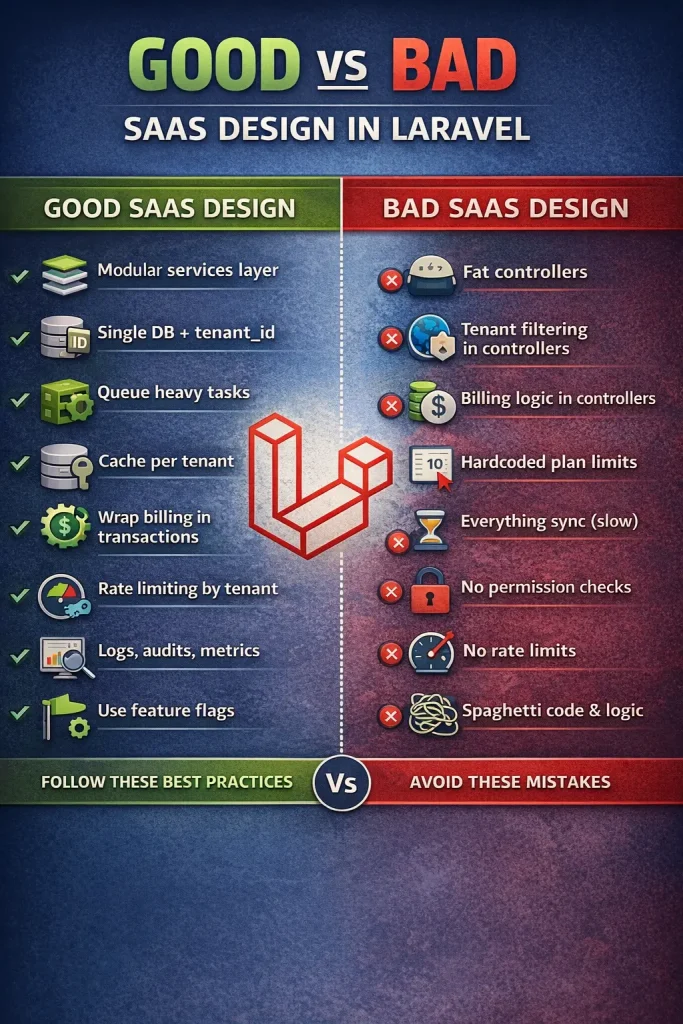
    Good vs bad SaaS design in Laravel showing best practices versus common architectural mistakes

    1. Choose the Right SaaS Architecture Early

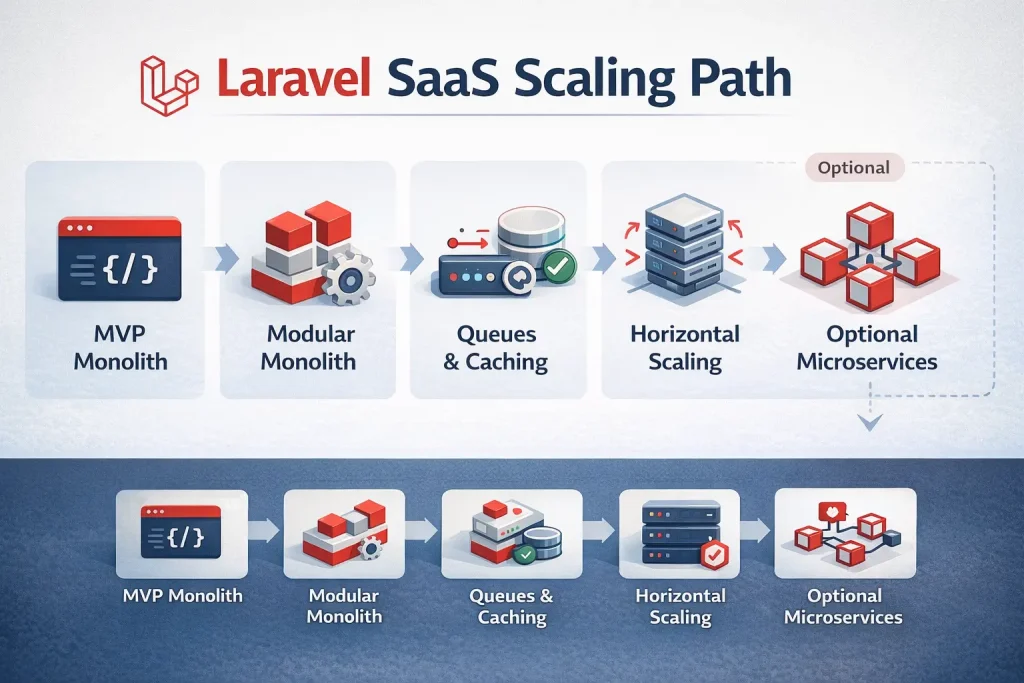
    Monolith First, Modular Always

    For most SaaS startups, the best approach is:

    Modular Monolith → Selective Microservices

    Best practices:

    • Start with a modular monolith
    • Split the system by business domains, not technical layers

    Example domain-based structure:

    app/
     ├── Domains/
     │    ├── Billing/
     │    ├── Users/
     │    ├── Subscriptions/
     │    ├── Notifications/
     │    ├── Reporting/
    

    Avoid early microservices unless you truly need:

    • Independent scaling
    • Heavy async workloads
    • Multiple teams working in parallel

    2. Multi-Tenancy: The Core of SaaS

    Multi-tenancy is the foundation of any SaaS platform.

    Common Multi-Tenant Models in Laravel

    • Single database + tenant_id – Best for early and mid-stage SaaS
    • Schema per tenant – Useful for regulated environments
    • Database per tenant – Enterprise-grade isolation

    Recommended Best Practice

    • Use single database + tenant_id
    • Enforce isolation at:
      • Middleware
      • Global scopes
      • Repository or service layer

    Never rely only on controllers to filter tenant data.

    3. Authentication & Authorization Best Practices

    Use Token-Based Authentication

    For SaaS APIs, use:

    • Laravel Sanctum (SPA + mobile)
    • OAuth2 (for public APIs)

    Implement Role-Based Access Control (RBAC)

    Typical SaaS roles:

    • Owner
    • Admin
    • Manager
    • User

    Best practices:

    • Store permissions in the database
    • Cache permission checks
    • Avoid hardcoding role logic

    4. Service Layer Over Fat Controllers

    One of the biggest Laravel SaaS mistakes is putting business logic in controllers.

    Correct Pattern

    Controller → Service → Repository → Model
    

    Benefits:

    • Testable business logic
    • Cleaner controllers
    • Easier refactoring
    • Safer long-term scaling

    5. Billing & Subscription Management

    Golden Rules for SaaS Billing

    • Billing logic should never live in controllers
    • Always log billing actions
    • Never trust frontend prices
    • Support proration and retries

    A proper SaaS billing system should include:

    • Plans and add-ons
    • Usage-based pricing
    • Invoices and taxes
    • Webhooks and retries
    • Grace periods

    Always wrap billing actions in database transactions and process webhooks via queues.


    6. Queues, Jobs & Asynchronous Processing

    No serious SaaS application runs everything synchronously.

    What Must Be Queued

    • Emails
    • Notifications
    • Webhooks
    • PDF generation
    • Reports
    • Third-party API calls
    • Heavy calculations

    Rule of thumb:

    If it can fail or take more than 200ms — queue it.

    Best practices:

    • Use separate queues (billing, notifications, imports)
    • Configure retries and backoff
    • Monitor failures

    7. Database & Data Integrity Best Practices

    Use Transactions Aggressively

    Critical business operations should always be wrapped in database transactions.

    Avoid Common Eloquent Pitfalls

    Avoid:

    • N+1 queries
    • Business logic in model events
    • Missing indexes

    Always index:

    • tenant_id
    • foreign keys
    • date columns used in filters

    Use UUIDs for Public SaaS Entities

    Benefits:

    • Safer API exposure
    • Better security
    • Easier horizontal scaling later

    8. Caching Strategy for SaaS Performance

    Caching is mandatory for SaaS scalability.

    What to Cache

    • Permissions
    • Feature flags
    • Tenant settings
    • Expensive reports
    • Aggregated metrics

    Best practices:

    • Cache per tenant
    • Use TTL wisely
    • Invalidate cache on writes, not reads

    9. Feature Flags & Plan Enforcement

    Never hardcode SaaS limits.

    Best practices:

    • Store plans in database
    • Enforce limits centrally
    • Cache feature flags

    This allows:

    • Upselling
    • A/B testing
    • Custom enterprise plans

    10. Observability: Logs, Metrics & Audits

    Logging Best Practices

    • Use structured logs
    • Include tenant_id and user_id
    • Separate business logs from system logs

    Audit Trails Are Mandatory

    Track:

    • Billing changes
    • Role updates
    • Settings changes
    • Security events

    Audit logs protect both you and your customers.


    11. Security Best Practices for Laravel SaaS

    Must-Have Security Measures

    • Rate limiting per tenant
    • MFA for admin users
    • Webhook signature validation
    • Encrypted sensitive fields
    • Strict CORS policies

    Never:

    • Store secrets in repositories
    • Skip webhook verification
    • Trust client-side limits

    12. CI/CD & Deployment Best Practices

    Recommended deployment flow:

    1. Automated tests
    2. Static analysis
    3. Database migrations
    4. Cache warm-up
    5. Zero-downtime deployment
    6. Queue restart

    Laravel SaaS checklist:

    • config caching
    • route caching
    • queue monitoring
    • rollback strategy

    13. Scaling Laravel SaaS the Right Way

    Scale in this order:

    1. Query optimization
    2. Caching
    3. Background jobs
    4. Horizontal scaling
    5. Read replicas
    6. Service extraction

    Do not start with microservices — start with clean boundaries.


    14. Common Laravel SaaS Mistakes to Avoid

    • No tenant isolation enforcement
    • Billing logic in controllers
    • No background jobs
    • Hardcoded plan limits
    • No audit logs
    • No rate limiting

    Each of these becomes very expensive to fix later.


    Final Thoughts

    Laravel is not “just a PHP framework.”
    Used correctly, it is a complete SaaS application platform.

    If you follow these best practices, your Laravel SaaS will be:

    • Easier to scale
    • Safer to operate
    • Faster to evolve
    • Cheaper to maintain

    Need Help Building or Scaling a Laravel SaaS?

    If you’re looking for:

    • SaaS architecture planning
    • Multi-tenant Laravel setup
    • Subscription and billing systems
    • Performance and security optimization

    👉 Explore our Laravel SaaS expertise:

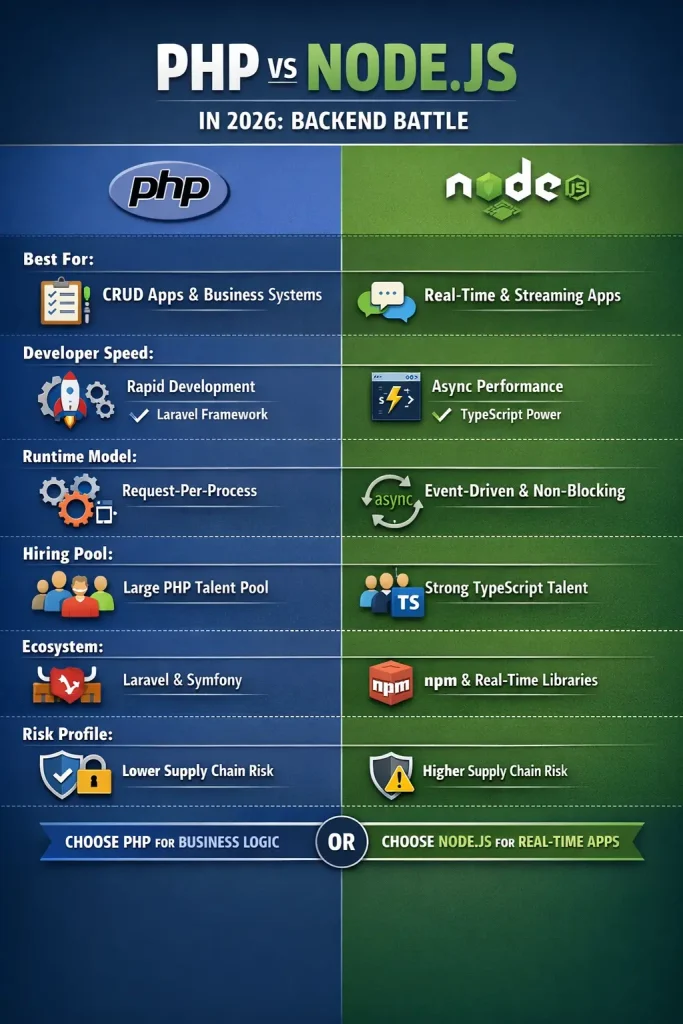
  • PHP vs Node.js in 2026: Which Backend Is Better for SaaS, APIs, and Real-Time Apps?

    In 2026, “PHP vs Node.js” is no longer a debate about which language is “faster” or “more modern.” It’s a strategic decision about delivery speed, operational simplicity, team productivity, and how your backend will evolve as your product grows. Both ecosystems are mature, battle-tested, and capable of powering high-traffic systems—yet they shine in different scenarios.

    This guide will help you choose the right backend stack for your next build (or your next phase). You’ll get a clear comparison, a decision matrix, architecture patterns that work in real life, and a practical 30–60–90 day execution plan.


    Quick Verdict (When You Need an Answer Today)

    • Choose PHP if you want ultra-fast delivery for CRUD-heavy apps, content platforms, admin panels, and business workflows—especially with Laravel’s ecosystem and conventions.
    • Choose Node.js if your product is real-time by nature (chat, live dashboards, collaboration), heavily event-driven, or benefits from a unified JavaScript/TypeScript stack across frontend + backend.
    • Choose both if you’re building a platform: PHP/Laravel for the core business system + Node.js for real-time gateways, streaming, and event processors.

    Need implementation help? Explore our backend services:


    PHP vs Node.js in 2026: The Comparison Table (Decision-Friendly)

    Category PHP (Modern PHP + Laravel) Node.js (Modern Node + TypeScript)
    Best fit CRUD apps, admin panels, SaaS backoffices, content-driven platforms, multi-tenant business systems Real-time apps, event-driven systems, streaming APIs, BFF layers, high-concurrency I/O workloads
    Developer speed Very high with conventions (Laravel scaffolding, ORM, queues, auth) High with frameworks (NestJS/Fastify) but depends on architecture discipline
    Runtime model Traditionally request-per-process (PHP-FPM). Modern options exist (workers/app servers) Event loop, async I/O, excellent for concurrent network workloads
    Hiring Deep global pool (especially for web + CMS + Laravel) Strong pool, especially TypeScript engineers; competition can be higher
    Operational simplicity Very straightforward on shared hosting/VPS; mature deployment patterns Simple in containers; requires process management & monitoring discipline
    Ecosystem strengths Laravel, Symfony, WordPress ecosystem, strong server-side patterns, stable tooling npm ecosystem, TypeScript tooling, real-time libs, modern dev workflows
    Risk profile Lower supply-chain risk exposure by default (Composer is generally more conservative) Higher supply-chain exposure (npm is huge); strong practices mitigate this

    The Real Question: “What Kind of Backend Are You Building?”

    Choosing a backend stack becomes simple when you classify your product into one of these patterns:

    1) Business Systems (CRUD + Workflows + Roles)

    If your core product is a business process—customers, invoices, inventory, scheduling, approvals—then delivery speed and maintainability matter more than theoretical throughput.

    • PHP/Laravel wins because you get authentication, roles, queues, validation, migrations, admin tooling, and a clean MVC workflow that teams understand quickly.
    • Node.js works too, but the “speed advantage” depends on your team’s ability to standardize patterns (DTOs, modules, guards, validation, error contracts).

    2) Real-Time Products (Chat, Live Tracking, Collaboration)

    Real-time features are not “just one more endpoint.” They change the architecture: websockets, pub/sub, message fan-out, presence, and stream state.

    • Node.js shines due to async I/O and the ecosystem around real-time communication.
    • PHP can do real-time too (especially with modern app servers and pub/sub), but Node is often the most direct path to production.

    3) Platform Backends (Multiple Services, Events, Integrations)

    If you’re building a platform (billing, notifications, data pipelines, integrations, APIs), the best answer in 2026 is often hybrid:

    • Laravel/PHP for the core business domain + admin UX + core APIs
    • Node.js for real-time gateway, event consumers, streaming endpoints, and lightweight edge/BFF services

    Framework Reality Check: Laravel vs NestJS (And Why This Matters More Than Language)

    Most teams don’t adopt a language—they adopt a framework + conventions. Here’s the practical view:

    Laravel (PHP) is a “productivity engine”

    • Faster for standard SaaS patterns: auth, roles, CRUD, billing logic, background jobs, email, events.
    • Opinionated defaults reduce decision fatigue.
    • Great fit when you need a stable long-term codebase with predictable architecture.

    NestJS (Node.js) is a “structure engine”

    • NestJS brings enterprise structure to Node: modules, dependency injection, guards, pipes, interceptors.
    • When paired with TypeScript and strict linting, you can build highly maintainable systems.
    • Best for teams already strong in modern JS/TS and building event-driven services.

    Actionable tip: If your Node backend currently looks like “Express + random folders,” your future pain is not Node—it’s missing architecture. If your PHP codebase is “controllers doing everything,” your pain is not PHP—it’s lack of service-layer discipline.


    Performance in 2026: What Actually Matters in Production

    In production, performance is not a single number. It’s the combination of:

    • Latency (how fast the API responds)
    • Throughput (requests per second)
    • Concurrency (how many connections you can handle)
    • Cost efficiency (how much traffic per server/container)
    • Predictability under load (no surprise timeouts)

    Node.js: Great for concurrent I/O

    Node’s event loop model performs extremely well when your workload is dominated by network I/O: database calls, APIs, websockets, message brokers, and streaming responses.

    PHP: Great for request/response business workloads

    PHP’s traditional model (PHP-FPM) is still excellent for typical web APIs and server-rendered apps. Plus, modern PHP has evolved with better language features and modern deployment choices.

    Modern PHP App Servers: The 2026 upgrade path

    One of the biggest shifts in the PHP ecosystem is the growing adoption of modern application servers and worker-style execution (where your app stays warm in memory). This can significantly reduce bootstrapping overhead for high-traffic APIs.

    Bottom line: If your app is “standard business SaaS,” either stack will be fast enough. If your app is “10k concurrent websocket connections,” Node is often simpler. If your app is “API + heavy business rules + lots of admin workflows,” PHP/Laravel will feel like a shortcut.


    Security & Supply Chain: A Practical Checklist (Both Stacks)

    In 2026, most backend breaches aren’t from the language—they’re from:

    • weak auth/session handling
    • misconfigured cloud storage
    • dependency vulnerabilities
    • secrets leaked in CI/CD
    • missing rate limits

    Use this baseline security checklist

    • Dependency hygiene: lock files committed, automated audits, controlled upgrades
    • Secrets: vault or secret manager, no secrets in repos, rotation policy
    • Auth: MFA for admins, refresh token strategy, session invalidation, device tracking
    • Rate limiting: per IP + per account + per endpoint category
    • Logging: structured logs + alerting on suspicious patterns
    • Backups: tested restores, not just “enabled backups”

    Recommended reading (non-competitor references):


    Hiring & Team Fit: The “Lowest Friction” Rule

    Here’s the most reliable hiring strategy for 2026:

    Pick the stack that your team can execute cleanly for the next 24 months.

    Choose PHP/Laravel if:

    • your team already ships business systems in Laravel
    • you want predictable conventions and fast onboarding
    • your roadmap is heavy on workflows, admin panels, and data integrity

    Choose Node.js/TypeScript if:

    • your team is strong in TypeScript and modern JS tooling
    • your roadmap includes real-time, streaming, or event-driven architecture
    • you want one language across frontend and backend (especially for BFF layers)

    Actionable hiring tip: The best backend teams aren’t defined by language; they’re defined by consistency: code standards, reviews, testing culture, and operational discipline.


    Decision Matrix: Score PHP vs Node.js for Your Project

    Give each category a score from 1 (low) to 5 (high) based on your project needs. Then see which side dominates.

    Criteria If this is HIGH, lean toward… Why
    Admin panels + CRUD PHP/Laravel Faster scaffolding, conventions, stable patterns
    Real-time features Node.js Direct ecosystem fit for websockets + event-driven services
    Complex business rules PHP/Laravel Clean domain/service layering, strong tooling for long-lived apps
    Streaming APIs / long-lived connections Node.js Async I/O and concurrency model excel here
    Team is TypeScript-first Node.js Unified language and tooling reduces friction
    Time-to-market for SaaS MVP PHP/Laravel Rapid feature delivery with fewer architectural decisions

    Rule of thumb: If your top 3 needs are CRUD/workflows/admin/billing → pick Laravel. If your top 3 needs are real-time/streaming/events/BFF → pick Node.js.


    Modern Architecture Patterns That Win in 2026

    Pattern A: Laravel Core + Node Real-Time Gateway (Best of Both)

    • Laravel: auth, users, billing, admin, core business logic
    • Node.js: websockets, live events, presence, stream fan-out
    • Redis/Kafka/RabbitMQ: event backbone

    Why it works: You keep the business system stable while scaling real-time features independently.

    Pattern B: Node BFF + PHP Services (Great for frontend-heavy teams)

    • Node BFF aggregates data for web/mobile
    • PHP services handle billing/workflows/legacy modules
    • Shared contracts via OpenAPI/Swagger

    Pattern C: One Stack, Two Runtimes

    • PHP only: Laravel + queues + modern server runtime where needed
    • Node only: NestJS + background workers + message-driven modules

    Why it works: Lower cognitive load. Best when your product doesn’t demand a hybrid approach yet.


    30–60–90 Day Execution Plan (Actionable)

    First 30 Days: Prove the core

    • Define your API contract (OpenAPI) and error format
    • Implement auth + roles + rate limiting
    • Build the 3–5 highest-value workflows end-to-end
    • Add basic observability: logs + traces + metrics

    Day 31–60: Make it stable

    • Add background jobs + retries + DLQs (dead letter queues)
    • Implement caching strategy (what to cache, TTL, invalidation)
    • Load test the top endpoints and fix slow queries
    • Harden security: secrets, headers, WAF rules, audit logs

    Day 61–90: Make it scalable

    • Split real-time/streaming workloads into separate services if needed
    • Introduce event-driven patterns for heavy processes
    • Set SLOs (latency, error rate) and alerting thresholds
    • Document runbooks: deployment, rollback, incident response

    Internal Linking Ideas (For Your WordPress Blog)

    These are safe internal articles to create/link (no competitor links):


    FAQs

    Is PHP still a good choice in 2026?

    Yes. Modern PHP is productive, stable, and widely used for business systems and content-driven platforms. With the Laravel ecosystem, it remains one of the fastest ways to ship and maintain SaaS backends.

    Is Node.js better for scaling?

    Node.js scales very well for concurrent I/O and real-time workloads. But scaling success depends more on architecture, caching, DB design, and observability than language alone.

    Should I rewrite my PHP app in Node.js?

    Usually no. Instead, extract the parts that truly need Node.js (real-time, streaming, event processing) and keep the stable business core in PHP.

    Which is better for an MVP?

    For most SaaS MVPs with workflows and admin features, Laravel is often the quickest path. For real-time-first MVPs, Node.js can be faster.

    What’s the best approach if I’m unsure?

    Start with the stack your team is strongest in, and design your system so you can add a second service later (event bus + clean API boundaries).

    Can you help me choose and implement the right architecture?

    Yes—if you want a guided build with production-ready patterns, explore our Laravel development, Node.js development, and PHP development services.


    Final Takeaway

    PHP Vs Node JS in 2026

    In 2026, the winning move isn’t “PHP or Node.js forever.” The winning move is choosing the stack that matches your product’s workload and your team’s strengths—then building with clean boundaries so your system can evolve.

    If your product is workflow-heavy: PHP/Laravel is a strategic advantage.
    If your product is real-time and event-driven: Node.js is a strategic advantage.
    If you’re building a platform: a hybrid architecture is often the most effective path.

  • Laravel Upgrade Services in 2026: Costs, Timeline, Risks

    Laravel Upgrade Services in 2026: Costs, Timeline, Risks

    Laravel Upgrade Services in 2026: Costs, Timeline, Risks, and a Safe Upgrade Plan

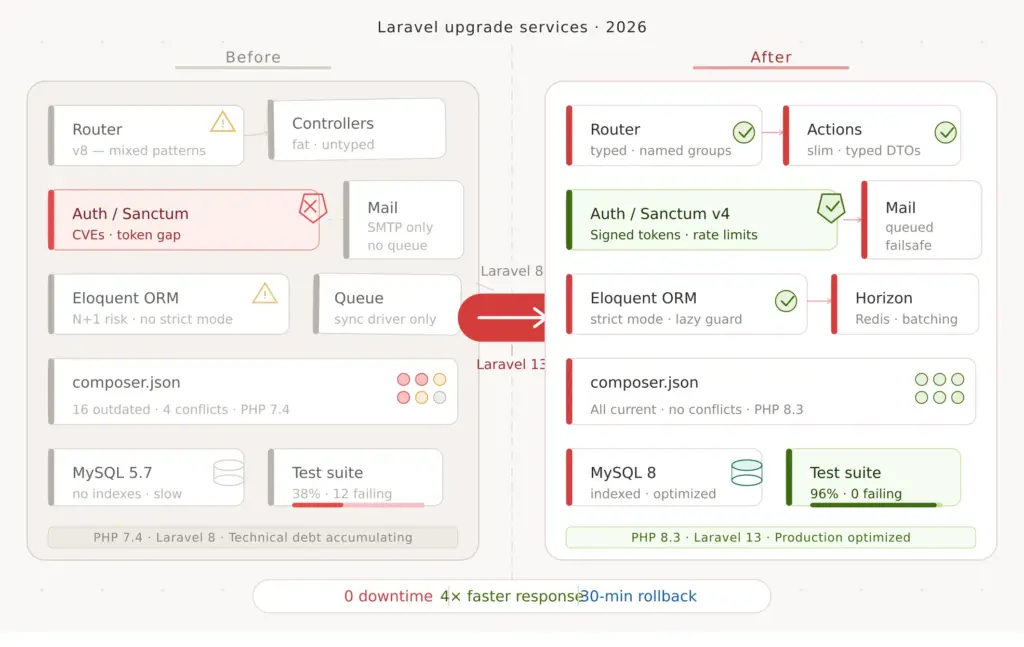
    Laravel upgrade services in 2026 are no longer just a “nice to have” for teams on older versions. If your application is still on Laravel 10 or earlier, you are already outside Laravel’s security support window, and if you stayed on Laravel 11 too long, that window has also now closed. For most teams, Laravel upgrade services are best when the application is business-critical, has payment flows, complex integrations, background jobs, admin workflows, or revenue risk attached to downtime. They are less necessary for tiny internal tools with low complexity and low operational risk. And with Laravel 13 now live, the conversation has shifted from “should we upgrade later?” to “what is the safest upgrade path now?”

    Last updated: April 2026


    The short answer

    If your Laravel application powers real business workflows, customer-facing systems, APIs, billing, ecommerce, scheduling, reporting, or internal operations, delaying the upgrade usually increases cost and risk. Laravel upgrade services are valuable because the real work is not changing a version number in composer.json. The real work is reducing operational risk: dependency planning, breaking-change review, testing, database safety, deployment strategy, rollback planning, and post-release monitoring.

    If you already know your application needs a structured version migration, start with our Laravel upgrade service. If your upgrade is part of a broader rebuild, modernization, or platform strategy, our Laravel development services page is the better place to frame the wider project.

    Why Laravel upgrade services matter more in 2026

    A lot of teams postpone framework upgrades because the app still “works.” But in production systems, “still working” is not the same as “still secure, supported, performant, and easy to maintain.” That gap is where upgrade costs quietly grow.

    Once a framework version leaves security support, every decision becomes a little more expensive. Dependencies drift. Package compatibility becomes harder. New engineers spend more time navigating historical decisions. Emergency fixes become riskier. Even small feature work can slow down because the team is coding around framework age rather than building forward confidently.

    That is why Laravel upgrade services are rarely just technical cleanup. In most serious products, they are part risk management, part modernization, and part business continuity planning.

    Laravel support deadlines: what changed in 2026

    Laravel follows an annual major release cadence, with 18 months of bug fixes and 2 years of security fixes per major version. In practical terms, that means old versions age out quickly if you do not actively plan upgrades. Laravel 10 security support ended in February 2025, Laravel 11 security support ended in March 2026, Laravel 12 remains supported into 2027, and Laravel 13 is now the current major release. For teams planning modernization today, the target is no longer “eventually get to Laravel 12.” The safer question is whether you should go directly to Laravel 13, or stabilize on 12 first and then move with a shorter second step.

    If you want the official source for release cadence and support windows, Laravel’s 13.x release notes are the reference you should use internally with stakeholders.

    Who Laravel upgrade services are best for

    • Teams on Laravel 10 or earlier that are already outside framework security support
    • Teams on Laravel 11 that delayed their upgrade planning and now need a current target path
    • Businesses with customer-facing products where downtime, billing disruption, or broken APIs directly affect revenue
    • SaaS products with queues, cron jobs, webhooks, subscriptions, dashboards, and multi-step workflows
    • Admin-heavy internal systems such as ERP, CRM, operations, telecom, healthcare, inventory, or compliance platforms
    • Companies with fragile dependencies where package conflicts or old custom code make direct upgrades risky

    Laravel upgrade services are especially useful when the application is too important to “try in production and see what happens.”

    When you may not need full Laravel upgrade services

    Not every Laravel app needs a large external upgrade project. If your application is small, has healthy dependencies, limited integrations, low uptime pressure, and a team with strong Laravel experience plus decent test coverage, an internal upgrade may be enough.

    But that is usually the exception, not the rule, for business-critical products. The more your application touches payments, reporting, customer accounts, background jobs, third-party APIs, or sensitive data, the more valuable a structured upgrade process becomes.

    Why upgrading late usually costs more

    The biggest misconception around framework upgrades is that waiting saves money. In reality, waiting often compresses multiple upgrade problems into one project:

    • more version jumps
    • older packages and abandoned dependencies
    • larger behavior gaps between framework versions
    • more undocumented custom code
    • more brittle deployment assumptions
    • higher regression risk during rollout

    That is also why teams who read our Laravel relevance guide and still decide Laravel is right for their product often arrive at the same next question: how do we upgrade without turning the app into a fire drill?

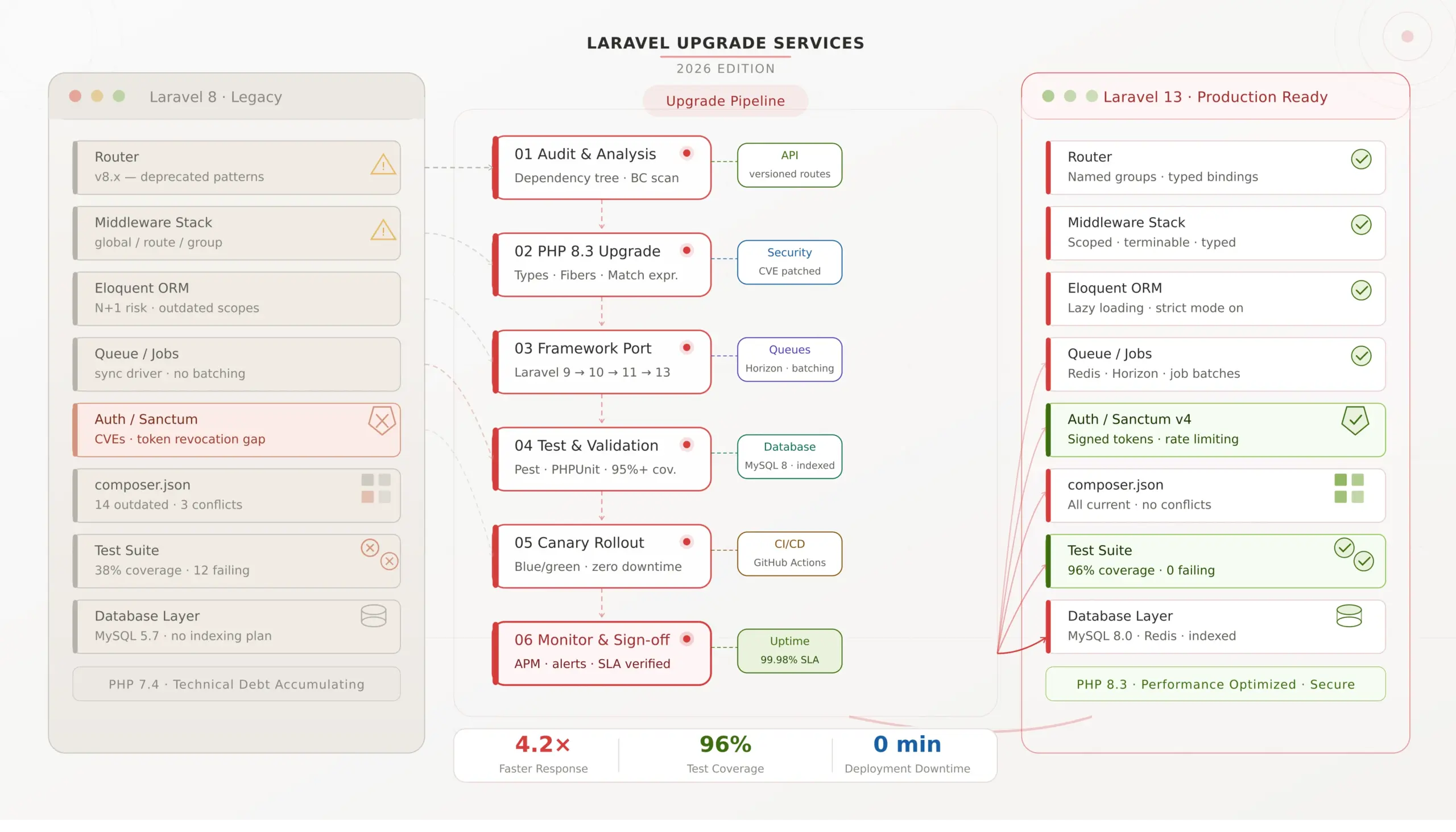
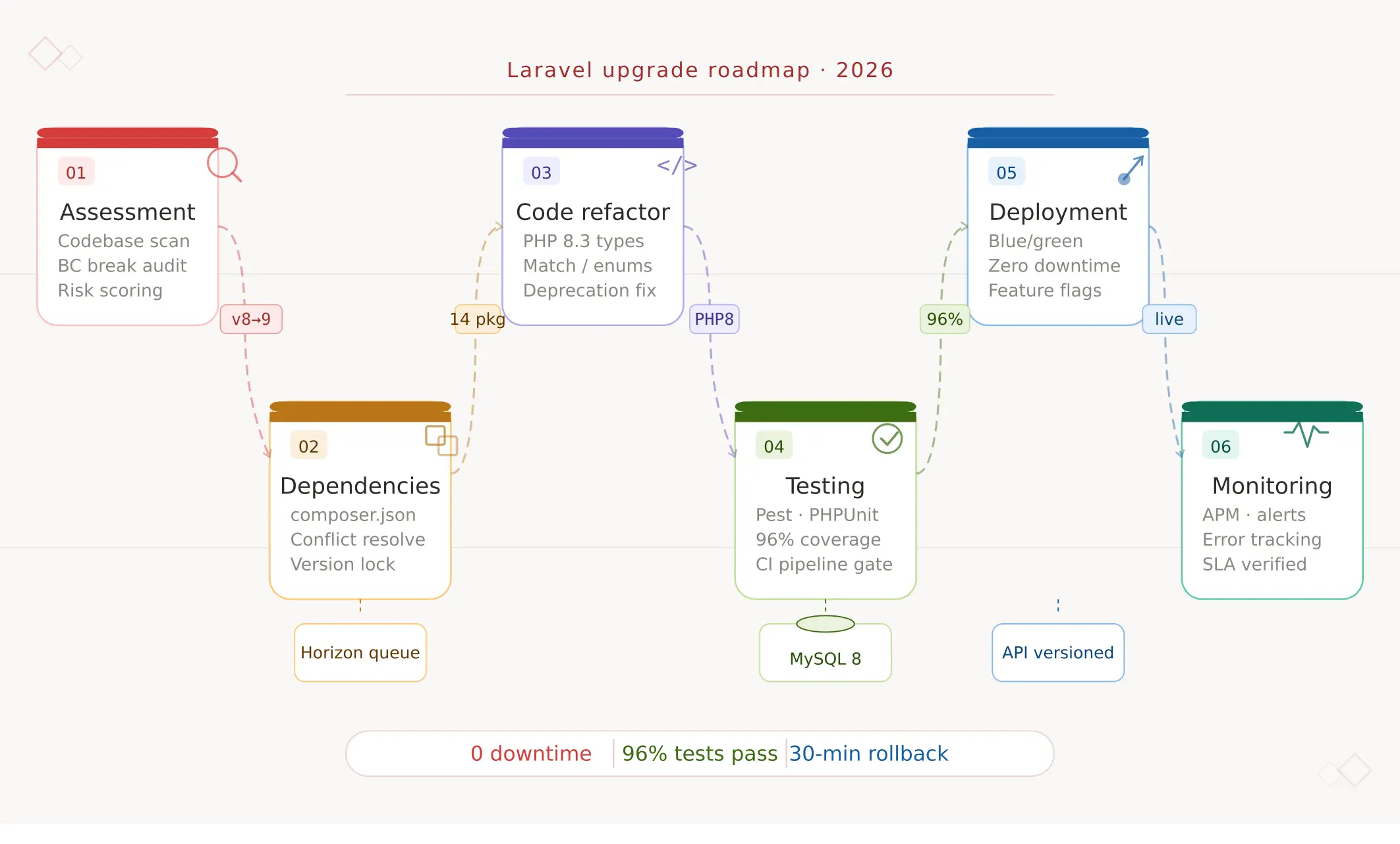
    What a professional Laravel upgrade process should include

    Good Laravel upgrade services should feel like a controlled engineering program, not a rushed patch job. At minimum, the process should include six stages.

    1. Pre-upgrade assessment

    This is where the real project begins. The team should audit your current Laravel version, PHP version, Composer dependencies, auth flows, custom packages, queue setup, cron jobs, deployment pipeline, and critical user journeys. The output should be a written plan, not just a verbal opinion.

    2. Target version strategy

    The team should decide whether your best path is a direct move to Laravel 13, a phased path through intermediate versions, or a short stabilization step before the main upgrade. This depends on your current version, dependency health, and risk tolerance. The official Laravel 13 upgrade guide is a good starting point, but production apps still need application-specific review.

    3. Breaking-change and dependency analysis

    Most upgrade pain does not come from Laravel itself. It comes from the surrounding ecosystem: old auth SDKs, legacy payment libraries, abandoned notification packages, forks, macros, helper assumptions, and glue code that was never properly tested. That is where experienced upgrade work pays for itself.

    4. Test planning and risk reduction

    A serious upgrade project should include smoke tests for critical flows, feature coverage for major business actions, queue validation, API contract checks, and rollback criteria. “It boots locally” is not a deployment standard.

    5. Deployment and rollback planning

    You should know before deployment how queue workers will be handled, whether feature flags are needed, which database changes are safe during release, how rollback will work, and what KPIs define a stable rollout.

    6. Hypercare after launch

    The project is not done at deploy time. Good Laravel upgrade services include a short monitoring and support window after release to catch edge cases, queue issues, hidden dependency behavior, and performance regressions quickly.

    Laravel 12 vs Laravel 13: what most teams should do now

    For many teams, the practical decision is not whether Laravel 12 is “good enough.” It is whether Laravel 13 is now mature enough to become the target version. In many cases, the answer is yes. Laravel 13 keeps Laravel’s annual cadence, continues the framework’s support policy, and is positioned as a relatively manageable upgrade for most apps already on 12. That is why your version decision should be based on your current starting point, dependency landscape, and deployment risk rather than on old assumptions from early 2025.

    Our own latest Laravel version guide is a good companion read if your team is still deciding between version targets and support windows.

    How long do Laravel upgrade services usually take?

    The honest answer is: it depends on application complexity, not just the version number.

    • Small application with healthy dependencies: often 1–2 weeks including review, implementation, and validation
    • Mid-sized product with moderate package and workflow complexity: often 2–6 weeks
    • Large business-critical platform with legacy code, custom auth, heavy queues, and sensitive database changes: often 6–12+ weeks with phased rollout planning

    The timeline is usually driven by dependency cleanup, test maturity, rollout constraints, and the number of high-risk user journeys that need validation.

    What affects the cost of Laravel upgrade services?

    If you are budgeting for Laravel upgrade services, these are the main variables that change project scope:

    • your current Laravel version
    • number of version jumps required
    • Composer dependency health
    • custom packages or framework overrides
    • test coverage quality
    • database complexity and migration risk
    • deployment constraints and downtime tolerance
    • API compatibility requirements
    • queue, scheduler, and webhook complexity
    • post-upgrade support expectations

    That is why a real estimate should come after an assessment, not before it. The best upgrade partners will give you a scoped plan with assumptions, risks, exclusions, and a clear target version strategy.

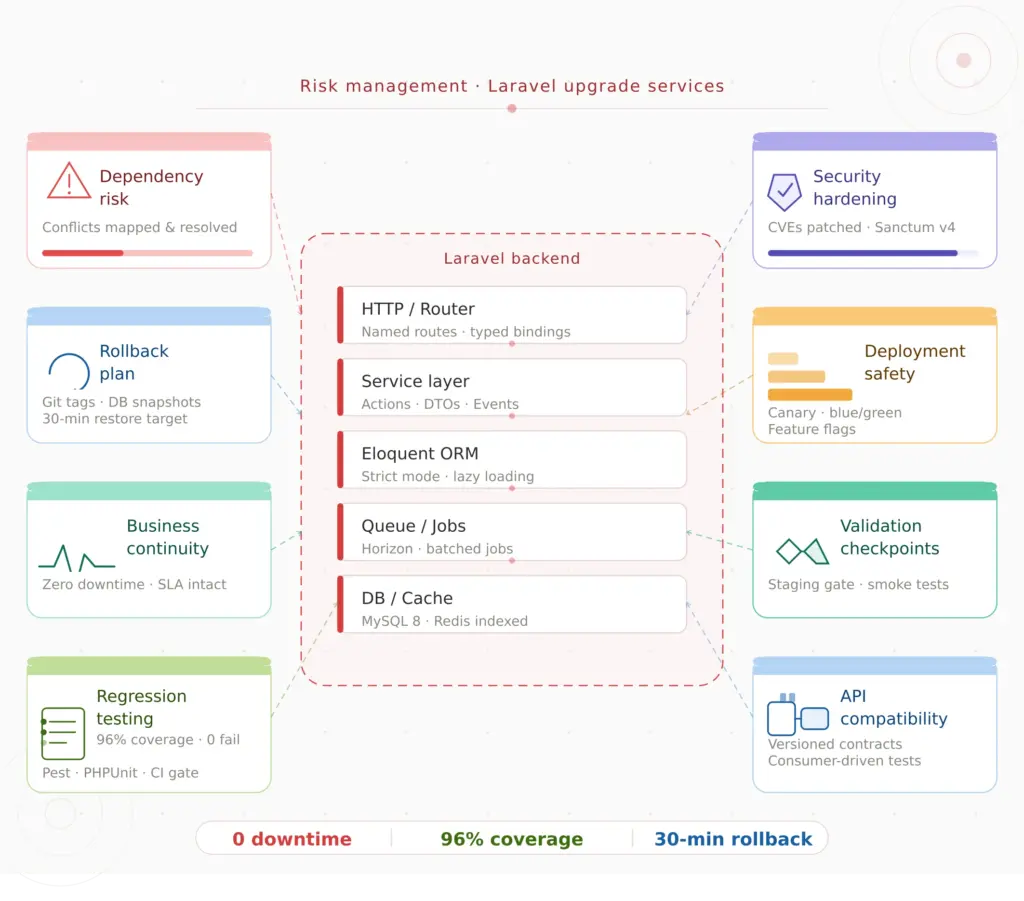
    Common upgrade risks that teams underestimate

    • package incompatibility that looks small but affects auth, billing, or notifications
    • hidden database locks during deployment
    • queue payload or worker behavior changes
    • custom middleware or macros that rely on legacy behavior
    • uncovered business flows that only break under production traffic patterns
    • deployment differences between staging and production

    This is also why performance should not be treated as a separate discussion after the upgrade. A framework modernization project often reveals query bottlenecks, cache gaps, queue issues, and indexing problems that should be addressed in the same roadmap. Our Laravel performance checklist is useful here because it helps teams connect version upgrades with actual system behavior.

    DIY vs hiring a Laravel upgrade partner

    A DIY upgrade can work if the app is relatively small, the package ecosystem is clean, the team knows Laravel deeply, and downtime risk is low. But once the application has real business weight behind it, hiring a Laravel upgrade partner often makes more sense because the project is no longer just engineering effort. It becomes a coordination problem across product, operations, QA, deployment, and business continuity.

    If you are comparing options, the question is not just “can our developers technically do this?” The better question is “can we do it without delaying roadmap work, increasing production risk, or discovering hidden upgrade debt too late?”

    What a good Laravel upgrade proposal should contain

    • a version and dependency audit
    • a recommended upgrade path
    • a breaking-change risk list
    • a testing plan
    • a deployment and rollback strategy
    • timeline assumptions
    • clear in-scope and out-of-scope items
    • post-deployment support terms

    If a proposal is vague and mostly promises “we’ll handle it carefully,” that is a warning sign. Laravel upgrade services should reduce uncertainty, not just rename it.

    Our practical view

    Laravel upgrade services in 2026 are really about protecting delivery speed, lowering operational risk, and keeping your product aligned with a supported modern stack. For some teams, that means moving directly to Laravel 13. For others, it means stabilizing the codebase first, then upgrading in a controlled sequence. The right answer depends on your starting point, but the wrong answer is usually to keep postponing until the project becomes urgent and expensive.

    If your Laravel application is important enough that downtime, regressions, or unsupported software would hurt the business, an upgrade deserves a structured plan.

    Need a safe Laravel upgrade plan?

    If you want a clear view of upgrade scope, risk, timeline, dependency issues, and rollout strategy, the best next step is an assessment. Our Laravel upgrade service is designed for teams that want a low-risk path, and our Laravel development services page is there if the upgrade is part of a wider modernization or rebuild effort.


    FAQs

    Why are Laravel upgrade services important in 2026?

    They matter because support windows move quickly, dependency drift gets worse over time, and business-critical applications usually cannot tolerate careless upgrades. A structured upgrade reduces security, compatibility, and rollout risk.

    Should we upgrade to Laravel 12 or Laravel 13?

    That depends on your current version, dependency health, and rollout risk. Many teams should now evaluate Laravel 13 directly, especially if the upgrade path is manageable and the application needs a current target with longer support runway.

    How long do Laravel upgrade services take?

    Smaller apps may take a couple of weeks. Mid-sized business products often take several weeks. Large or legacy platforms can take significantly longer if dependencies, database changes, testing, or rollout complexity are high.

    Can an internal team handle a Laravel upgrade?

    Yes, sometimes. But once the app is business-critical, has complex dependencies, or cannot tolerate production issues, external upgrade support often reduces risk and protects roadmap time.

    What should a Laravel upgrade partner deliver?

    You should expect an assessment, target version strategy, dependency review, breaking-change plan, testing approach, deployment and rollback plan, and post-release support window.

  • Why Businesses Choose PHP Laravel for Secure & Scalable Web Applications

    Why Businesses Choose PHP Laravel for Secure & Scalable Web Applications

    In today’s competitive digital environment, businesses need web applications that are secure, scalable, and easy to maintain. PHP Laravel has become one of the most trusted frameworks for building modern web applications, powering thousands of business solutions worldwide.


    What Is Laravel?

    Laravel is an open-source PHP web application framework designed to make development faster, cleaner, and more efficient. It follows the MVC (Model–View–Controller) architecture and provides built-in tools that simplify common development tasks.