A Practical, Scalable, and Secure Guide for Modern SaaS Teams
Building a SaaS product is not just about writing code — it’s about scalability, security, performance, and long-term maintainability. Laravel has become one of the most reliable frameworks for SaaS development, but real success depends on how you use it.
Recommended Reading
This guide covers Laravel best practices specifically for SaaS projects, based on real-world production systems running at scale.
Why Laravel Is a Strong Choice for SaaS
Laravel is particularly well-suited for SaaS platforms because it offers:
- Opinionated yet flexible architecture
- Built-in authentication, queues, jobs, and events
- A rich ecosystem for billing, notifications, caching, and APIs
- High developer productivity and long-term maintainability
For SaaS businesses, time-to-market and stability matter more than theoretical benchmarks — and Laravel delivers both.
👉 If you’re planning a SaaS build, explore our
Laravel Development Services
1. Choose the Right SaaS Architecture Early
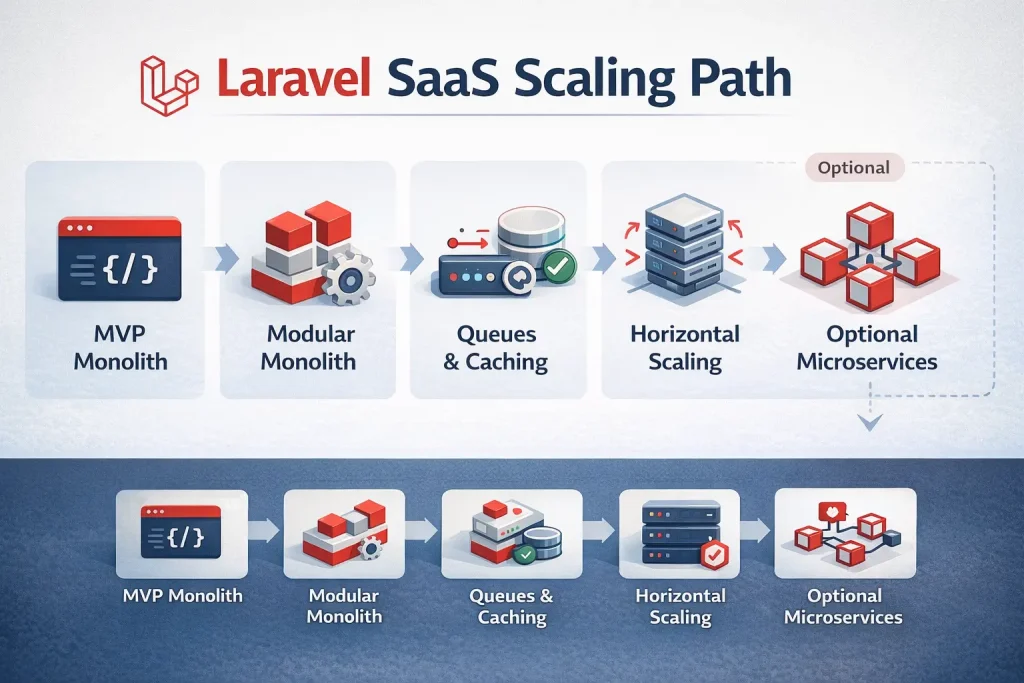
Monolith First, Modular Always
For most SaaS startups, the best approach is:
Modular Monolith → Selective Microservices
Best practices:
- Start with a modular monolith
- Split the system by business domains, not technical layers
Example domain-based structure:
app/
 ├── Domains/
 │    ├── Billing/
 │    ├── Users/
 │    ├── Subscriptions/
 │    ├── Notifications/
 │    ├── Reporting/
Avoid early microservices unless you truly need:
- Independent scaling
- Heavy async workloads
- Multiple teams working in parallel
2. Multi-Tenancy: The Core of SaaS
Multi-tenancy is the foundation of any SaaS platform.
Common Multi-Tenant Models in Laravel
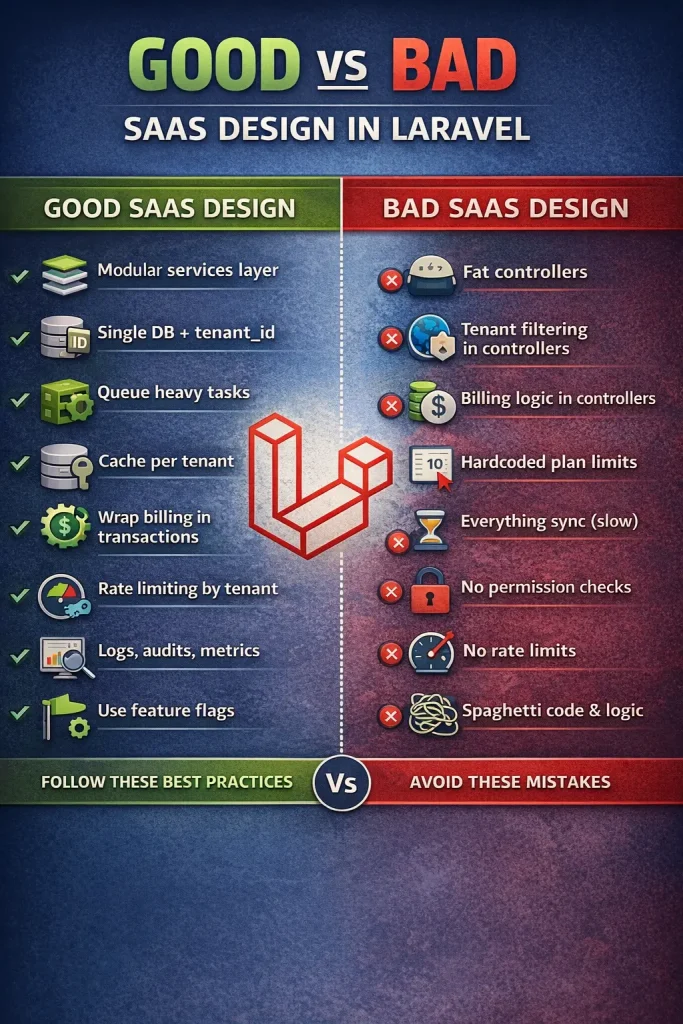
- Single database + tenant_id – Best for early and mid-stage SaaS
- Schema per tenant – Useful for regulated environments
- Database per tenant – Enterprise-grade isolation
Recommended Best Practice
- Use single database + tenant_id
- Enforce isolation at:
- Middleware
- Global scopes
- Repository or service layer
Never rely only on controllers to filter tenant data.
3. Authentication & Authorization Best Practices
Use Token-Based Authentication
For SaaS APIs, use:
- Laravel Sanctum (SPA + mobile)
- OAuth2 (for public APIs)
Implement Role-Based Access Control (RBAC)
Typical SaaS roles:
- Owner
- Admin
- Manager
- User
Best practices:
- Store permissions in the database
- Cache permission checks
- Avoid hardcoding role logic
4. Service Layer Over Fat Controllers
One of the biggest Laravel SaaS mistakes is putting business logic in controllers.
Correct Pattern
Controller → Service → Repository → Model
Benefits:
- Testable business logic
- Cleaner controllers
- Easier refactoring
- Safer long-term scaling
5. Billing & Subscription Management
Golden Rules for SaaS Billing
- Billing logic should never live in controllers
- Always log billing actions
- Never trust frontend prices
- Support proration and retries
A proper SaaS billing system should include:
- Plans and add-ons
- Usage-based pricing
- Invoices and taxes
- Webhooks and retries
- Grace periods
Always wrap billing actions in database transactions and process webhooks via queues.
6. Queues, Jobs & Asynchronous Processing
No serious SaaS application runs everything synchronously.
What Must Be Queued
- Emails
- Notifications
- Webhooks
- PDF generation
- Reports
- Third-party API calls
- Heavy calculations
Rule of thumb:
If it can fail or take more than 200ms — queue it.
Best practices:
- Use separate queues (billing, notifications, imports)
- Configure retries and backoff
- Monitor failures
7. Database & Data Integrity Best Practices
Use Transactions Aggressively
Critical business operations should always be wrapped in database transactions.
Avoid Common Eloquent Pitfalls
Avoid:
- N+1 queries
- Business logic in model events
- Missing indexes
Always index:
- tenant_id
- foreign keys
- date columns used in filters
Use UUIDs for Public SaaS Entities
Benefits:
- Safer API exposure
- Better security
- Easier horizontal scaling later
8. Caching Strategy for SaaS Performance
Caching is mandatory for SaaS scalability.
What to Cache
- Permissions
- Feature flags
- Tenant settings
- Expensive reports
- Aggregated metrics
Best practices:
- Cache per tenant
- Use TTL wisely
- Invalidate cache on writes, not reads
9. Feature Flags & Plan Enforcement
Never hardcode SaaS limits.
Best practices:
- Store plans in database
- Enforce limits centrally
- Cache feature flags
This allows:
- Upselling
- A/B testing
- Custom enterprise plans
10. Observability: Logs, Metrics & Audits
Logging Best Practices
- Use structured logs
- Include tenant_id and user_id
- Separate business logs from system logs
Audit Trails Are Mandatory
Track:
- Billing changes
- Role updates
- Settings changes
- Security events
Audit logs protect both you and your customers.
11. Security Best Practices for Laravel SaaS
Must-Have Security Measures
- Rate limiting per tenant
- MFA for admin users
- Webhook signature validation
- Encrypted sensitive fields
- Strict CORS policies
Never:
- Store secrets in repositories
- Skip webhook verification
- Trust client-side limits
12. CI/CD & Deployment Best Practices
Recommended deployment flow:
- Automated tests
- Static analysis
- Database migrations
- Cache warm-up
- Zero-downtime deployment
- Queue restart
Laravel SaaS checklist:
- config caching
- route caching
- queue monitoring
- rollback strategy
13. Scaling Laravel SaaS the Right Way
Scale in this order:
- Query optimization
- Caching
- Background jobs
- Horizontal scaling
- Read replicas
- Service extraction
Do not start with microservices — start with clean boundaries.
14. Common Laravel SaaS Mistakes to Avoid
- No tenant isolation enforcement
- Billing logic in controllers
- No background jobs
- Hardcoded plan limits
- No audit logs
- No rate limiting
Each of these becomes very expensive to fix later.
Final Thoughts
Laravel is not “just a PHP framework.”
Used correctly, it is a complete SaaS application platform.
If you follow these best practices, your Laravel SaaS will be:
- Easier to scale
- Safer to operate
- Faster to evolve
- Cheaper to maintain
Need Help Building or Scaling a Laravel SaaS?
If you’re looking for:
- SaaS architecture planning
- Multi-tenant Laravel setup
- Subscription and billing systems
- Performance and security optimization
👉 Explore our Laravel SaaS expertise:
Leave a Reply