Laravel Upgrade Services in 2026: Costs, Timeline, Risks, and a Safe Upgrade Plan
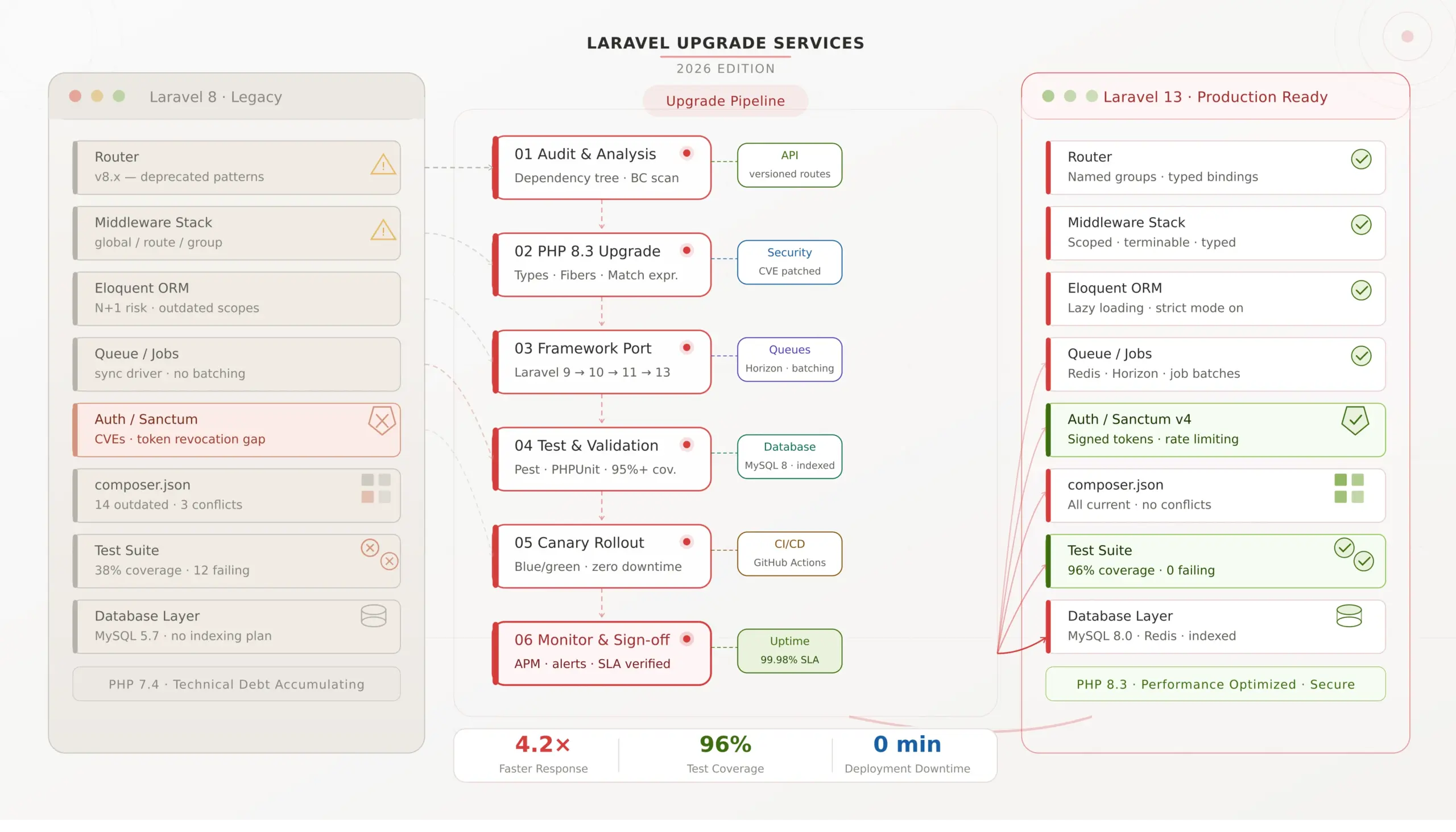
Laravel upgrade services in 2026 are no longer just a “nice to have” for teams on older versions. If your application is still on Laravel 10 or earlier, you are already outside Laravel’s security support window, and if you stayed on Laravel 11 too long, that window has also now closed. For most teams, Laravel upgrade services are best when the application is business-critical, has payment flows, complex integrations, background jobs, admin workflows, or revenue risk attached to downtime. They are less necessary for tiny internal tools with low complexity and low operational risk. And with Laravel 13 now live, the conversation has shifted from “should we upgrade later?” to “what is the safest upgrade path now?”
Last updated: April 2026
The short answer
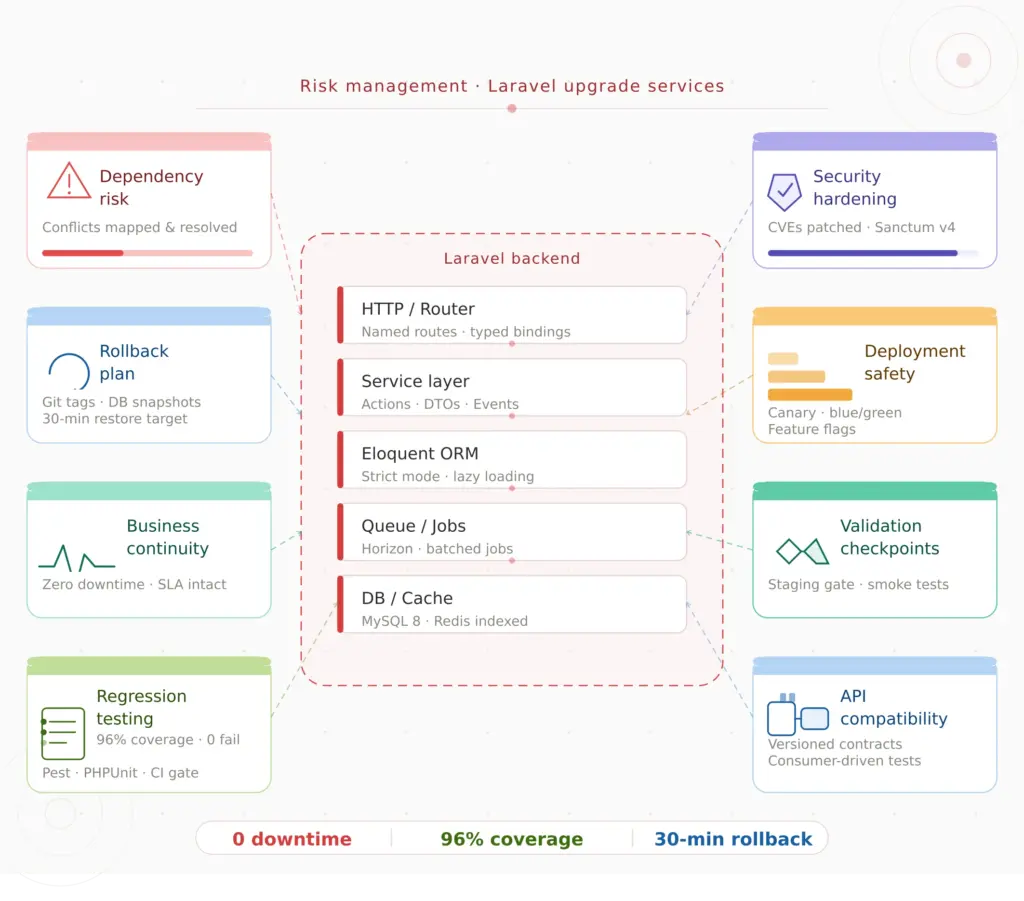
If your Laravel application powers real business workflows, customer-facing systems, APIs, billing, ecommerce, scheduling, reporting, or internal operations, delaying the upgrade usually increases cost and risk. Laravel upgrade services are valuable because the real work is not changing a version number in composer.json. The real work is reducing operational risk: dependency planning, breaking-change review, testing, database safety, deployment strategy, rollback planning, and post-release monitoring.
If you already know your application needs a structured version migration, start with our Laravel upgrade service. If your upgrade is part of a broader rebuild, modernization, or platform strategy, our Laravel development services page is the better place to frame the wider project.
Why Laravel upgrade services matter more in 2026
A lot of teams postpone framework upgrades because the app still “works.” But in production systems, “still working” is not the same as “still secure, supported, performant, and easy to maintain.” That gap is where upgrade costs quietly grow.
Once a framework version leaves security support, every decision becomes a little more expensive. Dependencies drift. Package compatibility becomes harder. New engineers spend more time navigating historical decisions. Emergency fixes become riskier. Even small feature work can slow down because the team is coding around framework age rather than building forward confidently.
That is why Laravel upgrade services are rarely just technical cleanup. In most serious products, they are part risk management, part modernization, and part business continuity planning.
Laravel support deadlines: what changed in 2026
Laravel follows an annual major release cadence, with 18 months of bug fixes and 2 years of security fixes per major version. In practical terms, that means old versions age out quickly if you do not actively plan upgrades. Laravel 10 security support ended in February 2025, Laravel 11 security support ended in March 2026, Laravel 12 remains supported into 2027, and Laravel 13 is now the current major release. For teams planning modernization today, the target is no longer “eventually get to Laravel 12.” The safer question is whether you should go directly to Laravel 13, or stabilize on 12 first and then move with a shorter second step.
If you want the official source for release cadence and support windows, Laravel’s 13.x release notes are the reference you should use internally with stakeholders.
Who Laravel upgrade services are best for
- Teams on Laravel 10 or earlier that are already outside framework security support
- Teams on Laravel 11 that delayed their upgrade planning and now need a current target path
- Businesses with customer-facing products where downtime, billing disruption, or broken APIs directly affect revenue
- SaaS products with queues, cron jobs, webhooks, subscriptions, dashboards, and multi-step workflows
- Admin-heavy internal systems such as ERP, CRM, operations, telecom, healthcare, inventory, or compliance platforms
- Companies with fragile dependencies where package conflicts or old custom code make direct upgrades risky
Laravel upgrade services are especially useful when the application is too important to “try in production and see what happens.”
When you may not need full Laravel upgrade services
Not every Laravel app needs a large external upgrade project. If your application is small, has healthy dependencies, limited integrations, low uptime pressure, and a team with strong Laravel experience plus decent test coverage, an internal upgrade may be enough.
But that is usually the exception, not the rule, for business-critical products. The more your application touches payments, reporting, customer accounts, background jobs, third-party APIs, or sensitive data, the more valuable a structured upgrade process becomes.
Why upgrading late usually costs more
The biggest misconception around framework upgrades is that waiting saves money. In reality, waiting often compresses multiple upgrade problems into one project:
- more version jumps
- older packages and abandoned dependencies
- larger behavior gaps between framework versions
- more undocumented custom code
- more brittle deployment assumptions
- higher regression risk during rollout
That is also why teams who read our Laravel relevance guide and still decide Laravel is right for their product often arrive at the same next question: how do we upgrade without turning the app into a fire drill?
What a professional Laravel upgrade process should include
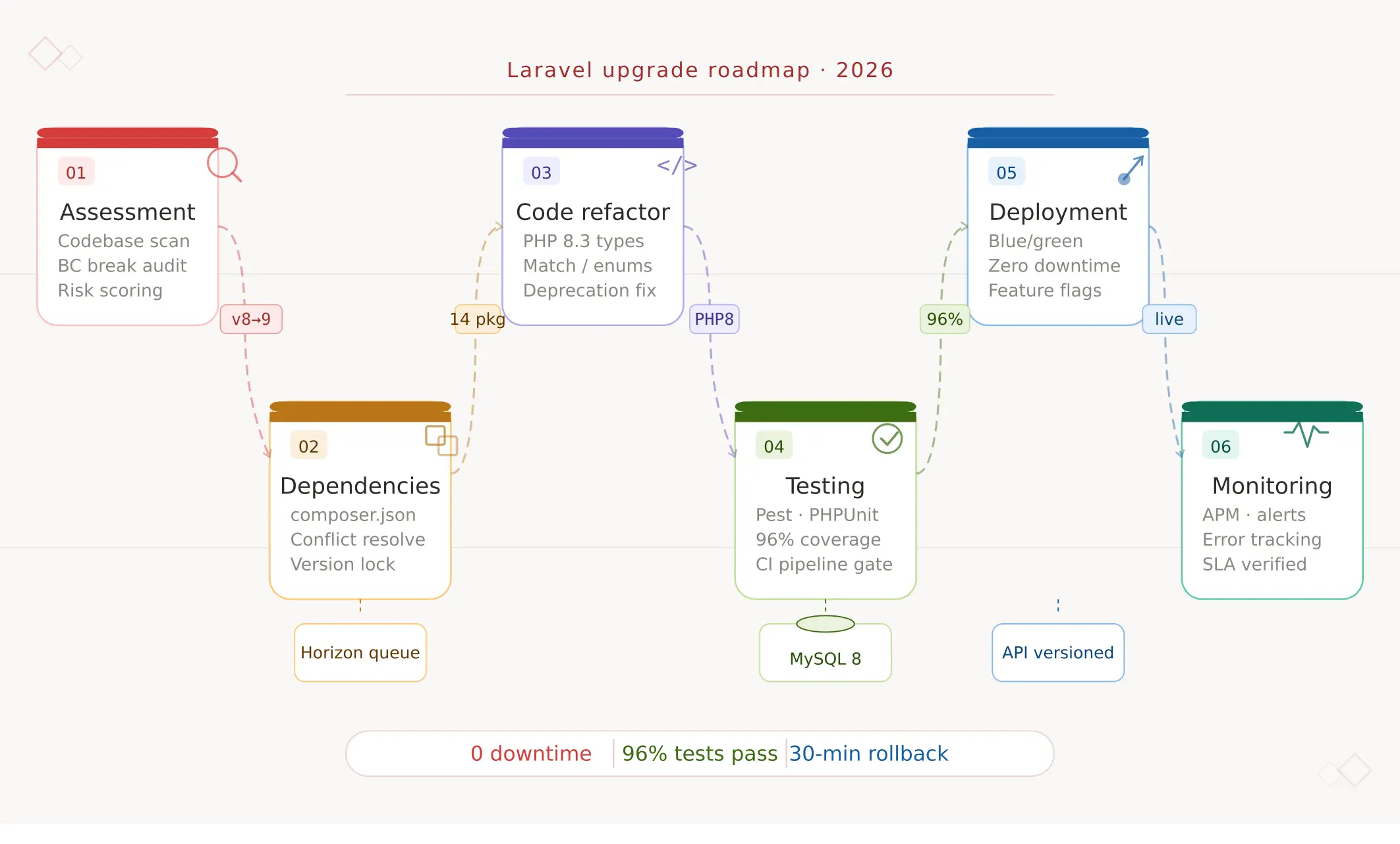
Good Laravel upgrade services should feel like a controlled engineering program, not a rushed patch job. At minimum, the process should include six stages.
1. Pre-upgrade assessment
This is where the real project begins. The team should audit your current Laravel version, PHP version, Composer dependencies, auth flows, custom packages, queue setup, cron jobs, deployment pipeline, and critical user journeys. The output should be a written plan, not just a verbal opinion.
2. Target version strategy
The team should decide whether your best path is a direct move to Laravel 13, a phased path through intermediate versions, or a short stabilization step before the main upgrade. This depends on your current version, dependency health, and risk tolerance. The official Laravel 13 upgrade guide is a good starting point, but production apps still need application-specific review.
3. Breaking-change and dependency analysis
Most upgrade pain does not come from Laravel itself. It comes from the surrounding ecosystem: old auth SDKs, legacy payment libraries, abandoned notification packages, forks, macros, helper assumptions, and glue code that was never properly tested. That is where experienced upgrade work pays for itself.
4. Test planning and risk reduction
A serious upgrade project should include smoke tests for critical flows, feature coverage for major business actions, queue validation, API contract checks, and rollback criteria. “It boots locally” is not a deployment standard.
5. Deployment and rollback planning
You should know before deployment how queue workers will be handled, whether feature flags are needed, which database changes are safe during release, how rollback will work, and what KPIs define a stable rollout.
6. Hypercare after launch
The project is not done at deploy time. Good Laravel upgrade services include a short monitoring and support window after release to catch edge cases, queue issues, hidden dependency behavior, and performance regressions quickly.
Laravel 12 vs Laravel 13: what most teams should do now
For many teams, the practical decision is not whether Laravel 12 is “good enough.” It is whether Laravel 13 is now mature enough to become the target version. In many cases, the answer is yes. Laravel 13 keeps Laravel’s annual cadence, continues the framework’s support policy, and is positioned as a relatively manageable upgrade for most apps already on 12. That is why your version decision should be based on your current starting point, dependency landscape, and deployment risk rather than on old assumptions from early 2025.
Our own latest Laravel version guide is a good companion read if your team is still deciding between version targets and support windows.
How long do Laravel upgrade services usually take?
The honest answer is: it depends on application complexity, not just the version number.
- Small application with healthy dependencies: often 1–2 weeks including review, implementation, and validation
- Mid-sized product with moderate package and workflow complexity: often 2–6 weeks
- Large business-critical platform with legacy code, custom auth, heavy queues, and sensitive database changes: often 6–12+ weeks with phased rollout planning
The timeline is usually driven by dependency cleanup, test maturity, rollout constraints, and the number of high-risk user journeys that need validation.
What affects the cost of Laravel upgrade services?
If you are budgeting for Laravel upgrade services, these are the main variables that change project scope:
- your current Laravel version
- number of version jumps required
- Composer dependency health
- custom packages or framework overrides
- test coverage quality
- database complexity and migration risk
- deployment constraints and downtime tolerance
- API compatibility requirements
- queue, scheduler, and webhook complexity
- post-upgrade support expectations
That is why a real estimate should come after an assessment, not before it. The best upgrade partners will give you a scoped plan with assumptions, risks, exclusions, and a clear target version strategy.
Common upgrade risks that teams underestimate
- package incompatibility that looks small but affects auth, billing, or notifications
- hidden database locks during deployment
- queue payload or worker behavior changes
- custom middleware or macros that rely on legacy behavior
- uncovered business flows that only break under production traffic patterns
- deployment differences between staging and production
This is also why performance should not be treated as a separate discussion after the upgrade. A framework modernization project often reveals query bottlenecks, cache gaps, queue issues, and indexing problems that should be addressed in the same roadmap. Our Laravel performance checklist is useful here because it helps teams connect version upgrades with actual system behavior.
DIY vs hiring a Laravel upgrade partner
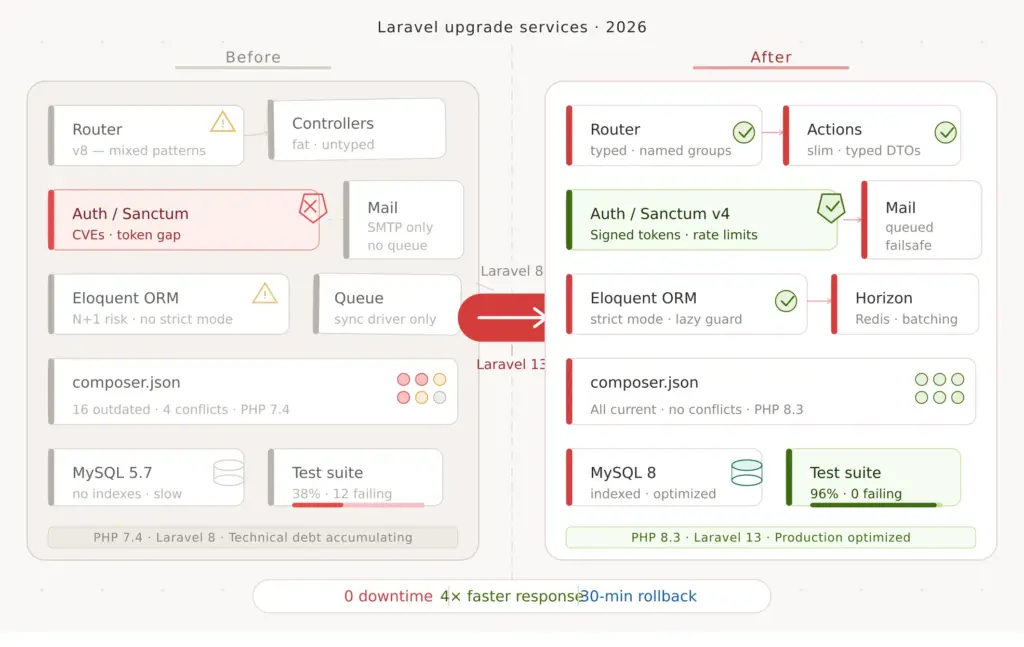
A DIY upgrade can work if the app is relatively small, the package ecosystem is clean, the team knows Laravel deeply, and downtime risk is low. But once the application has real business weight behind it, hiring a Laravel upgrade partner often makes more sense because the project is no longer just engineering effort. It becomes a coordination problem across product, operations, QA, deployment, and business continuity.
If you are comparing options, the question is not just “can our developers technically do this?” The better question is “can we do it without delaying roadmap work, increasing production risk, or discovering hidden upgrade debt too late?”
What a good Laravel upgrade proposal should contain
- a version and dependency audit
- a recommended upgrade path
- a breaking-change risk list
- a testing plan
- a deployment and rollback strategy
- timeline assumptions
- clear in-scope and out-of-scope items
- post-deployment support terms
If a proposal is vague and mostly promises “we’ll handle it carefully,” that is a warning sign. Laravel upgrade services should reduce uncertainty, not just rename it.
Our practical view
Laravel upgrade services in 2026 are really about protecting delivery speed, lowering operational risk, and keeping your product aligned with a supported modern stack. For some teams, that means moving directly to Laravel 13. For others, it means stabilizing the codebase first, then upgrading in a controlled sequence. The right answer depends on your starting point, but the wrong answer is usually to keep postponing until the project becomes urgent and expensive.
If your Laravel application is important enough that downtime, regressions, or unsupported software would hurt the business, an upgrade deserves a structured plan.
Need a safe Laravel upgrade plan?
If you want a clear view of upgrade scope, risk, timeline, dependency issues, and rollout strategy, the best next step is an assessment. Our Laravel upgrade service is designed for teams that want a low-risk path, and our Laravel development services page is there if the upgrade is part of a wider modernization or rebuild effort.
FAQs
Why are Laravel upgrade services important in 2026?
They matter because support windows move quickly, dependency drift gets worse over time, and business-critical applications usually cannot tolerate careless upgrades. A structured upgrade reduces security, compatibility, and rollout risk.
Should we upgrade to Laravel 12 or Laravel 13?
That depends on your current version, dependency health, and rollout risk. Many teams should now evaluate Laravel 13 directly, especially if the upgrade path is manageable and the application needs a current target with longer support runway.
How long do Laravel upgrade services take?
Smaller apps may take a couple of weeks. Mid-sized business products often take several weeks. Large or legacy platforms can take significantly longer if dependencies, database changes, testing, or rollout complexity are high.
Can an internal team handle a Laravel upgrade?
Yes, sometimes. But once the app is business-critical, has complex dependencies, or cannot tolerate production issues, external upgrade support often reduces risk and protects roadmap time.
What should a Laravel upgrade partner deliver?
You should expect an assessment, target version strategy, dependency review, breaking-change plan, testing approach, deployment and rollback plan, and post-release support window.