Blog

  • Laravel PHP compatibility matrix (updated April 2026 — Laravel 13)

    Laravel PHP compatibility matrix (updated April 2026 — Laravel 13)

    Quick reference: Laravel 13 requires PHP 8.3 minimum and supports PHP 8.3, 8.4, and 8.5. Laravel 12 requires PHP 8.2 minimum. Laravel 11 security support ended March 12, 2026. Laravel 10 is fully end-of-life. If you are setting up a new project in 2026, start on Laravel 13 with PHP 8.4.

    If you are deciding whether to invest in an upgrade or start fresh, our article on whether Laravel is still the right choice in 2026 covers the business and technical case in full. For the step-by-step upgrade process from older versions, see our Laravel upgrade guide for 2026.

    Updated for Laravel 13 — released March 17, 2026.

    You’re setting up a new server. Or a client just asked: “Can we upgrade to Laravel 13 with our current PHP 8.1 stack?” The answer, tucked inside release notes and Composer errors, can cost your team hours. This guide puts every answer in one place — a clear, accurate laravel php compatibility reference for Laravel 10 through 13, with practical upgrade guidance for real teams.

    Laravel PHP Compatibility Matrix — Quick Reference (2026)

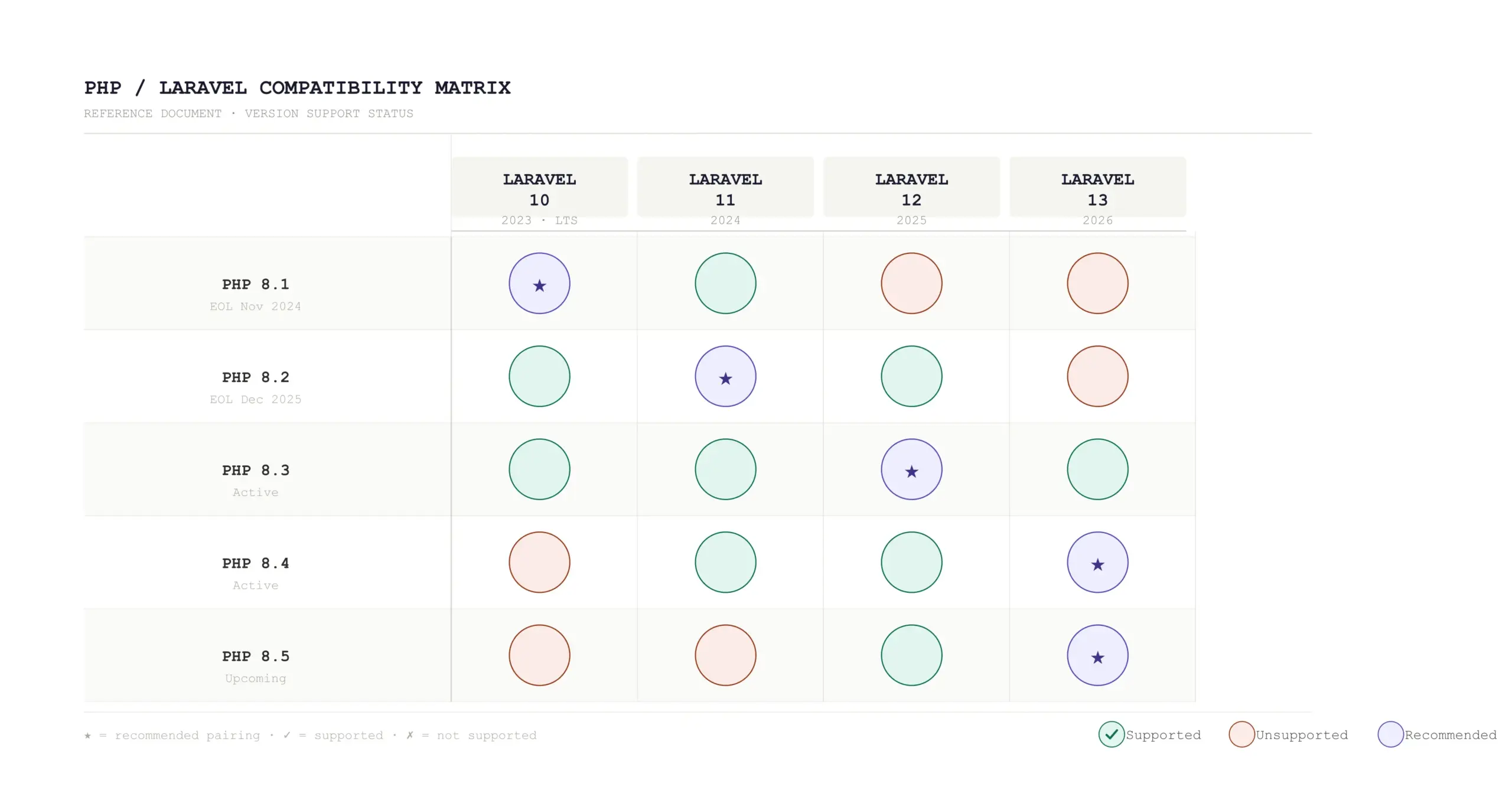
    The table below answers which php version for laravel at every major release. Check it before you touch composer.json.

    PHP VersionLaravel 10Laravel 11Laravel 12Laravel 13
    PHP 8.0
    PHP 8.1
    PHP 8.2
    PHP 8.3★ Best★ Min
    PHP 8.4~~★ Rec

    Legend: ★ = Recommended • ✓ = Supported • ✗ = Not supported • ~ = May work, not officially tested

    A note on Laravel 13.3+ and PHP 8.3
    Some patch versions of Laravel 13 pull in Symfony 8 components that hard-require PHP 8.4. If you’re on PHP 8.3, stay on Laravel 12 until you can upgrade your runtime, or pin laravel/framework: ^13.0 <13.3 temporarily.

    Laravel 10 — PHP Requirements

    Laravel 10 dropped PHP 8.0 and made PHP 8.1 the minimum. It’s the last version to support PHP 8.1, which still matters for teams managing older hosting stacks. Laravel 10 also introduced full return types and argument types in every stub — a nice developer-experience improvement that PHP 8.1 made possible.

    PHP VersionSupportedNotes
    PHP 8.0Not supportedDropped from Laravel 10
    PHP 8.1SupportedMinimum requirement
    PHP 8.2SupportedFully compatible
    PHP 8.3SupportedCompatible, though not official at release

    Laravel 10 is EOL
    Security support for Laravel 10 ended in early 2025. If you’re still on Laravel 10, you’re already outside the safe support window.

    Laravel 11 — PHP Requirements

    Laravel 11 raised the minimum to PHP 8.2. That wasn’t just a cosmetic change. PHP 8.2 brought readonly classes, DNF types, and deprecated dynamic properties, and Laravel 11 leaned into that with its slimmer app structure.

    The Laravel 11 project structure is also worth noting. It removed several default files, like the separate api.php route file and much of the starter middleware setup. Existing Laravel 10 apps do not need to mirror that new layout to upgrade safely.

    PHP VersionSupportedNotes
    PHP 8.1Not supportedMinimum dropped
    PHP 8.2SupportedMinimum requirement
    PHP 8.3SupportedRecommended
    PHP 8.4UnofficialCommunity tested, not guaranteed

    Laravel 11 is now out of security support
    Security support ended March 12, 2026. Any production app still running Laravel 11 should be on an active upgrade path now.

    Laravel 12 — PHP Requirements

    Laravel 12 was intentionally calm. The core team focused on minimizing breaking changes instead of introducing large new APIs. In practice, many applications move from Laravel 11 to Laravel 12 without touching application code. It also introduced updated starter kits and optional WorkOS AuthKit integration for passkeys and SSO.

    For laravel 12 php compatibility, Laravel 12 requires PHP 8.2 as the minimum, while PHP 8.3 and 8.4 both work comfortably. In 2026, PHP 8.3 remains the safest general recommendation for most Laravel 12 production environments.

    PHP VersionSupportedComposer Constraint
    PHP 8.1Not supported
    PHP 8.2Supported^12.0
    PHP 8.3Recommended^12.0
    PHP 8.4Supported^12.0
    // composer.json
    {
      "require": {
        "php": "^8.2",
        "laravel/framework": "^12.0"
      }
    }

    Laravel 12 support timeline

    Bug fixes continue until August 13, 2026. Security fixes continue until February 24, 2027. If you are on Laravel 12 today, you still have time — but Laravel 13 should already be part of your plan.

    Laravel 13 — PHP Requirements (Released March 2026)
    Laravel 13 launched on March 17, 2026. It is the current recommended version for new applications, and the biggest practical shift is straightforward: laravel 13 php version raises the minimum to PHP 8.3 and drops PHP 8.2 entirely.

    Zero breaking changes from Laravel 12 to 13
    If you’re already on PHP 8.3 and Laravel 12, the upgrade is one of the lightest major-version moves Laravel has had.

    What’s new in Laravel 13 that leans on PHP 8.3?

    • Native PHP Attributes across more framework locations
    • Laravel AI SDK with a provider-agnostic approach
    • Cache::touch() to extend TTL without refetching data
    • Reverb database driver for WebSocket broadcasting without Redis
    • Passkey authentication in the auth scaffolding
    PHP VersionLaravel 13 SupportRecommendation
    PHP 8.2Not supportedUpgrade PHP first
    PHP 8.3Supported (Min)Works for 13.0–13.2
    PHP 8.4RecommendedBest for 13.3+ and beyond

    Laravel 13.3+ practical reality
    Because of Symfony 8 dependencies, Laravel 13.3+ can effectively require PHP 8.4 in practice, even though Laravel 13 officially lists PHP 8.3 as the minimum.

    // composer.json
    {
      "require": {
        "php": "^8.3",
        "laravel/framework": "^13.0",
        "phpunit/phpunit": "^12.0"
      }
    }

    Support Status & End-of-Life Dates (2026)

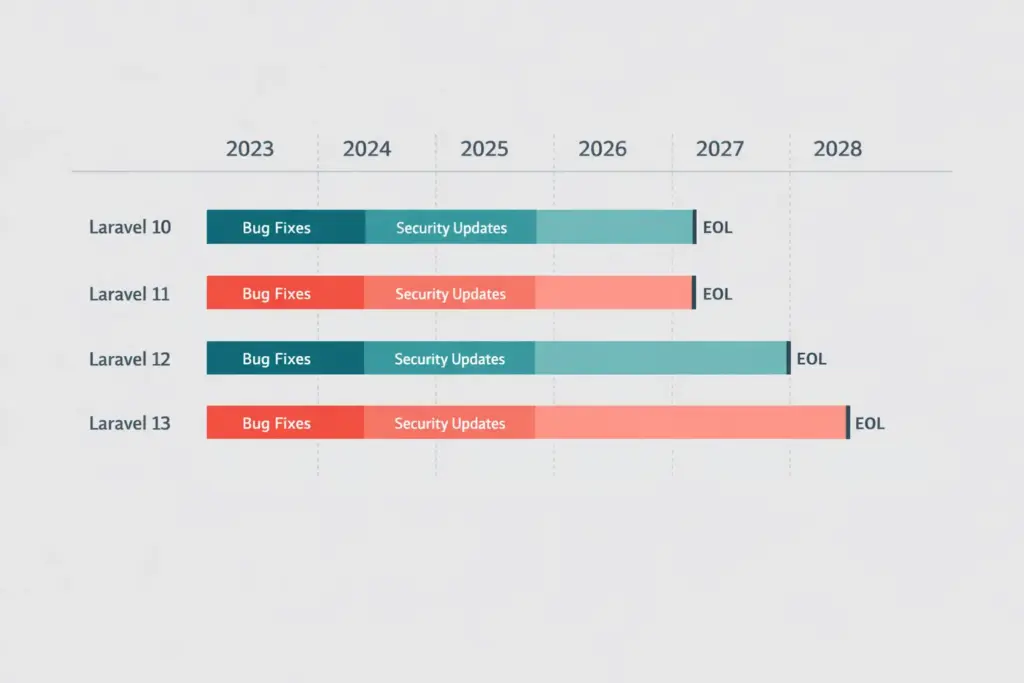
    Laravel’s support policy provides bug fixes for 18 months and security fixes for 2 years per major release. Here’s the picture as of April 2026:

    Laravel 10

    End of Life
    Bug fixes ended Aug 2024
    Security ended Feb 2025
    Min PHP 8.1

    Laravel 11

    End of Life
    Security ended Mar 12, 2026
    Migrate urgently
    Min PHP 8.2

    Laravel 12

    Active Support
    Bug fixes Aug 13, 2026
    Security Feb 24, 2027
    Min PHP 8.2

    Laravel 13

    Current
    Bug fixes Q3 2027
    Security Q1 2028
    Min PHP 8.3

    No LTS in Laravel (since v6)
    Laravel 6 was the last LTS release. Every current major version follows the same 18-month bug-fix and 2-year security model, which makes steady annual upgrades the healthier habit.

    Upgrade Path & Pre-Flight Checklist

    You cannot skip major versions cleanly in Laravel. The upgrade path should be sequential:

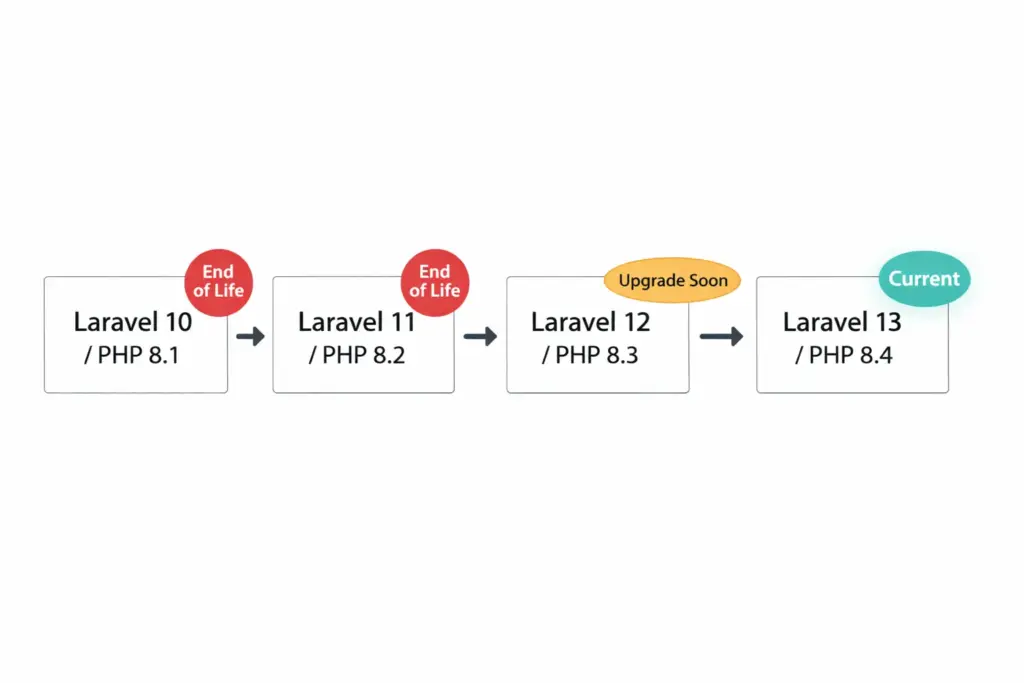
    Laravel 10 → Laravel 11 → Laravel 12 → Laravel 13

    Pre-upgrade checklist: Laravel 12 → 13

    1. Run php -v on production. You need PHP 8.3 minimum, and PHP 8.4 for Laravel 13.3+.
    2. Update composer.json to require laravel/framework: ^13.0 and phpunit/phpunit: ^12.0.
    3. Run composer update on a feature branch.
    4. Clear caches before testing the app.
    5. Review queue behavior, cache configuration, and CSRF/origin settings.
    6. Drain queues before deployment if you are moving workers between Laravel 12 and 13.
    7. Deploy to staging first and run the full test suite.
    8. Confirm ecosystem packages like Livewire, Inertia, Filament, and Spatie packages are ready.

    Use Laravel Shift for mechanical upgrades
    For larger apps, Laravel Shift is often worth it because it handles much of the repetitive upgrade work and opens a reviewable pull request.

    What if I’m still on PHP 8.1?

    If your server still runs PHP 8.1, you are locked to Laravel 10 — which is already end-of-life. The safest route is usually PHP 8.1 → PHP 8.2 first, then Laravel 11 or 12, then PHP 8.3, and finally Laravel 13.
    Summary: Laravel PHP Compatibility at a Glance

    Legacy

    • Laravel 10 — Min PHP 8.1 • EOL
    • Laravel 11 — Min PHP 8.2 • Security ended Mar 2026

    Current

    • Laravel 12 — Min PHP 8.2 • Best on 8.3
    • Laravel 13 — Min PHP 8.3 • Best on 8.4

    Practical Rule

    • No LTS exists now
    • Upgrade sequentially
    • Check PHP first, then Laravel

    The laravel php compatibility story in 2026 is actually encouraging. The upgrade from Laravel 12 to Laravel 13 is one of the smoothest Laravel has had. For most teams, the real blocker is not application code. It is the PHP version running underneath the app.

    Tags: #Laravel #PHP #Laravel13 #PHP83 #WebDevelopment #ITMarkerz
  • Laravel Support Policy (2026): EOL Dates

    Laravel Support Policy Explained (2026): Bug Fixes vs Security Fixes + EOL Dates

    The Laravel support policy looks simple on paper, but it drives real engineering decisions. Laravel gives each major release 18 months of bug fixes and 2 years of security fixes. That difference matters. A version may still receive security updates after normal bug-fix support ends, but that does not make it a comfortable long-term base for active product work. Teams usually start caring about support policy when an upgrade feels urgent. The better approach is to use the support window early, while you still have time to plan properly. If your team already knows it needs a structured migration path, our Laravel upgrade services guide is the best next step.

    Understanding the Laravel support policy helps teams budget maintenance, plan upgrades, and decide how long an older version can safely stay in production.

    Last updated: April 2026

    Laravel support policy in 2026 with bug fixes security fixes and end of life dates

    The short answer

    Laravel supports each major release for 18 months with bug fixes and for 2 years with security fixes. That means older versions move from “fully supported” to “security fixes only” sooner than many teams expect. Laravel 10 is already out of support. Laravel 11 reached the end of security support on March 12, 2026. Laravel 12 stays supported into 2027, and Laravel 13 is the current major release with security fixes through March 17, 2028.

    If you want the current-version answer first, start with our latest Laravel version guide. Use this page when the real question is support timing, risk, and what your team should do next.

    What the Laravel support policy actually means

    Many teams hear the word “supported” and assume the framework still receives everything: regular fixes, maintenance, and security updates. Laravel does not use support that way. First, normal bug-fix support ends. After that, the version may still receive security fixes for a limited period. Once security support ends, that version is effectively end-of-life for serious production work.

    This is where teams often get into trouble. They keep shipping on an older version because the app still runs, but support policy is about more than whether the app boots. It affects how confidently you can maintain the product, upgrade dependencies, and respond when something goes wrong.

    Laravel support policy: bug fixes vs security fixes

    Bug fixes cover the everyday issues that affect framework behavior: defects, regressions, and non-security problems that show up during normal development. Once bug-fix support ends, you should not expect Laravel to keep smoothing out those issues for that version.

    Security fixes are much narrower. They address vulnerabilities that could put applications at risk. A version in the security-fixes-only phase still has some life left, but not much breathing room. You can keep it running for a short period while you prepare the next move, but you should not treat it as a comfortable long-term platform.

    This distinction sits at the heart of the Laravel support policy. Teams often say “we’re still supported” when what they really mean is “we have not reached the final deadline yet.” Those two statements are not the same.

    Laravel support policy dates at a glance

    Laravel VersionSupported PHPRelease DateBug Fixes UntilSecurity Fixes Until
    Laravel 10PHP 8.1–8.3February 14, 2023August 6, 2024February 4, 2025
    Laravel 11PHP 8.2–8.4March 12, 2024September 3, 2025March 12, 2026
    Laravel 12PHP 8.2–8.5February 24, 2025August 13, 2026February 24, 2027
    Laravel 13PHP 8.3–8.5March 17, 2026Q3 2027March 17, 2028

    Laravel’s official release notes are the source of truth for these dates. They also confirm the annual major-release cadence and the current PHP support ranges for Laravel 10 through 13.

    The Laravel support policy matters most when a team has to choose between staying briefly on Laravel 12 or moving directly to Laravel 13. At that point, support dates stop being documentation details and start shaping real delivery plans.

    Is Laravel 11 still supported?

    No. Laravel 11 reached the end of its security support window on March 12, 2026. Teams still running Laravel 11 should move upgrade planning out of the “later” bucket and into active work. Some teams may still choose Laravel 12 as a stepping stone. Others should evaluate a direct move to Laravel 13, especially if their dependency stack is healthy enough to support it.

    If your main question is version targeting rather than support policy alone, our latest Laravel version guide goes deeper into Laravel 12 vs 13 planning.

    Why the Laravel support policy matters for real teams

    Support policy affects far more than compliance language. It influences how confidently your team can ship features, upgrade packages, manage infrastructure, and respond to bugs without accumulating hidden risk. The older the framework version gets, the more likely you are to run into package conflicts, upgrade friction, and maintenance work that feels slower than it should.

    That is why support awareness usually turns into an execution question: how do we move to a supported version without disrupting billing flows, API consumers, queue jobs, background tasks, or internal workflows? That is exactly where a structured Laravel upgrade services guide becomes useful.

    Laravel support policy timeline with version support windows and upgrade planning

    Laravel support policy for teams on Laravel 10 or 11

    If you run Laravel 10, you are already past security support. If you run Laravel 11, that window has closed as well. In both cases, the right move is not panic. The right move is planning. Review the current version, check PHP compatibility, inspect your Composer dependencies, identify package risks, and decide whether a direct path to Laravel 13 makes sense or whether an intermediate step would reduce risk.

    Business-critical apps need more than a version bump. They need rollout planning, regression checks, deployment safety, and rollback thinking. Treat the upgrade as an engineering project, not a background chore.

    Laravel support policy for teams on Laravel 12

    Teams on Laravel 12 are in a stronger position because the version still sits inside its support window. Even so, “still supported” should not turn into “ignore the roadmap.” Laravel 13 is already current, and Laravel’s own upgrade guidance frames the 12-to-13 jump as relatively light for many applications. That makes timing the main question, not whether Laravel 13 matters yet.

    Laravel’s official upgrade guide is worth reading alongside your own package audit, test coverage review, and deployment checklist before you lock in that decision.

    Laravel support policy for teams on Laravel 13

    If you are already on Laravel 13, support pressure is low for now. Your focus should shift toward healthy maintenance habits: keep dependencies current, stay aligned with supported PHP versions, protect test coverage, and avoid pushing framework upgrades so far into the future that they become emergency work again.

    That broader delivery conversation often goes beyond versioning alone. When you need help with platform stability, scaling, modernization, or long-term engineering direction, our Laravel development services page is the right commercial hub.

    How Laravel support policy connects to PHP compatibility

    Support windows never sit in isolation from runtime planning. Laravel 12 supports PHP 8.2 through 8.5. Laravel 13 supports PHP 8.3 through 8.5. That means framework lifecycle and PHP lifecycle move together. If your infrastructure still lags behind, your Laravel roadmap automatically gets tighter.

    This is another reason the Laravel support policy matters in practice. It helps product teams and engineering teams see framework lifecycle, PHP support, deployment timing, and technical debt as one connected decision instead of four unrelated problems.

    Our practical view

    Laravel’s support model is clear. Bug-fix support ending should prompt planning. Security-fix support ending should trigger action. Teams on Laravel 10 or 11 should already be moving. Teams on Laravel 12 should be planning the Laravel 13 step now, not later. Teams on Laravel 13 should build habits that keep future upgrades routine.

    In practice, the Laravel support policy belongs in your product roadmap, not buried in a documentation tab that nobody checks until the deadline is close.

    If you are still deciding whether Laravel is the right long-term stack for your product before you commit to a roadmap, this guide on Is Laravel still the right choice in 2026 gives the broader context.

    Need help planning a supported Laravel roadmap?

    If your team needs help deciding whether to move directly to Laravel 13, whether the current version is already too risky to keep, or how to reduce production risk during an upgrade, start with a structured assessment. Our Laravel upgrade services guide is the best next step for migration planning, while our Laravel development services page fits broader platform work.


    FAQs

    What is Laravel support policy?

    Laravel support policy gives each major release 18 months of bug fixes and 2 years of security fixes.

    What is the difference between bug fixes and security fixes in Laravel?

    Bug fixes cover general framework issues and defects. Security fixes address vulnerabilities. A version that only receives security fixes is already close to the end of its comfortable lifecycle for active product work.

    Is Laravel 11 still supported?

    No. Laravel 11 security support ended on March 12, 2026.

    Is Laravel 12 still supported?

    Yes. Laravel 12 receives bug fixes until August 13, 2026 and security fixes until February 24, 2027.

    How long is Laravel 13 supported?

    Laravel 13 receives bug fixes until Q3 2027 and security fixes until March 17, 2028.

  • Laravel Testing Strategy (2026): Pest/PHPUnit + CI Checklist

    Laravel Testing Strategy (2026): Pest/PHPUnit + CI Checklist

    If your Laravel app is growing, testing isn’t “nice to have”—it’s what lets you ship faster without breaking production. This guide gives you a practical testing strategy (not theory) you can implement in a week and improve every sprint.

    Quick answer

    A strong Laravel testing strategy in 2026 means:

    • Feature tests for critical flows (auth, billing, permissions, APIs)
    • Unit tests for business logic (services, pricing rules, policies)
    • Fakes for external systems (HTTP, queues, notifications, storage)
    • Repeatable CI pipeline (tests + lint + static analysis)
    • Stable test data (factories + minimal seeds)

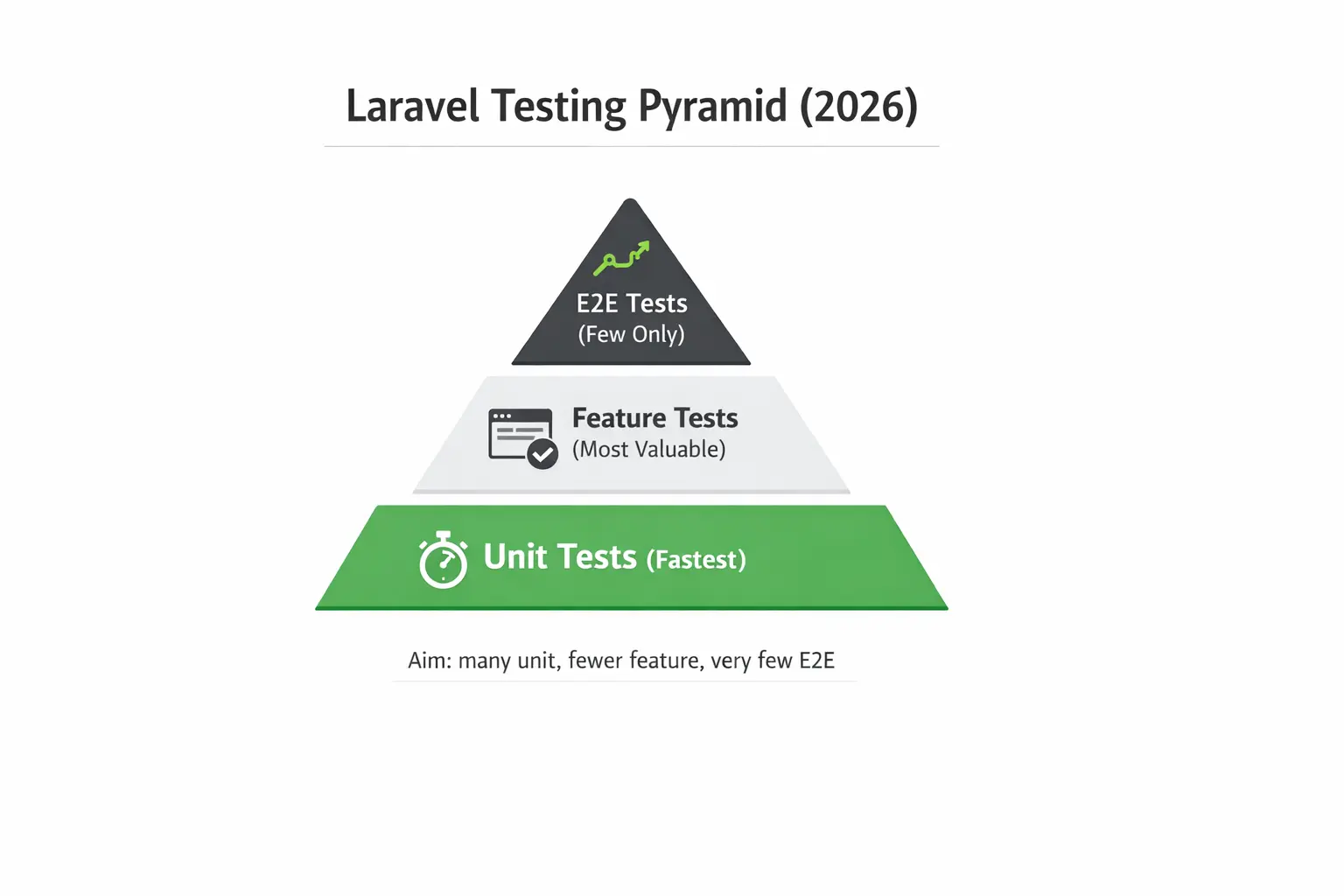
    1) The testing pyramid that actually works in Laravel

    Think in layers:

    • Unit tests (fastest): Pure business rules (calculations, validators, service classes)
    • Feature tests (most valuable): HTTP endpoints, middleware, auth, validation, database writes
    • E2E tests (few only): A tiny set for “login → checkout → success” style flows

    Rule: Start by covering the top 5 revenue / risk flows with feature tests. Then expand unit tests around complex logic.

    2) PHPUnit vs Pest: what we recommend in 2026

    Laravel supports both. The best choice depends on your team’s style:

    • If your team prefers clean, readable tests: use Pest
    • If your codebase is PHPUnit-heavy: keep PHPUnit and modernize gradually

    Either way, keep assertions consistent and avoid mixing styles everywhere.

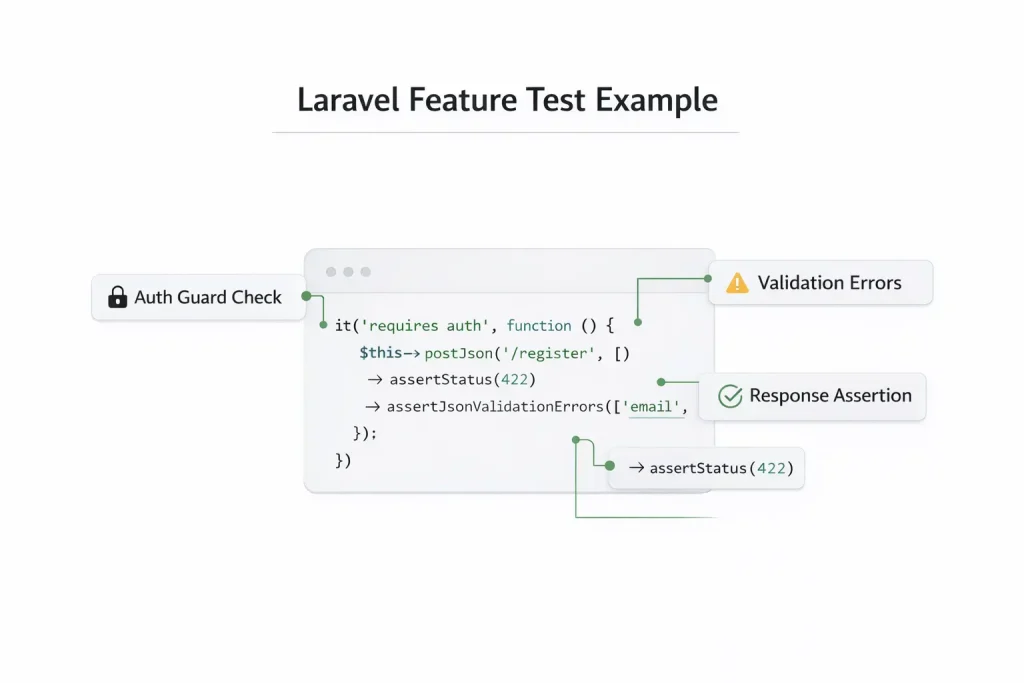
    Example Laravel feature test for authentication and validation

    Example (Pest feature test)

    use App\Models\User;
    
    it('requires auth to access dashboard', function () {
        $this->get('/dashboard')->assertRedirect('/login');
    });
    
    it('shows dashboard for authenticated users', function () {
        $user = User::factory()->create();
    
        $this->actingAs($user)
            ->get('/dashboard')
            ->assertOk()
            ->assertSee('Dashboard');
    });

    3) Set up a stable test environment (the biggest win)

    Most teams don’t “lack tests”—they lack stable tests. Do this once and you’ll save weeks:

    • Create .env.testing
    • Choose a test database strategy:
      • MySQL/Postgres in CI (closest to production)
      • SQLite for speed (good early, but may diverge in edge cases)
    • Ensure migrations + factories are reliable

    Recommended Laravel defaults:

    • Use RefreshDatabase for most feature tests
    • Prefer factories over heavy seeds
    use Illuminate\Foundation\Testing\RefreshDatabase;
    
    uses(RefreshDatabase::class);

    Run tests fast locally:

    php artisan test
    php artisan test --parallel

    4) Write feature tests for the flows that matter

    Start with flows where a bug costs money or trust:

    • Signup / Login / OTP
    • Subscription purchase / billing
    • Admin permissions
    • File uploads / downloads
    • API endpoints (mobile/web)

    Feature test pattern (validation + response)

    it('validates required fields on registration', function () {
        $this->postJson('/register', [])
            ->assertStatus(422)
            ->assertJsonValidationErrors(['email', 'password']);
    });

    Tip: Always assert HTTP status, JSON shape/message, and database changes (only when relevant).

    5) Use Laravel fakes to avoid flaky tests

    External dependencies make tests slow and flaky. Laravel provides clean fakes.

    HTTP fake

    use Illuminate\Support\Facades\Http;
    
    Http::fake([
        'api.partner.com/*' => Http::response(['ok' => true], 200),
    ]);

    Queue / Events / Mail / Notifications / Storage fakes

    Queue::fake();
    Event::fake();
    Mail::fake();
    Notification::fake();
    Storage::fake('public');
    
    Queue::assertPushed(\App\Jobs\SendInvoiceJob::class);

    6) Testing APIs: the “API-first” baseline

    If you want stable mobile/web APIs, enforce consistency in error format, pagination, auth guards, and rate limiting behavior.

    it('returns paginated data in expected structure', function () {
        $this->getJson('/api/v1/products')
            ->assertOk()
            ->assertJsonStructure([
                'data',
                'links' => ['first','last','prev','next'],
                'meta'  => ['current_page','last_page','per_page','total'],
            ]);
    });

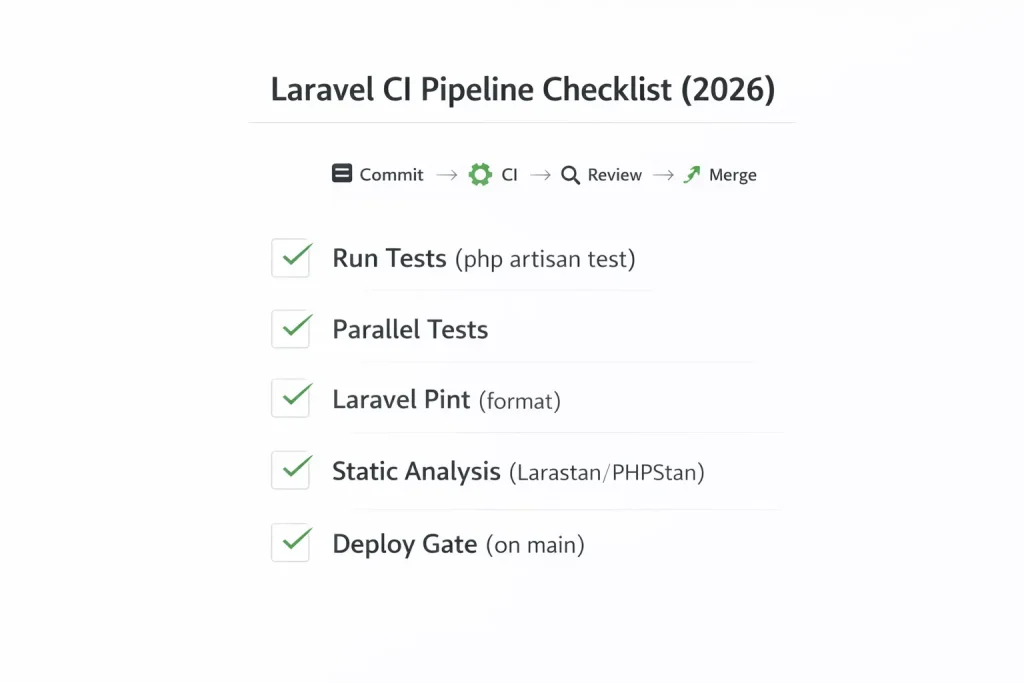
    7) CI pipeline checklist (ship with confidence)

    The goal: every PR runs the same quality gate.

    Minimum CI checks

    • php artisan test
    • ✅ Lint/format (Laravel Pint)
    • ✅ Static analysis (PHPStan/Larastan)
    • ✅ (Optional) coverage threshold for critical folders

    Example GitHub Actions workflow (simple)

    name: CI
    
    on: [push, pull_request]
    
    jobs:
      tests:
        runs-on: ubuntu-latest
        steps:
          - uses: actions/checkout@v4
          - uses: shivammathur/setup-php@v2
            with:
              php-version: '8.3'
              coverage: none
          - run: composer install --no-interaction --prefer-dist
          - run: cp .env.example .env
          - run: php artisan key:generate
          - run: php artisan test
    CI checklist for Laravel tests, Pint, and static analysis

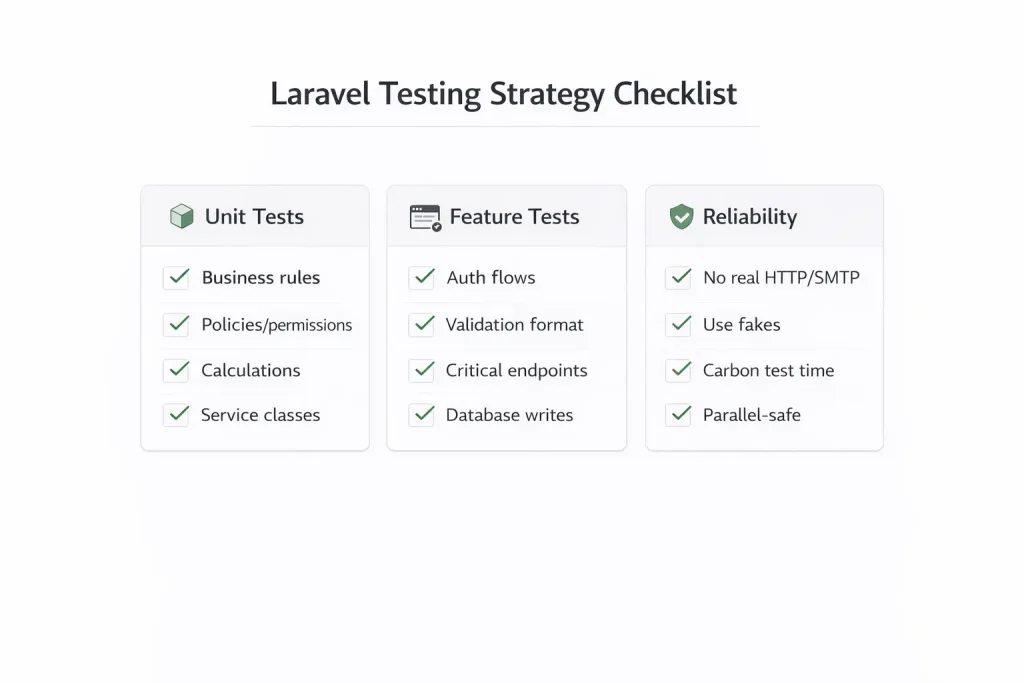
    8) The testing checklist we use for Laravel delivery

    • Unit tests
      • [ ] All pricing/calculation logic tested
      • [ ] Policy/permission logic tested
      • [ ] Any complex parser/mapper tested
    • Feature tests
      • [ ] Auth (success + failure)
      • [ ] Validation errors return correct format
      • [ ] Critical endpoints protected by middleware
      • [ ] Database writes verified for core flows
    • Reliability
      • [ ] No tests depend on real HTTP/SMTP
      • [ ] Time-based logic uses Carbon::setTestNow()
      • [ ] Parallel tests pass
    Laravel testing strategy checklist for production teams

    9) Common mistakes (and quick fixes)

    • Flaky tests: remove real external calls → use fakes
    • Slow suite: reduce heavy seeds, prefer factories
    • Random failures: stop relying on record order; assert by IDs/fields
    • SQLite surprises: match production DB for critical flows in CI

    Need a Laravel testing baseline quickly?

    If you already have a Laravel app but almost no tests, the fastest path is:

    • Add tests for top 5 flows
    • Add CI gate
    • Refactor safely after baseline is green

    Want us to set up a production-grade testing baseline and CI for your Laravel app? Visit our Laravel Development Service.

    FAQ

    1) How many tests do I need to start?

    Start with 10–20 feature tests for critical flows. That alone reduces production bugs massively.

    2) Is 100% coverage required?

    No. Focus coverage on risk areas: billing, auth, permissions, and critical APIs.

    3) Pest or PHPUnit?

    Both are fine. Pest is faster to write and read; PHPUnit is more traditional.

    4) Should I use SQLite for tests?

    SQLite is fast, but for critical apps, run CI on the same DB engine as production.

    5) What’s the fastest way to add tests to a legacy app?

    Begin with feature tests around the most-used endpoints, then extract business logic into services and unit test those.


    Laravel Development Resources

  • Laravel Maintenance for Enterprises (2026): SLAs, Patch Cadence, Monitoring, and Preventing Incidents

    In enterprise systems, “maintenance” is not bug fixing. It’s the operating model that keeps revenue-critical apps stable: security patches, queue health, database performance, incident readiness, and continuous improvement—under an SLA.

    This post explains what enterprise Laravel maintenance should include, how to structure SLAs, and what a real monthly maintenance cycle looks like.

    If you want done-for-you ongoing support, see: Laravel Maintenance. For the full enterprise build/scale guide: Laravel Development (2026): The Complete Guide to Building & Scaling Enterprise Applications.


    Quick navigation


    1) What “enterprise maintenance” actually means

    Enterprise maintenance is the ability to keep production predictable as the system and data evolve. It includes:

    • Security patching and dependency updates
    • Monitoring, alerting, and on-call readiness
    • Queue stability and failure recovery
    • Performance tuning (DB + cache + workers)
    • Incident response and root cause analysis (RCA)
    • Continuous improvements and technical debt control

    Enterprise rule: If you don’t measure reliability, you can’t manage it.


    2) SLA structure: response times & severity levels

    A practical enterprise SLA starts with severity tiers:

    Severity Definition Target Response Target Resolution
    P0 Production outage / revenue-impacting failure [15–30 mins] [4–8 hrs]
    P1 Major feature broken / degraded performance [1–2 hrs] [1–2 days]
    P2 Bug with workaround / limited impact [4–8 hrs] [3–7 days]
    P3 Minor issue / cosmetic / backlog item [1–2 days] [planned]

    Enterprise tip: SLAs fail when severity is vague. Define concrete examples (login down = P0, queue stalled = P0/P1, report incorrect = P1).


    3) Patch cadence: framework, dependencies, servers

    A maintenance plan needs a predictable patch rhythm:

    • Weekly: dependency updates (safe patch releases), vulnerability review
    • Monthly: framework updates, OS patching, PHP minor updates (if safe)
    • Quarterly: security review, access review, disaster recovery drill

    For enterprise systems, upgrades should be risk-controlled. See also: Laravel Upgrade Service.


    4) Monitoring: what to track (and alert on)

    Enterprise monitoring is not just uptime. It’s the signals that predict incidents:

    • API latency (p95/p99) and error rate
    • Queue depth per queue + job failure spikes
    • DB health: slow queries, lock waits, deadlocks
    • Server resources: CPU, RAM, disk, IO, swap
    • Auth anomalies: login failures, suspicious access patterns

    Enterprise rule: Alert on trends, not just outages. Backlog spikes are a warning sign.


    5) Queue reliability: Horizon health, retries, duplicates

    Queues are where enterprise systems break. Maintenance must include:

    • Queue separation (critical vs imports vs compute vs notifications)
    • Correct timeout + retry_after tuning
    • Idempotency checks for critical jobs (payments, invoices, provisioning)
    • Monitoring backlog depth and failed jobs
    • Worker restart strategy and memory leak detection

    Once published, link this internally to your Horizon cluster post: Laravel Queues & Horizon at Scale (2026).


    6) Database performance: slow queries, deadlocks, growth

    Maintenance must include a database performance loop:

    • Review slow query log weekly
    • Index tuning based on real workload
    • Batching heavy writes to reduce locks
    • Partitioning or archiving strategy for huge event tables
    • Rollup tables for reporting (avoid aggregating raw events repeatedly)

    Link this to your DB performance cluster post once live: Database Performance for Enterprise Laravel (2026).


    7) Security hardening: OWASP, access, secrets

    • Quarterly access review (admin roles, privileged users, API keys)
    • Secrets rotation plan (and proof it works)
    • WAF/rate limits on auth + abusive endpoints
    • File upload hardening and scanning if needed
    • Dependency vulnerability scanning in CI

    Link this to your security cluster post once live: Enterprise Laravel Security Checklist (2026).


    8) Backups, DR, and recovery drills

    Backups are not real until restore is proven. Enterprise maintenance should include:

    • Automated backups for DB + object storage
    • Encryption at rest + in transit
    • Restore test at least quarterly (document RTO/RPO)
    • Incident runbook: who does what during P0/P1 events

    9) Monthly maintenance report template

    Enterprises love predictable reporting. A good monthly report includes:

    • Uptime & incident summary (P0/P1 events + RCAs)
    • Security updates applied (framework + dependencies)
    • Top performance wins (slow queries fixed, cache improvements)
    • Queue health (backlog incidents, failure rates, tuning changes)
    • Planned improvements next month

    10) Copy/paste enterprise maintenance checklist

    1. Weekly dependency updates + vulnerability review.
    2. Monthly framework + OS patching with release notes logged.
    3. Monitor API latency + error rates + queue depth + job failures.
    4. Review slow query log and tune indexes/batching.
    5. Queue hardening: retry_after vs timeout alignment + idempotency.
    6. Quarterly access review + secrets rotation + restore drill.
    7. Incident runbook + RCA process (and continuous improvement tracking).

    Next steps (internal links)

    Want enterprise maintenance under SLA?

    We keep Laravel stable with monitoring, patching, queue reliability work, performance tuning, and incident response.

    Need architecture work or new features?

    We build enterprise Laravel systems: modules, queues, data pipelines, and scalable architecture.

    Upgrading to Laravel 12? Laravel Upgrade Service. Adding AI features safely? Laravel AI Development.

    FAQ

    What should a Laravel maintenance plan include?

    Monitoring, patching, queue stability, database tuning, security hardening, backup verification, incident response, and monthly reporting—under an SLA.

    How often should we patch Laravel and dependencies?

    Enterprises typically do weekly dependency updates (safe patches) and monthly framework/OS patching, with urgent security patches applied immediately when needed.

    Why do enterprise Laravel apps still go down?

    Because queues and databases become bottlenecks without continuous tuning and monitoring. Maintenance prevents incidents by detecting trends early and hardening the system continuously.

  • Laravel Upgrade Playbook for Enterprises (2026): Laravel 12 Migration, Risk Control, and Zero-Downtime Releases

    Enterprise Laravel upgrades fail when teams treat them as “composer update and hope.” The right approach is a risk-controlled migration: dependency mapping, phased rollout, observability, and rollback readiness.

    This guide is a practical playbook for upgrading to Laravel 12 (or upgrading major versions in general) while keeping production stable, especially for systems with queues, heavy jobs, multi-tenant data, and strict SLAs.

    For hands-on help, see: Laravel Upgrade Service. For the full enterprise guide: Laravel Development (2026): The Complete Guide to Building & Scaling Enterprise Applications.


    Quick navigation


    1) Why enterprise teams delay upgrades (and why it’s risky)

    Enterprises delay upgrades because the system is “too important to break.” Ironically, staying on old versions increases risk over time:

    • Security exposure (patches aren’t optional in enterprise contexts)
    • Dependency rot (packages stop supporting older versions)
    • Hiring friction (new engineers don’t want legacy stacks)
    • Upgrade becomes harder (jumping multiple major versions compounds work)

    Enterprise truth: Avoiding upgrades is not avoiding risk—it’s deferring it with interest.


    2) What a “good upgrade” looks like

    • Production stays stable (no big incident).
    • Queues don’t duplicate processing or stall.
    • Performance is equal or better after upgrade.
    • Rollback plan exists (and is proven).
    • Post-upgrade patch cadence is established.

    3) Pre-upgrade audit: dependencies, PHP, infra, CI

    A) Dependency inventory (Composer first)

    • List all composer packages and identify blockers for Laravel 12.
    • Mark business-critical packages (auth, billing, payments, queues, PDF, imports).
    • Decide: upgrade, replace, or remove each blocker.

    B) PHP version + extensions

    • Confirm PHP compatibility (prod + workers + CLI must match).
    • Verify extensions used by your stack: Redis, GD/Imagick, intl, mbstring, PDO drivers.

    C) Infrastructure alignment

    • Ensure queue workers, schedulers, and web nodes are consistent.
    • Confirm Redis persistence/limits for Horizon stability.
    • Validate DB version and strict mode compatibility.

    D) CI pipeline readiness

    • Automated tests must run on every branch.
    • Static analysis and code style checks should be predictable.
    • Artifact build process must be deterministic.

    4) Phased upgrade plan (the enterprise way)

    The safest approach is a phased plan that keeps the system shippable at all times.

    Phase 1: Prepare the codebase

    • Reduce “unknowns”: remove dead code and deprecated packages.
    • Refactor high-risk areas into services (controllers should stay thin).
    • Add smoke tests for the top user flows.

    Phase 2: Upgrade dependencies incrementally

    • Update packages with minimal behavior change.
    • Replace blockers early (auth libs, PDF libs, import libs).
    • Keep runtime stable while moving version support forward.

    Phase 3: Upgrade framework + fix breakpoints

    • Upgrade Laravel core and apply required code changes.
    • Fix configuration, middleware, auth changes, caching and queue behavior.
    • Run full test suite and regression test critical workflows.

    Phase 4: Staged rollout

    • Deploy to staging, then canary (small % of traffic).
    • Monitor logs, latency, queue backlog, and error rates.
    • Expand rollout only after stability is confirmed.

    5) Testing strategy that actually catches breakage

    Enterprise upgrades fail because tests don’t cover the right risk areas. Focus on:

    • Smoke tests for login, permissions, core CRUD, billing flows
    • Queue pipeline tests (imports → rating → bundle → summary)
    • Contract tests for external APIs (payment, SMS, webhooks)
    • DB migration tests on production-like data snapshots

    Enterprise rule: The goal is not “high coverage.” The goal is “high confidence in critical workflows.”


    6) Queues, Horizon, and long-running jobs during upgrades

    Queues are the #1 source of upgrade incidents. Protect them:

    • Ensure idempotency for critical jobs (payments, invoices, status changes).
    • Align timeouts (worker timeout vs retry_after) to prevent duplicates.
    • Separate queues so heavy imports don’t starve critical tasks.
    • Drain strategy: pause new jobs, let workers finish, deploy, then resume.

    If you want a deep dive, see our cluster post on Horizon scaling (link it internally once published): Laravel Queues & Horizon at Scale (2026).


    7) Database migrations + backward compatibility

    Zero-downtime upgrades require DB migrations to be backward compatible during rollout.

    • Additive first: add new columns/tables before removing old ones.
    • Avoid long locks: large migrations must be done in safe steps.
    • Dual-read/write patterns for risky schema changes.
    • Feature flags to switch behavior without redeploying.

    Enterprise rule: Schema changes should be designed like production releases, not “migration scripts.”


    8) Zero-downtime deployment + rollback plan

    A) Deployment strategy

    • Use blue/green or rolling deploys where possible.
    • Run migrations safely (additive first).
    • Deploy code, warm caches, restart workers gracefully.
    • Monitor metrics and errors for 30–60 minutes before expanding.

    B) Rollback strategy

    • Rollback must be tested, not theoretical.
    • Backward compatible DB changes enable safe rollback.
    • Have a queue replay plan (only if idempotency is guaranteed).

    9) Copy/paste enterprise upgrade checklist

    1. Audit composer dependencies and identify blockers.
    2. Align PHP + extensions across web, workers, and CLI.
    3. Add smoke tests for critical workflows and queue pipelines.
    4. Upgrade dependencies incrementally; replace abandoned packages.
    5. Upgrade Laravel core and resolve breaking changes.
    6. Plan queue draining and ensure idempotency for critical jobs.
    7. Design DB migrations for backward compatibility and low lock time.
    8. Roll out via staging → canary → full deploy with monitoring.
    9. Test rollback plan and confirm safe recovery paths.

    Next steps (internal links)

    Need a safe Laravel 12 upgrade?

    We do enterprise upgrades with risk control, staged rollout, queue safety, and rollback plans.

    Want ongoing stability after upgrade?

    Monitoring, patching, performance tuning, incident response, and queue hardening.

    If you want the architecture rebuilt for scale while upgrading, see: Laravel Development Services. Building AI features on top of Laravel safely? Laravel AI Development.

    FAQ

    How long does an enterprise Laravel 12 upgrade take?

    It depends on dependency blockers and test coverage. The fastest path is to run a pre-upgrade audit, remove blockers, and roll out in phases with canary deployments.

    What breaks most often during Laravel upgrades?

    Authentication/authorization assumptions, queue behavior (timeouts/retries), and third-party packages. That’s why queue draining and idempotency checks are part of the upgrade plan.

    How do we ensure zero downtime?

    Use backward compatible migrations, staged rollout (staging → canary → full), graceful worker restarts, and a tested rollback plan.

  • Database Performance for Enterprise Laravel (2026): Indexing, Deadlocks, Lock Waits, and Fast Reporting

    Enterprise Laravel performance is usually a database story: slow reporting queries, lock wait timeouts, deadlocks during high-write jobs, and dashboards that “feel slow” at scale. This guide is a practical playbook to keep MySQL + Laravel fast under real production load.

    For the complete enterprise build/scale guide, start here: Laravel Development (2026): The Complete Guide to Building & Scaling Enterprise Applications. If you want ongoing performance monitoring + tuning under SLA: Laravel Maintenance.


    Quick navigation


    1) Common enterprise symptoms (and what they really mean)

    • “The dashboard is slow” → missing indexes or doing heavy aggregation on hot tables.
    • Lock wait timeouts → long transactions + competing writes + poor batching.
    • Deadlocks → inconsistent row update order across jobs/requests.
    • CPU spikes during reports → full table scans + large joins.
    • Query time grows as data grows → queries were “fine” at 10k rows, not at 10M.

    Enterprise rule: If you can’t explain your slowest queries, you don’t control performance.


    2) Indexing strategy that actually works

    Indexes should be designed around real query patterns, not theory.

    A) Start with your top 10 slow queries

    • Capture slow query log (or APM traces) and pick the top offenders.
    • Run EXPLAIN and confirm whether you’re scanning or using indexes.
    • Add composite indexes that match WHERE + JOIN + ORDER patterns.

    B) Composite index rules of thumb

    • Put the most selective columns first (often tenant/account, period, status).
    • Match the leftmost prefix of the index to the query WHERE clauses.
    • If you order by a column, include it in the index after the filters.
    • Avoid “index spam” — every index slows writes.

    C) Enterprise multi-tenant indexing pattern

    In multi-tenant SaaS, 80% of queries should begin with tenant/account scope. Example pattern:

    // Example composite index patterns (conceptual)
    (account_id, status, created_at)
    (account_id, billing_period, supplier_id)
    (account_id, customer_id, event_date)

    3) Lock wait timeouts: why they happen and how to fix

    Lock wait timeouts happen when transactions hold locks too long and other queries pile up waiting. In enterprise Laravel, the usual causes are:

    • Large “update many rows” statements inside transactions
    • Jobs processing huge chunks without committing in between
    • Missing indexes causing updates to scan many rows (locking more than expected)
    • Multiple workers updating the same entity range concurrently

    Fix pattern: shorten transactions + batch writes

    • Move non-DB work (API calls, file operations) outside transactions.
    • Update in chunks (e.g., 200–1,000 rows) and commit between chunks.
    • Make sure the WHERE clause uses a supporting index.

    Enterprise rule: Long transactions are performance debt with interest.


    4) Deadlocks: prevention patterns

    Deadlocks are normal in high-write systems. The goal isn’t “no deadlocks,” it’s deadlocks that auto-recover without corrupting business outcomes.

    A) Update rows in a consistent order

    If two processes update the same set of rows in different orders, they will deadlock. Always enforce a deterministic ordering (by primary key or timestamp).

    B) Keep transactions short

    Short transactions reduce lock time and reduce deadlock windows.

    C) Retry deadlocks safely

    Enterprise apps implement retry on deadlock errors (with backoff), but only if the operation is idempotent or safely repeatable.

    // Conceptual pattern (pseudo)
    for attempt in 1..3:
      try:
        transaction(...)
        break
      catch deadlock:
        sleep(backoff)
        continue

    5) Batching writes (imports, rating, recalculation)

    Enterprise systems need predictable write patterns. Batching is the simplest way to reduce locks and keep throughput high.

    • Use smaller chunks when you see lock waits or OOM issues.
    • Prefer upserts for patch flows (with proper unique keys).
    • Replace flows should delete + insert by key tuples, not truncate full tables.
    • Write only changed columns to reduce row lock work.

    CTO signal: A pipeline that supports safe reruns (patch/replace) is how enterprise billing systems survive supplier data chaos.


    6) Fast reporting: raw SQL, summary tables, and caching

    Reporting is where Laravel apps slow down because raw events tables grow huge. The fix is usually:

    • Use summary tables (daily/monthly rollups) instead of aggregating raw events repeatedly.
    • Precompute metrics via scheduled jobs (queues) and store results.
    • Use raw SQL for heavy aggregation instead of deep ORM chains.
    • Cache read-heavy dashboards (short TTL, invalidate on changes).

    Enterprise reporting pattern: raw events → rollups → dashboards

    Events table (large, write-heavy)
      ↓ nightly/hourly job
    Rollup table (small, indexed, dashboard-ready)
      ↓
    Dashboard queries (fast)

    7) Eloquent performance: safe patterns and anti-patterns

    Safe patterns

    • Eager load relationships (avoid N+1 queries).
    • Select only needed columns in listing endpoints.
    • Chunk processing for large updates.
    • Use cursor for streaming reads when appropriate.

    Anti-patterns (enterprise pain)

    • Using ORM loops to update thousands of rows one-by-one.
    • Aggregations inside request cycles without rollups/caching.
    • Deep “dynamic filters” without proper composite indexes.
    • Joining huge tables without scoping by account/period.

    8) Production-safe tuning checklist

    • Enable slow query log and review weekly.
    • Add/adjust indexes based on real query patterns.
    • Keep transactions short; remove API calls from transactions.
    • Batch writes and avoid full-table updates.
    • Move reporting to rollup tables + cached dashboards.
    • Monitor lock waits, deadlocks, and top tables by write volume.

    9) Copy/paste database performance checklist

    1. Identify top 10 slow queries and run EXPLAIN.
    2. Add composite indexes matching WHERE + JOIN + ORDER patterns.
    3. Shorten transactions; batch writes (200–1,000 rows).
    4. Ensure heavy updates use supporting indexes (avoid lock amplification).
    5. Standardize update order to reduce deadlocks.
    6. Use deadlock retry only when operations are idempotent.
    7. Move reporting to rollup tables; cache dashboards.
    8. Use raw SQL for large aggregation; avoid ORM loops at scale.
    9. Monitor lock waits + deadlocks + runtime distribution.

    Next steps (internal links)

    Need performance fixes in production?

    We diagnose slow queries, fix indexing, optimize jobs, and redesign reporting to keep enterprise Laravel fast at scale.

    Want ongoing monitoring + SLA support?

    We handle patching, monitoring, performance tuning, queue stability, and incident response under maintenance.

    Upgrading to Laravel 12 and worried about regressions? Laravel Upgrade Service. Building AI features with search and ingestion pipelines? Laravel AI Development.

    FAQ

    Why do we get “Lock wait timeout exceeded” in Laravel?

    Usually due to long transactions holding locks, large batch updates without proper indexes, or multiple workers competing to update the same rows. Fixes include batching, shortening transactions, and adding the correct composite indexes.

    Are deadlocks bad?

    Deadlocks happen in high-write systems. The goal is to reduce their frequency and ensure safe auto-recovery using consistent update ordering, short transactions, and idempotent retry logic.

    How do we make reporting fast when tables grow huge?

    Use rollup tables (daily/monthly summaries), precompute metrics with scheduled jobs, and cache dashboard queries. Avoid running heavy aggregations on raw event tables during user requests.

  • Laravel Queues & Horizon at Scale (2026): Idempotency, Retries, and Enterprise Job Pipelines

    In enterprise Laravel systems, the queue is where the business actually runs: imports, billing calculations, notifications, webhooks, reports, AI ingestion, and scheduled workflows. The fastest way to create outages is to treat queues like “background tasks” instead of a production-critical system.

    This guide shows how to run Laravel queues + Horizon safely at scale: queue separation, correct retry configuration, idempotency, long-running jobs, batch pipelines, and monitoring—without duplicate processing or random worker meltdowns.

    For the full enterprise build guide, start here: Laravel Development (2026): The Complete Guide to Building & Scaling Enterprise Applications. If you need help hardening your production queues under SLA: Laravel Maintenance.


    Quick navigation


    1) Why queues break in production

    • Mixed workloads: imports + notifications + CPU-heavy rating all share the same workers.
    • Wrong timeouts: workers kill jobs early; jobs restart; duplicates happen.
    • No idempotency: retries create double charges, double emails, double exports.
    • Unbounded jobs: one job tries to do “everything” and eats memory.
    • No queue monitoring: you discover problems only after customers complain.

    Enterprise rule: A job must be safe to retry. If it isn’t, it’s not production-ready.


    2) Enterprise queue design (separation + priorities)

    Start by separating workloads by behavior. A clean enterprise baseline looks like:

    • critical (payments, billing actions, contract state changes)
    • notifications (emails/SMS/webhooks)
    • imports (file ingestion + normalization)
    • compute (rating engines, analytics, heavy transforms)
    • exports (CSV/XLS/PDF generation)

    Why this matters: if exports spike, your payments must still run. If imports spike, your notifications must still send. Queue separation prevents “cross-contamination.”

    Horizon example: dedicated supervisors per workload

    Here’s a clean starting point (adapt to your infra). The key is: separate queues + different timeouts + right worker counts.

    // config/horizon.php (example)
    'environments' => [
      'production' => [
        'critical' => [
          'connection' => 'redis',
          'queue' => ['critical'],
          'balance' => 'auto',
          'minProcesses' => 2,
          'maxProcesses' => 10,
          'tries' => 3,
          'timeout' => 120,
        ],
    
        'notifications' => [
          'connection' => 'redis',
          'queue' => ['notifications'],
          'balance' => 'auto',
          'minProcesses' => 1,
          'maxProcesses' => 8,
          'tries' => 5,
          'timeout' => 120,
        ],
    
        'imports' => [
          'connection' => 'redis',
          'queue' => ['imports'],
          'balance' => 'auto',
          'minProcesses' => 1,
          'maxProcesses' => 4,
          'tries' => 1,
          'timeout' => 3600,
        ],
    
        'compute' => [
          'connection' => 'redis',
          'queue' => ['compute'],
          'balance' => 'auto',
          'minProcesses' => 2,
          'maxProcesses' => 20,
          'tries' => 2,
          'timeout' => 1800,
        ],
    
        'exports' => [
          'connection' => 'redis',
          'queue' => ['exports'],
          'balance' => 'auto',
          'minProcesses' => 1,
          'maxProcesses' => 6,
          'tries' => 2,
          'timeout' => 900,
        ],
      ],
    ];

    3) timeout vs retry_after (the #1 duplicate-processing cause)

    This mistake causes “phantom duplicates” in billing systems: the worker kills a job at timeout, but Redis thinks it’s still running, then re-queues it after retry_after and the job runs again.

    Rule of thumb: retry_after must be greater than your longest real job runtime (plus buffer), and worker timeout must align to that reality.

    // config/queue.php (Redis)
    'redis' => [
      'driver' => 'redis',
      'connection' => 'default',
      'queue' => env('REDIS_QUEUE', 'default'),
      // Must be > longest job runtime + buffer
      'retry_after' => 5400,
      'block_for' => null,
      'after_commit' => true,
    ];

    Enterprise reality: If you don’t measure job runtime distribution (p95/p99), you’ll guess timeouts—and guessing creates duplicates.


    4) Idempotency patterns (do this or pay later)

    Idempotency means: if a job runs twice (retry, redeploy, crash), the business outcome remains correct. Here are enterprise-grade patterns that work.

    A) Idempotency key + DB unique constraint

    Best for payments, invoices, webhooks, and “create once” operations.

    // Example: write once using a unique key
    // Table has UNIQUE(idempotency_key)
    
    DB::transaction(function () use ($key, $payload) {
      $already = DB::table('job_outcomes')
        ->where('idempotency_key', $key)
        ->lockForUpdate()
        ->first();
    
      if ($already) {
        return; // safe retry
      }
    
      // Do the business action
      // ...
    
      DB::table('job_outcomes')->insert([
        'idempotency_key' => $key,
        'status' => 'done',
        'created_at' => now(),
        'updated_at' => now(),
      ]);
    });

    B) Distributed lock (Redis) for “one-at-a-time” processing

    Best for imports, per-customer processing, per-file pipelines, and allowance tracking (bundles).

    use Illuminate\Support\Facades\Cache;
    
    $lock = Cache::lock("import:{$supplierId}:{$period}", 7200);
    
    if (! $lock->get()) {
      return; // another worker is processing this already
    }
    
    try {
      // do work safely
    } finally {
      optional($lock)->release();
    }

    C) “Exactly-once” isn’t real—design for safe “at-least-once”

    Queues are designed for at-least-once delivery. Your architecture must assume duplicates are possible and handle them safely.


    5) Long-running jobs: imports, exports, heavy rating

    Enterprise strategy is simple: no single job should do unbounded work. Use chunking + batches.

    • Parse files using streams (don’t load entire CSV into memory).
    • Process in chunks (1k–5k rows) based on your workload.
    • Commit progress frequently (and log progress events).
    • Use “replace vs patch” write modes depending on the pipeline.

    CTO signal: Chunking + idempotency is how you make “reprocessing” safe—critical in billing and finance systems.


    6) Batches & pipelines: structure multi-stage processing

    Most enterprise workflows are pipelines, not single jobs. Example:

    Import (chunked) →
    Normalize + dedupe →
    Rate (compute queue) →
    Apply bundles →
    Update summary →
    Export / notify

    Use batch IDs to tie all stages together so ops can answer: “What happened for period X?”

    • Store job_id / batch_id on records created/updated
    • Write processing history per stage (start/end + counts + errors)
    • Make each stage rerunnable independently (with idempotency)

    7) Monitoring & alerting (what to track)

    Enterprise queue monitoring should trigger alerts before customer impact.

    • Backlog depth per queue (critical/imports/compute)
    • Job failure rate (spikes = release regression or upstream data shift)
    • Runtime p95/p99 for heavy jobs (timeout tuning and capacity planning)
    • Deadlocks/lock wait timeouts (DB-level contention)
    • Worker restarts/OOM (memory leaks or oversized jobs)

    This is exactly what an enterprise maintenance plan should include: monitoring + tuning + incident response. See: Laravel Maintenance.


    8) Incident playbook: backlog spikes, deadlocks, failures

    Scenario A: backlog spike on imports

    • Confirm upstream change (new file format/volume).
    • Scale imports supervisor temporarily.
    • Reduce chunk size if memory is spiking.
    • Enable strict validation + issue logging so pipeline doesn’t stall.

    Scenario B: deadlocks/lock wait timeouts

    • Identify hot queries and add the right composite indexes.
    • Reduce transaction scope (shorter transactions).
    • Batch updates (e.g., 200–500 rows) instead of huge updates.
    • Implement deadlock retry around critical updates.

    Scenario C: job failures after release

    • Pause only the affected queue (not all queues).
    • Rollback the release or hotfix the specific job.
    • Replay failed jobs safely only if idempotency is confirmed.

    9) Copy/paste enterprise checklist

    1. Separate queues by workload (critical/notifications/imports/compute/exports).
    2. Align worker timeout and Redis retry_after to real p95/p99 runtimes.
    3. Make every job safe to retry (idempotency keys + locks + unique constraints).
    4. Chunk long tasks (stream files, small batches, frequent commits).
    5. Use batch IDs + processing histories per stage.
    6. Monitor backlog depth, failure rates, runtime distribution, and worker memory.
    7. Create an incident playbook for spikes, deadlocks, and regressions.

    Next steps (internal links)

    Need enterprise Laravel architecture + scaling?

    We design queue-first systems, safe pipelines, and high-throughput job processing (Horizon + Redis + MySQL tuning).

    Want monitoring + SLA support?

    We keep production stable: queue monitoring, failure triage, performance tuning, patching, and incident response.

    Upgrading to Laravel 12 safely? Laravel Upgrade Service. Building AI ingestion pipelines (RAG indexing/agents) on queues? Laravel AI Development.

    FAQ

    What is the most common cause of duplicate processing in Laravel queues?

    Misconfigured retry_after vs worker timeout, combined with jobs that aren’t idempotent. If a job is killed and re-queued, it will run twice unless your design prevents duplicates.

    How do enterprises scale Horizon safely?

    By separating workloads into dedicated queues and supervisors, measuring job runtimes (p95/p99), and applying idempotency patterns so retries are safe.

    Should we use one queue or multiple queues?

    Multiple queues. Mixing imports, CPU-heavy compute, and critical billing actions causes unpredictable latency and incidents. Queue separation makes performance predictable and safer under load.

  • Migrating from WordPress to Statamic (2026): Cost, Risks & SEO Checklist

    Migrating from WordPress to Statamic (2026): Cost, Risks & SEO Checklist

    Many businesses start with WordPress—and that’s fine.
    But by 2026, a growing number of marketing teams are asking a serious question:

    “Is WordPress still the right platform for our marketing site?”

    If performance issues, plugin fatigue, security concerns, or rising maintenance costs sound familiar, you’re not alone. This is why more teams are migrating from WordPress to Statamic—a modern, Laravel-based CMS built for speed, security, and long-term efficiency.

    This guide explains:

    • When a WordPress → Statamic migration makes sense
    • What can (and can’t) be migrated
    • SEO risks and how to avoid traffic loss
    • Realistic migration cost & timeline
    • A practical SEO migration checklist
    • Who should not migrate (important)

    Why Businesses Are Moving Away from WordPress

    WordPress still powers millions of sites—but marketing-driven teams face real friction as sites grow.

    Common WordPress pain points:

    • Plugin overload and conflicts
    • Slower performance over time
    • Rising maintenance costs
    • Security vulnerabilities via third-party plugins
    • Difficulty achieving consistent Core Web Vitals

    This is where Statamic stands out:

    • Flat-file CMS (no database dependency)
    • Built on Laravel
    • Minimal attack surface
    • Fast by default
    • Structured content for marketing teams

    👉 If you haven’t already, read Statamic vs WordPress (2026) to understand the architectural differences.


    When WordPress → Statamic Migration Makes Sense

    Migration is a strategic decision—not a trend.

    Statamic is a good fit if:

    • Your site is marketing-focused (SaaS, brand, landing pages)
    • Performance & SEO matter
    • You’re tired of plugin dependency
    • Maintenance cost keeps increasing
    • You want predictable long-term ownership cost

    Statamic is NOT ideal if:

    • You rely heavily on WooCommerce
    • Your site depends on many WordPress-only plugins
    • Editors need complete visual page-builder freedom
    • You run a large multi-author blog network

    What Can Be Migrated from WordPress to Statamic?

    Can be migrated

    • Pages & posts
    • Categories & taxonomies
    • Media (images, files)
    • SEO metadata (titles, descriptions)
    • URLs & permalink structure
    • Redirects (301s)

    Cannot be directly migrated

    • WordPress plugins
    • Themes & page builders
    • Shortcodes
    • Plugin-specific features

    👉 In Statamic, features are rebuilt cleanly, not patched with plugins—this is a strength, not a limitation.


    WordPress to Statamic Migration Cost (2026)

    Typical Migration Cost Ranges

    Site TypeEstimated Cost
    Small marketing site$1,500 – $3,000
    SaaS / brand site$3,000 – $6,000
    Enterprise marketing site$6,000 – $12,000+

    What Impacts the Cost

    • Number of pages & content types
    • URL complexity
    • SEO requirements
    • Custom features to rebuild
    • Multi-language setup
    • Design refresh vs rebuild

    👉 Migration is often combined with a performance or design upgrade, delivering better ROI.

    If you’re considering a migration, our 👉 Statamic Development Services
    include structured migration planning, SEO safety, and post-launch support.


    SEO Risks (and How to Avoid Them)

    SEO is the #1 concern during any CMS migration—and rightly so.

    Common SEO Risks

    • URL changes without redirects
    • Metadata loss
    • Broken internal links
    • Image path changes
    • Missing structured data
    • Temporary indexing issues

    How to Migrate Without Losing Traffic

    A professional migration includes:

    • Full URL mapping
    • 301 redirect implementation
    • Metadata migration
    • Sitemap regeneration
    • Robots.txt review
    • Post-launch SEO validation

    👉 Done correctly, traffic loss is avoidable—and many sites see performance gains after migration.


    WordPress → Statamic SEO Migration Checklist

    Before launch:

    • ✅ Crawl existing WordPress site
    • ✅ Export all URLs & metadata
    • ✅ Identify top-performing pages
    • ✅ Plan content structure in Statamic
    • ✅ Prepare redirect rules

    During migration:

    • ✅ Rebuild templates with clean HTML
    • ✅ Preserve URL structure where possible
    • ✅ Implement 301 redirects
    • ✅ Optimize images & assets
    • ✅ Configure SEO fields

    After launch:

    • ✅ Submit new sitemap
    • ✅ Monitor Search Console
    • ✅ Fix crawl errors
    • ✅ Track rankings & traffic
    • ✅ Validate Core Web Vitals

    Timeline: How Long Does Migration Take?

    Project SizeTimeline
    Small site2–3 weeks
    Medium site3–5 weeks
    Large site6–8+ weeks

    A phased approach ensures minimal downtime and zero SEO shock.


    Maintenance After Migration

    One major benefit of Statamic is lower ongoing maintenance.

    After migration:

    • No plugin updates
    • No database optimization
    • Fewer security patches
    • Cleaner deployments

    This is a sharp contrast to WordPress, where ongoing 👉 WordPress Maintenance Services
    are often essential just to keep sites stable.


    Who Should NOT Migrate to Statamic?

    Migration is not always the right move.

    Do not migrate if:

    • Your business depends on WooCommerce
    • You need dozens of third-party plugins
    • Your editors rely heavily on drag-and-drop builders
    • Your site is purely blog-driven

    In these cases, optimizing WordPress with professional 👉 WordPress Development Services
    may be the better solution.


    Final Verdict: Is WordPress → Statamic Migration Worth It?

    Yes—if your website is a marketing asset, not just a content container.

    Statamic delivers:
    ✔ Faster performance
    ✔ Lower long-term cost
    ✔ Better security
    ✔ Cleaner SEO foundations
    ✔ Less operational overhead

    Migration isn’t about changing CMS—it’s about fixing structural problems WordPress can’t solve cleanly.


    Need Help Migrating from WordPress to Statamic?

    If you want:

    • A safe, SEO-friendly migration
    • Clear cost & timeline
    • Structured content rebuild
    • Post-launch support

    Explore our 👉 Statamic Development Services

    We specialize in performance-driven migrations, not risky CMS switches.

  • WordPress to Statamic SEO Migration Checklist (2026): Step-by-Step Guide

    WordPress to Statamic SEO Migration Checklist (2026): Step-by-Step Guide

    A CMS migration can either improve your SEO or destroy years of rankings—there is no middle ground.

    If you’re planning to migrate from WordPress to Statamic, SEO should be treated as a first-class requirement, not an afterthought. The good news? When done correctly, a Statamic migration can improve performance, Core Web Vitals, and long-term SEO stability.

    This step-by-step checklist shows exactly how to migrate from WordPress to Statamic without losing rankings, traffic, or authority.

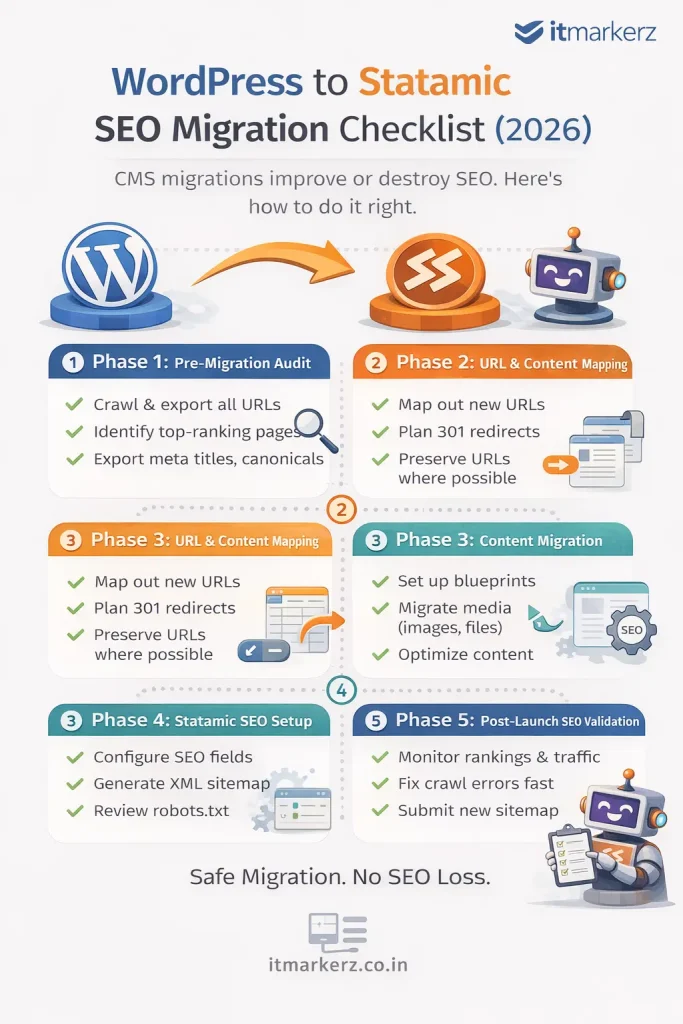
    Minimal infographic showing a WordPress to Statamic SEO migration checklist for 2026, outlining pre-migration audit, URL mapping, content migration, Statamic SEO setup, and post-launch validation steps

    Why SEO Migrations Fail (And How to Avoid It)

    Most SEO losses during CMS migrations happen because of:

    • URL changes without redirects
    • Metadata loss
    • Broken internal links
    • Image path changes
    • Poor post-launch monitoring

    Statamic itself is SEO-friendly by design, but migration mistakes—not the CMS—cause ranking drops.


    Phase 1: Pre-Migration SEO Audit (DO NOT SKIP)

    Before touching Statamic, you must freeze and document your current SEO state.

    ✅ Crawl the Existing WordPress Site

    Use tools like:

    • Screaming Frog
    • Ahrefs / Semrush
    • Google Search Console

    Export:

    • All indexable URLs
    • Status codes
    • Canonicals
    • Meta titles & descriptions
    • H1–H6 structure
    • Image URLs
    • Internal links

    This becomes your SEO source of truth.


    ✅ Identify High-Value Pages

    Not all pages are equal.

    Mark pages with:

    • Highest organic traffic
    • Best keyword rankings
    • Backlinks
    • Conversion value

    These pages get extra protection during migration.


    ✅ Export SEO Metadata

    From WordPress SEO plugins (Yoast / RankMath), export:

    • Meta titles
    • Meta descriptions
    • Index / noindex rules
    • Canonicals
    • Open Graph data (optional)

    👉 These will map directly into Statamic SEO fields.


    Phase 2: URL & Content Mapping (Critical Step)

    ✅ Preserve URL Structure Wherever Possible

    The safest SEO migration is:

    Old URL = New URL

    Example:

    /services/wordpress-development → /services/wordpress-development

    Statamic allows full control over routing—use it.


    ✅ Create a URL Mapping Sheet

    For every WordPress URL:

    • Old URL
    • New Statamic URL
    • Redirect required? (Yes/No)

    Even one missing redirect can leak SEO authority.


    ✅ Plan 301 Redirects

    If URLs must change:

    • Use 301 redirects only
    • Avoid redirect chains
    • Never rely on 302s

    Statamic supports clean redirect rules via:

    • Config files
    • Web server rules (Nginx / Apache)

    Phase 3: Content Migration into Statamic

    ✅ Rebuild Content Using Blueprints

    Statamic uses structured content, not page builders.

    Best practice:

    • Create collections (Pages, Blog, Resources)
    • Define blueprints with SEO fields
    • Keep content clean and reusable

    This improves:

    • SEO consistency
    • Content governance
    • Long-term scalability

    ✅ Migrate Media Carefully

    WordPress media URLs often look like:

    /wp-content/uploads/2023/09/image.jpg

    During migration:

    • Preserve filenames
    • Avoid changing image URLs if possible
    • Optimize images for size & format (WebP)

    Broken images = broken SEO signals.


    Phase 4: SEO Setup in Statamic

    ✅ Configure SEO Fields

    Ensure Statamic templates include:

    • Meta title
    • Meta description
    • Canonical URL
    • Open Graph tags
    • Twitter cards (optional)

    Statamic’s clean HTML output is a major SEO advantage.


    ✅ Generate XML Sitemap

    • Include only indexable URLs
    • Exclude test pages
    • Submit new sitemap to Google Search Console immediately after launch

    ✅ Robots.txt Review

    Check:

    • No accidental disallow rules
    • Correct sitemap reference
    • Crawlable assets (CSS, JS)

    Phase 5: Pre-Launch SEO Validation

    Before going live, test everything.

    ✅ Crawl the Statamic Staging Site

    Confirm:

    • All pages return 200
    • Redirects work correctly
    • Canonicals are correct
    • No orphan pages
    • No duplicate titles

    ✅ Compare Old vs New SEO Data

    Validate:

    • Title parity
    • Description parity
    • Heading structure
    • Internal links

    Your Statamic site should be SEO-equivalent or better than WordPress.


    Phase 6: Post-Launch SEO Checklist (First 30 Days)

    ✅ Submit Sitemap in GSC

    Immediately submit the new sitemap and request indexing for key pages.


    ✅ Monitor Rankings & Traffic

    For the first 30 days:

    • Watch impressions & clicks
    • Track ranking volatility
    • Fix crawl errors fast

    Small drops are normal. Large drops indicate a missed redirect or index issue.


    ✅ Fix Issues Quickly

    Common post-launch fixes:

    • Missing redirects
    • Noindex errors
    • Canonical mismatches
    • Broken internal links

    Fast fixes = fast recovery.


    SEO Benefits After WordPress → Statamic Migration

    When done correctly, teams often see:

    • Faster page load times
    • Better Core Web Vitals
    • Lower bounce rates
    • Improved crawl efficiency
    • More stable rankings

    Statamic’s flat-file architecture removes many performance bottlenecks common in WordPress.


    When You Should NOT DIY This Migration

    Do not attempt a DIY SEO migration if:

    • Your site gets significant organic traffic
    • SEO is a primary lead channel
    • You have complex URL structures
    • You rely on organic revenue

    In these cases, professional help pays for itself.

    👉 Our Statamic Development Services include SEO-safe WordPress migrations, URL mapping, redirect strategy, and post-launch monitoring.


    Final SEO Migration Rule

    CMS migrations don’t hurt SEO.
    Poor planning does.

    With the right checklist, WordPress → Statamic migration can be a ranking upgrade, not a risk.

  • Laravel Upgrade Playbook (2026): Risk-Based Migration to Laravel 12 Without Downtime

    Enterprise upgrades fail for predictable reasons: dependency drift, weak tests, production-only behavior (queues, schedules, file paths), and “big bang” releases. This playbook shows how to upgrade to Laravel 12 with controlled risk, staged rollout, and a real rollback plan—so you modernize without downtime drama.

    If you want the full enterprise context first, read: Laravel Development (2026): The Complete Guide to Building & Scaling Enterprise Applications.

    If you want a team to execute the upgrade end-to-end: Laravel Upgrade Service.


    Quick navigation


    1) Zero-downtime upgrade principles (enterprise rules)

    • Separate upgrade from feature work (upgrade branch only).
    • Backwards-compatible DB changes first (deploy schema changes before code that uses them).
    • Two-phase deploys: expand (add new) → migrate (switch) → contract (remove old).
    • Canary releases beat big-bang releases.
    • Rollback is a plan, not a hope: you must know exactly how to revert safely.

    Enterprise truth: Laravel upgrades don’t cause downtime by themselves. Poor release process and unsafe database changes do.


    2) Pre-upgrade audit (what to inventory)

    Before you touch Composer, you need a clear picture of what’s in production.

    1. Runtime: PHP version (web + workers), OS/container images, Node tooling (if applicable).
    2. Laravel: current version, installed first-party packages, custom macros/providers.
    3. Dependencies: the top packages that can block upgrades (auth stacks, tenancy, Spatie, payment libs).
    4. Infrastructure: DB version, Redis, queue drivers, Horizon config, cron/scheduler behavior.
    5. Risk surfaces: auth, payments, billing, scheduled jobs, file uploads, reporting, integrations.
    6. Observability: error tracking, logs, APM, queue metrics.

    Upgrade time is decided here. A clean Laravel 11 app with tests can be quick. A legacy app with dependency drift often needs a planned modernization path.


    3) CI gates: the safety net most teams don’t have

    Enterprises upgrade safely because they have automated gates. At minimum, your upgrade branch should run:

    • Test suite: unit + feature tests
    • Static analysis: PHPStan/Psalm (or at least strict linting)
    • Code style: enforce consistency (prevents “fix chaos”)
    • Security scan: dependency vulnerability scanning
    • Smoke tests: critical endpoints + queue health

    If you don’t have CI gates, the upgrade will still happen—but your risk moves from “controlled” to “hope-based.” That’s exactly why upgrade projects often include CI hardening.


    4) Choose your path: 11 → 12 vs 10/9/8 → 12

    Your upgrade plan depends on what version you’re on today.

    Current version Recommended approach Why
    Laravel 11 Direct 11 → 12 upgrade Typically low friction; focus on dependencies + regression tests.
    Laravel 10 10 → 11 → 12 (controlled) Reduces unknowns; easier to isolate breaking changes.
    Laravel 9/8 Modernization upgrade plan Higher dependency drift; more edge-case behavior; requires staged remediation.

    Enterprise advice: If the app is revenue-critical and old, do not jump versions blindly. Move step-by-step so you can isolate failures.


    5) Execution plan: branch strategy + dependency mapping

    5.1 Upgrade branch strategy

    • Create a dedicated upgrade branch.
    • Freeze feature merges into the upgrade branch (merge only critical fixes).
    • Keep commits small and scoped: “bump framework”, “fix package A”, “fix tests”, etc.

    5.2 Dependency mapping (the real work)

    The most common upgrade blockers are third-party packages. Build a dependency map:

    • List top packages by impact: auth/SSO, tenancy, payments, media/storage, queues, admin panels.
    • Check compatibility with Laravel 12 + your PHP target.
    • Replace abandoned packages early (avoid time sinks).

    Enterprise rule: upgrade “outer layer” dependencies first (tooling), then the core framework, then feature-adjacent packages.


    6) Migrations & data safety (the real downtime risk)

    Framework upgrades rarely cause downtime. Database migrations do—especially on large tables.

    6.1 Use the expand → migrate → contract pattern

    1. Expand: add new columns/tables (backwards compatible).
    2. Migrate: deploy code that writes both old + new, backfill in background.
    3. Contract: remove old columns only after you verify stability.

    6.2 Avoid table locks during peak hours

    • Break big migrations into safe steps.
    • Avoid index creation on huge tables during peak traffic without planning.
    • Prefer online schema change approaches when needed.

    7) Queues, Horizon, and background jobs during upgrade

    Queues are where upgrade regressions hide: serialization changes, timeouts, retry policies, and long-running jobs.

    • Pin worker runtimes (same PHP version, same env vars).
    • Review timeouts + retry_after so jobs don’t double-process.
    • Ensure idempotency in critical jobs (emails, webhooks, billing).
    • Staging replay: run production-like jobs in staging using sampled data.

    If queues are central to your product, this is often where maintenance and upgrade scopes overlap. See: Laravel Maintenance.


    8) Staged rollout: canary, feature flags, and rollback

    8.1 Canary release (enterprise default)

    Deploy the upgraded version to a small slice of traffic first (or one tenant/region). Monitor stability before expanding rollout.

    8.2 Feature flags for risky areas

    • Wrap risky changes behind a flag (auth flows, pricing, billing, integrations).
    • Flags allow fast rollback without redeploying.

    8.3 Rollback plan (define it before release day)

    • Rollback steps for code deployment
    • Rollback steps for DB migrations (if any irreversible changes exist, stop and redesign)
    • Queue draining strategy (avoid replaying jobs incorrectly)
    • Who approves rollback decisions (owner + escalation contact)

    Enterprise rule: If you can’t roll it back safely, it’s not ready to deploy.


    9) Copy/paste enterprise upgrade checklist

    1. Inventory runtime, dependencies, infra, and risk surfaces.
    2. Set up CI gates (tests, static analysis, security scan, smoke checks).
    3. Create an upgrade branch (no feature merges).
    4. Map critical packages + compatibility; replace abandoned packages.
    5. Upgrade step-by-step for older apps (10 → 11 → 12).
    6. Use expand → migrate → contract for schema changes.
    7. Validate queues in staging (timeouts, retries, idempotency).
    8. Release via canary; monitor p95 latency + error rates + queue health.
    9. Keep a written rollback plan with owners + steps.
    10. Post-upgrade: schedule monthly dependency audits + quarterly minor updates.

    Recommended Next Steps (Internal Links)

    Need an upgrade done safely?

    We handle audits, dependency mapping, CI hardening, staged rollout, and post-upgrade stabilization.

    Want ongoing stability after upgrade?

    After upgrading, maintenance keeps performance, security, and queue reliability stable month-to-month.

    Building a new enterprise Laravel product? Explore: Laravel Development Services and Laravel AI Development.


    FAQ

    Can we upgrade to Laravel 12 without downtime?

    Yes—if your release process is safe. Downtime is usually caused by risky database migrations, big-bang deployments, and insufficient staging validation—not the framework upgrade itself.

    What’s the biggest risk in enterprise Laravel upgrades?

    Third-party dependencies and production-only behaviors (queues, schedule timing, file paths, edge-case payloads). That’s why dependency mapping and staging replay are essential.

    Should we jump from Laravel 9 directly to 12?

    For enterprise systems, it’s safer to upgrade step-by-step (9 → 10 → 11 → 12) or use a structured modernization plan, so you can isolate breaking changes and reduce risk.

    Do we need to upgrade PHP at the same time?

    Often yes. Enterprises should align PHP versions across web and workers, then upgrade Laravel with consistent runtime environments to avoid “works on web, fails in workers” problems.